
Introduction
This manual provides detailed instructions for the setup, operation, and maintenance of your Pentax K10D Digital SLR Camera. The Pentax K10D features a 10.2-megapixel CCD sensor, a Pentax-developed Shake Reduction (SR) system, and a weather-resistant body, designed for high-quality digital imaging.

Figure 1: Pentax K10D Digital SLR Camera with 18-55mm lens. This image shows the camera body with the standard kit lens mounted, illustrating its compact design.
1. Setup
1.1 Battery Installation
The Pentax K10D uses a D-LI50 lithium-ion rechargeable battery. Ensure the battery is fully charged before first use.
- Locate the battery compartment cover on the bottom of the camera.
- Slide the cover release latch and open the compartment.
- Insert the D-LI50 battery with the contacts facing inward, ensuring it clicks into place.
- Close the battery compartment cover securely until it latches.

Figure 2: Bottom view of the camera. This image highlights the battery compartment and tripod mount on the underside of the Pentax K10D.
1.2 Lens Attachment
The K10D is compatible with Pentax K-, KA-, KAF-, and KAF2-mount lenses. For this model, an 18-55mm f/3.5-5.6 lens is included.
- Remove the body cap from the camera and the rear cap from the lens.
- Align the red index mark on the lens barrel with the red index mark on the camera's lens mount.
- Insert the lens into the camera mount and turn it clockwise until it locks with a click.
- To detach, press the lens release button on the camera body and turn the lens counter-clockwise.

Figure 3: Front view of the camera body. This image displays the lens mount and front controls of the Pentax K10D without a lens attached.
1.3 Memory Card Insertion
The camera supports standard SD and SDHC memory cards.
- Open the memory card slot cover, typically located on the side of the camera.
- Insert the SD/SDHC card with the label facing the front of the camera until it clicks into place.
- Close the memory card slot cover securely.
2. Operating Instructions
2.1 Power On/Off
Rotate the power switch, located around the shutter button, to the "ON" position to power on the camera. Rotate to "OFF" to power off.
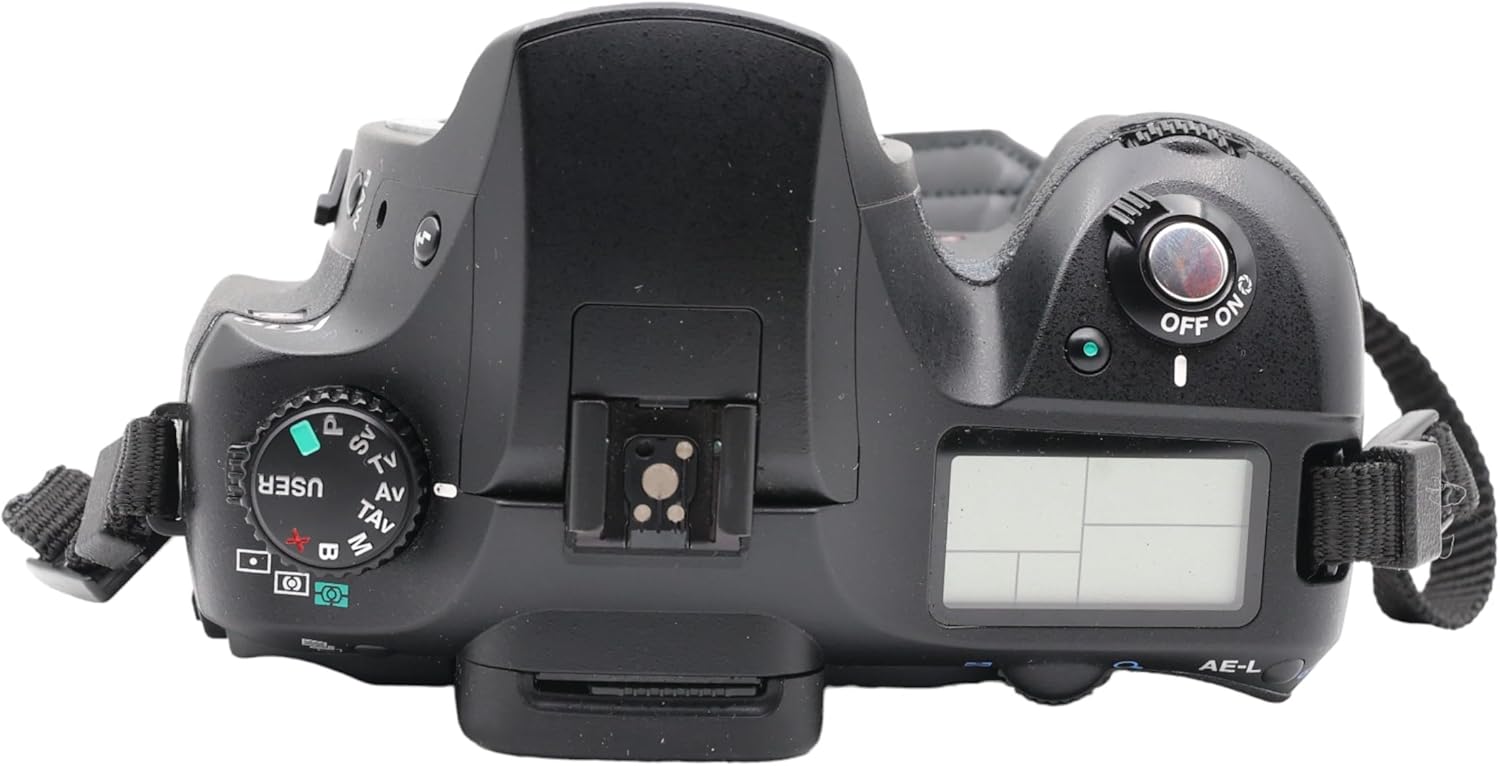
Figure 4: Top view of the camera. This image shows the top panel of the Pentax K10D, including the mode dial, power switch, and top LCD screen.
2.2 Basic Shooting Modes
The mode dial on the top of the camera allows selection of various shooting modes:
- Program AE (P): Camera automatically sets aperture and shutter speed.
- Shutter-Priority AE (Tv): You set shutter speed, camera sets aperture.
- Aperture-Priority AE (Av): You set aperture, camera sets shutter speed.
- Manual (M): You set both aperture and shutter speed.
- Sensitivity-Priority AE (Sv): You set ISO, camera sets aperture and shutter speed.
- Shutter & Aperture-Priority AE (TAv): You set shutter speed and aperture, camera sets ISO.
- Hyper Program Function: Allows instant switching between P, Tv, and Av modes using electronic dials.
- Hyper Manual Function: In Metered Manual mode, press the green button for instant proper exposure.
2.3 Autofocus System (SAFOX VIII)
The SAFOX VIII autofocus system features 11 sensor points, with nine cross-type sensors for precise focusing. The in-focus sensor point is highlighted in red in the viewfinder.
- AF.S (Single AF): Focus locks once achieved.
- AF.C (Continuous AF): Focus continuously tracks moving subjects.
- MF (Manual Focus): Allows manual adjustment of focus.

Figure 5: Back view of the camera. This image shows the 2.5-inch LCD monitor and various control buttons on the rear panel of the Pentax K10D.
2.4 Shake Reduction (SR) System
The Pentax-developed Shake Reduction (SR) system minimizes camera shake by oscillating the CCD image sensor. This system works with a wide range of Pentax lenses, providing a 2.5 to 4 stop advantage for sharper images in challenging conditions.
2.5 Continuous Shooting
The K10D offers continuous shooting at approximately three images per second. In JPEG format, you can shoot until the memory card is full. In RAW mode, up to 12 images can be captured in a burst.
2.6 Exposure Metering
Choose from three metering modes:
- 16-segment Multi-pattern Metering: For general photography.
- Center-weighted Metering: Emphasizes the central area of the frame.
- Spot Metering: Measures a small area around the center for precise exposure control.
2.7 Image Recording
Images can be recorded in JPEG or RAW format. The camera also supports simultaneous recording of RAW and JPEG images.
3. Maintenance
3.1 Dust Removal (DR) System
The K10D features a Dust Removal (DR) system to keep the CCD sensor clean. This system uses a Special Protect (SP) coating on the CCD surface and a shift mechanism to shake off dust. Dust is collected on an adhesive sheet at the bottom of the SR unit.
3.2 Weather-Resistant Construction
The camera body is designed with 72 special seals to provide dust-proof and weather-resistant protection. While this allows for shooting in light rain or dusty environments, avoid submerging the camera in water.
3.3 General Cleaning
- Use a soft, lint-free cloth to clean the camera body.
- For the lens, use a lens brush or blower to remove dust, then a lens cleaning solution and cloth.
- Avoid touching the sensor directly. If sensor cleaning is required beyond the DR system, consult a professional service center.
4. Troubleshooting
4.1 Common Issues and Solutions
- Camera does not power on:
- Ensure the battery is fully charged and correctly inserted.
- Check if the battery compartment cover is securely closed.
- Images are blurry:
- Verify that Shake Reduction (SR) is enabled in appropriate conditions.
- Check focus settings (AF.S, AF.C) and ensure the subject is in focus.
- Use a faster shutter speed, especially in low light or with moving subjects.
- Dust spots appear on images:
- Activate the Dust Removal (DR) system through the camera menu.
- If spots persist, professional sensor cleaning may be required.
- Autofocus is slow or inaccurate in low light:
- Use a lens with a wider aperture (lower f-number).
- Utilize the AF assist lamp if available and appropriate for the shooting situation.
- Hot/Dead Pixels:
- Occasionally, a hot or dead pixel may appear. If persistent or numerous, contact Pentax service for a sensor mapping or cleaning.
5. Specifications
| Feature | Detail |
|---|---|
| Model Name | Pentax K10D |
| Effective Still Resolution | 10.2 MP |
| Photo Sensor Technology | CCD (APS-C size) |
| Image Stabilization | Sensor-shift (Shake Reduction) |
| Lens Mount | Pentax KAF2, Pentax KAF3 |
| Included Lens | 18-55mm f/3.5-5.6 |
| Autofocus System | SAFOX VIII, 11 points (9 cross-type) |
| ISO Sensitivity | Auto (up to 1600), Manual (100-1600) |
| Shutter Speed Range | 30 seconds to 1/4000 seconds |
| Continuous Shooting | Approx. 3 FPS |
| LCD Monitor | 2.5-inch, 210,000 pixels, wide-view |
| Storage Media | SD/SDHC memory cards |
| File Formats | JPEG, RAW |
| Connectivity | USB 2.0 |
| Battery | D-LI50 Lithium-ion |
| Weight | 1.75 Pounds (body only) |
| Dimensions (Form Factor) | Mid-size SLR |
6. Warranty & Support
6.1 Warranty Information
Specific warranty terms and conditions for the Pentax K10D camera are typically provided at the time of purchase or can be found on the official Pentax (Ricoh Imaging) website. Please retain your proof of purchase for warranty claims.
6.2 Customer Support
For technical assistance, service, or further inquiries, please contact Pentax customer support. You can find contact information and additional resources on the official Pentax website.
Visit the Pentax Store on Amazon for more product information and accessories.


