
1. Product Overview
The VideoSecu MCB1B is a professional, height-adjustable camera mount designed for versatile indoor and outdoor applications. Its robust metal construction ensures durability and stability for various devices, including CCTV cameras, camcorders, and mini monitors. The mount offers extensive customization options, allowing for 12 different combinations to suit diverse mounting needs.
- Metal Construction: Ensures durability and stability.
- Interchangeable Parts: Allows for 12 different mounting configurations.
- Adjustable Angles: Features 90-degree tilt and 360-degree turn and rotation.
- Customizable Length: Can be configured to 2-inch, 4-inch, or 6-inch lengths.
- Standard Threading: Equipped with 1/4-inch / 20 threads for broad compatibility.
- T-bar Drop Ceiling Clip: Included for ceiling mounting options.
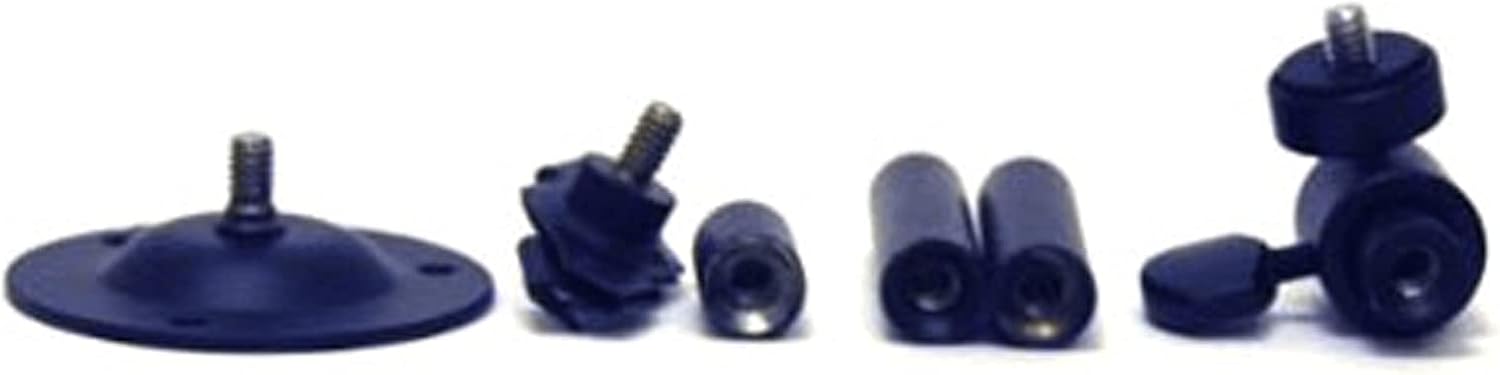
2. Package Contents
Verify that all the following components are included in your package:
- Two (2) 2-inch shafts
- One (1) 2-inch X-base (for drop ceilings)
- One (1) 1-inch base extender
- One (1) 2 3/8-inch round base (for wall/ceiling)
- One (1) adjustable head with 1/4-inch / 20 thread
- Necessary screw hardware for installation

3. Setup and Installation
The VideoSecu MCB1B mount is designed for easy assembly and installation without special tools. The interchangeable parts allow for customization to fit various mounting scenarios.
- Select Mounting Location: Choose a suitable wall or ceiling location that can securely support the weight of the mount and your device. Ensure the surface is structurally sound.
- Assemble Components: Based on your desired length (2, 4, or 6 inches) and application (wall or ceiling), connect the appropriate shafts, base extender, and base. All parts feature 1/4-inch / 20 threads for secure connection.
- Attach Base: Use the provided screw hardware to firmly attach the chosen base (round base for wall/ceiling or X-base for drop ceiling) to your selected surface. Ensure it is level and secure.
- Connect Adjustable Head: Screw the adjustable head onto the assembled shaft.
- Mount Device: Attach your camera, monitor, or other compatible device to the 1/4-inch / 20 thread on the adjustable head.
4. Adjustment and Positioning
The mount allows for flexible positioning of your device:
- Tilt Adjustment: The adjustable head allows for a 90-degree tilt. Loosen the thumbscrew on the head, adjust to the desired angle, and then firmly tighten the thumbscrew.
- Rotation: The head can rotate 360 degrees. Loosen the thumbscrew, rotate the device, and then tighten the thumbscrew.
- Length Adjustment: The modular design allows you to change the mount's length by adding or removing the 1-inch and 2-inch shafts. Ensure all connections are securely tightened after adjusting the length.
Important Note on Stability: For optimal stability, especially when adjusting the tilt, ensure the larger thumbscrew on the adjustable head is tightened first. If present, ensure any smaller set screws (e.g., Allen wrench type) are sufficiently backed off before tightening the thumbscrew, then use the smaller set screw to further reinforce the fit if needed.
5. Maintenance
To ensure the longevity and proper function of your VideoSecu MCB1B mount:
- Regular Inspection: Periodically check all screws and connections to ensure they remain tight and secure.
- Cleaning: Wipe the mount with a soft, dry cloth to remove dust. For stubborn dirt, a slightly damp cloth can be used, followed by immediate drying. Avoid abrasive cleaners or solvents.
- Environmental Considerations: While suitable for outdoor use, prolonged exposure to extreme weather conditions may affect the finish.
6. Troubleshooting
- Mount feels loose or unstable: Ensure all threaded connections between shafts and bases are fully tightened. Verify that the thumbscrew on the adjustable head is securely fastened after positioning. Check the mounting screws securing the base to the wall or ceiling.
- Device does not attach securely: Confirm your device has a standard 1/4-inch / 20 female thread. Ensure the device is screwed fully onto the adjustable head's thread.
- Difficulty adjusting angle: Loosen the thumbscrew sufficiently before attempting to adjust the angle. Do not force the adjustment.
7. Specifications
| Feature | Detail |
|---|---|
| Product Dimensions | 5.9 x 2.5 x 1.9 inches |
| Item Weight | 9.6 ounces |
| Item Model Number | MCB1B |
| Manufacturer | VideoSecu |
| Date First Available | September 7, 2006 |
8. Warranty and Support
For warranty information or technical support, please refer to the documentation included with your purchase or contact VideoSecu customer service directly. Keep your purchase receipt for warranty claims.