
1. Product Overview
The Dimplex CADIZ Oil Heater ROF14ECCJ is an advanced electric oil heater designed to provide comfortable and consistent warmth for your living space. Featuring a unique dual-sump oil heater system combined with a boost heater, it offers efficient and rapid heating. This model includes a digital timer, child lock, and remote control for convenient operation.
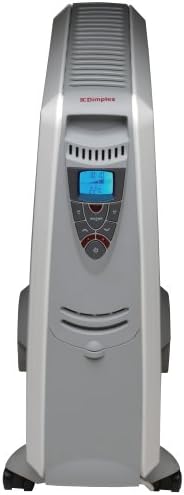
Figure 1: Front view of the Dimplex CADIZ Oil Heater ROF14ECCJ, showing the control panel and sleek design.
The CADIZ heater is engineered for optimal heat distribution, utilizing both radiant heat and convection to warm the room effectively. Its design prioritizes safety and ease of use, making it suitable for various indoor environments.
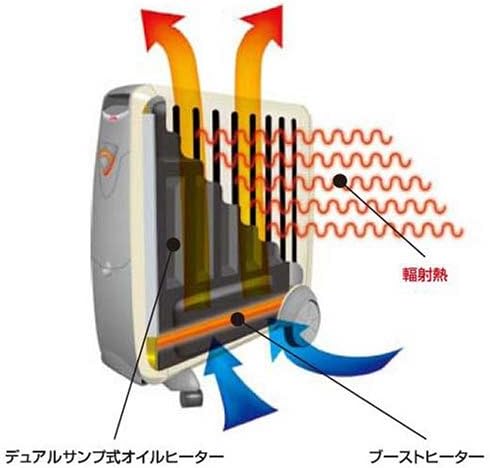
Figure 2: Diagram showing the internal heating mechanism, including the dual-sump oil heater and boost heater, and the emission of radiant heat.
2. Important Safety Information
Please read all safety instructions carefully before using this appliance. Failure to follow these instructions may result in electric shock, fire, or injury.
- Always plug the heater directly into a wall outlet. Never use with an extension cord or relocatable power tap.
- Do not operate any heater with a damaged cord or plug, or after the heater malfunctions or has been dropped or damaged in any manner.
- Keep combustible materials such as furniture, pillows, bedding, papers, clothes, and curtains at least 1 meter (3 feet) from the front and sides of the heater.
- Do not use outdoors. This heater is intended for indoor use only.
- Do not use in bathrooms, laundry areas, or similar indoor locations where water may be present.
- Extreme caution is necessary when any heater is used by or near children or invalids and whenever the heater is left operating and unattended.
- Never block air openings or place on a soft surface where openings may become blocked.
- Do not insert or allow foreign objects to enter any ventilation or exhaust opening as this may cause an electric shock or fire, or damage the heater.
- To prevent a possible fire, do not block air intakes or exhaust in any manner. Do not use on soft surfaces, like a bed, where openings may become blocked.
- The heater has hot and arcing or sparking parts inside. Do not use it in areas where gasoline, paint, or flammable liquids are used or stored.
3. Parts and Components
Familiarize yourself with the main components of your Dimplex CADIZ Oil Heater:
- Heater Body: The main unit containing the oil-filled fins and heating elements.
- Control Panel: Located on the front, featuring a digital display, temperature controls, timer settings, and function buttons.
- Wheels: For easy mobility of the unit.
- Power Cord: For connecting to an electrical outlet.
- Cotton Cover: Provided for dust protection during storage.
- Remote Control: For convenient operation from a distance.
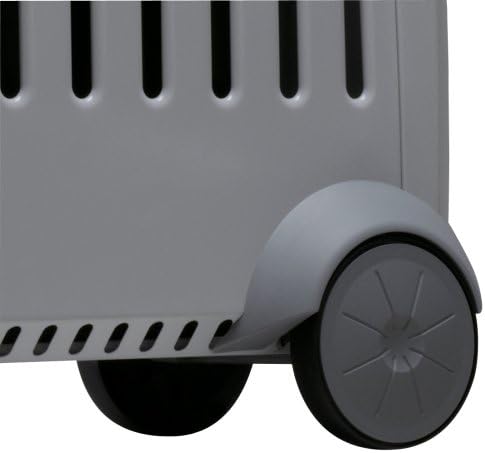
Figure 3: Detail of the sturdy wheels, designed for easy movement of the heater.
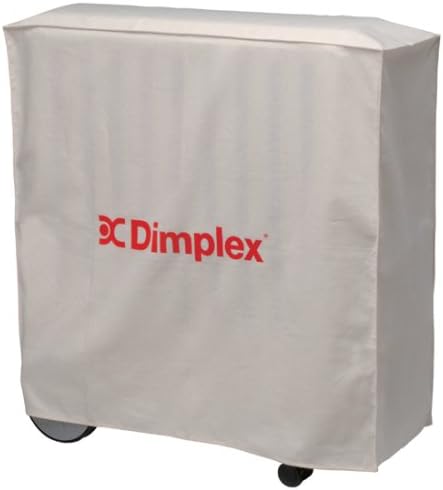
Figure 4: The heater shown with its included cotton cover, ideal for protecting the unit when not in use.
4. Setup and Installation
4.1 Unpacking
Carefully remove the heater from its packaging. Retain the packaging for future storage or transport. Inspect the heater for any signs of damage. If damaged, do not operate and contact customer support.
4.2 Attaching Wheels
The wheels are typically pre-assembled or require minimal attachment. Refer to the quick start guide included in the box for specific instructions on attaching the wheels if they are not already installed. Ensure all wheels are securely fastened before moving the unit.
4.3 Placement
Place the heater on a firm, level surface. Ensure there is at least 1 meter (3 feet) of clear space around the heater from walls, furniture, and other objects to allow for proper air circulation and prevent fire hazards. Do not place the heater directly below a power outlet. Avoid placing it in high-traffic areas where it could be easily knocked over.
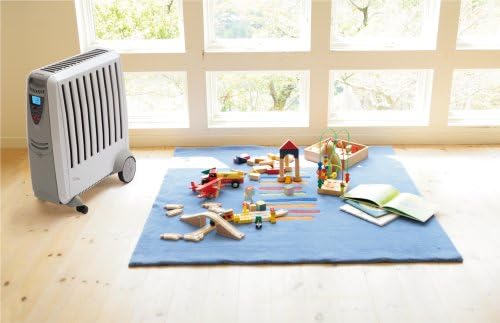
Figure 5: Example of proper heater placement in a room, ensuring adequate clearance from surrounding objects.
5. Operating Instructions
5.1 Control Panel Overview
The control panel features a digital display and several buttons for adjusting settings. Refer to Figure 1 for a visual representation.
- Power Button: Turns the heater on or off.
- Temperature Up/Down Buttons: Adjusts the desired room temperature.
- Mode Button: Cycles through heating modes or power levels.
- Timer Button: Activates and sets the programmable timer.
- Child Lock Button: Engages or disengages the child lock feature.
5.2 Power On/Off
- Plug the power cord into a suitable AC100V electrical outlet.
- Press the Power Button on the control panel or remote control to turn the heater on. The display will illuminate.
- To turn off, press the Power Button again. The heater will enter standby mode.
5.3 Temperature Setting
- With the heater on, use the Temperature Up (+) or Down (-) buttons to set your desired room temperature.
- The display will show the set temperature, then revert to showing the current room temperature.
5.4 Timer Function
The integrated timer allows you to program the heater to turn on or off at specific times. Consult the full manual for detailed timer programming steps, as this typically involves setting start and end times for each day.
5.5 Boost Heater Function
The boost heater provides additional rapid heating when activated. This function works in conjunction with the main oil heating elements to quickly bring the room to the desired temperature. Activate it via the control panel or remote control as indicated by a specific button or mode setting.
5.6 Child Lock
To prevent accidental changes to settings, activate the child lock by pressing and holding the Child Lock Button for a few seconds. An indicator will appear on the display. Repeat the action to deactivate.
5.7 Remote Control
The remote control duplicates most functions available on the main control panel, offering convenience. Ensure the remote control has working batteries and is pointed towards the heater's receiver.
6. Maintenance and Care
6.1 Cleaning
Always unplug the heater and allow it to cool completely before cleaning.
- Exterior: Wipe the exterior surfaces with a soft, damp cloth. Do not use abrasive cleaners, waxes, or polishes as these may damage the finish.
- Dust: Use a soft brush or vacuum cleaner to remove dust from the air intake and exhaust openings.
- Do not immerse the heater in water or allow water to drip into the interior.
6.2 Storage
When not in use, especially during off-season, store the heater in a cool, dry place. Use the provided cotton cover to protect it from dust and dirt. Ensure the power cord is neatly wrapped and secured to prevent damage.
7. Troubleshooting
If you experience issues with your heater, consult the following common troubleshooting steps:
- Heater does not turn on:
- Ensure the power cord is securely plugged into a working electrical outlet.
- Check if the circuit breaker has tripped.
- Verify the power button has been pressed.
- Heater is on but not heating:
- Check the temperature setting; ensure it is set higher than the current room temperature.
- Ensure no objects are blocking the air vents.
- Allow some time for the oil to heat up and radiate warmth, especially during initial use.
- Unusual noises or odors:
- A slight odor may occur during the first few uses as manufacturing residues burn off. This is normal.
- If loud or persistent noises or strong, burning odors occur, immediately turn off and unplug the heater and contact customer support.
If the problem persists after trying these steps, please contact Dimplex customer support.
8. Technical Specifications
| Feature | Specification |
|---|---|
| Model Number | ROF14ECCJ |
| Dimensions (W×D×H) | 57.6 cm × 24.5 cm × 60.5 cm |
| Weight | 14 kg |
| Material | Steel (acrylic powder coating), Nylon resin |
| Color | Gray |
| Rated Voltage | AC100V |
| Power Consumption | 1400W (500W oil heater ×2, 400W boost heater ×1) |
| Power Cord Length | 2 m |
| Applicable Room Size | 4 tatami mats (wooden housing) ~ 10 tatami mats (concrete housing) |
| Other Functions | Child lock, Remote control |
| Country of Origin | China |
| Accessories | Cotton cover ×1 |
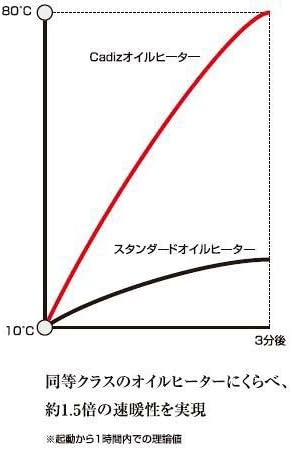
Figure 6: Performance graph illustrating the faster heating capability of the Cadiz Oil Heater compared to a standard oil heater.
9. Warranty and Customer Support
Your Dimplex CADIZ Oil Heater ROF14ECCJ comes with a manufacturer's warranty. Please refer to the warranty card included in your product packaging for specific terms and conditions, including the warranty period and coverage details.
For technical assistance, troubleshooting beyond this manual, or warranty claims, please contact Dimplex customer support. Contact information can typically be found on the Dimplex official website or on the product packaging.
When contacting support, please have your model number (ROF14ECCJ) and purchase date readily available.


