
1. Introduction
The Antec TP3-650 is a 650-watt ATX power supply designed to provide stable and efficient power to your personal computer system. Featuring three independent +12V rails, it ensures balanced power distribution for demanding components, including dual processors and multiple graphics cards. This manual provides essential information for the safe installation, operation, and maintenance of your power supply.
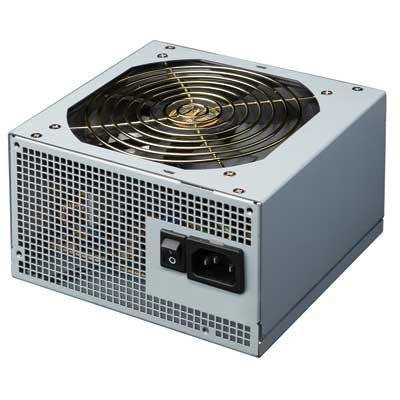
Image 1.1: Front view of the Antec TP3-650 Power Supply, showing its compact design and fan grille.
2. Safety Information
Please read and understand all safety instructions before installing or operating the power supply. Failure to do so may result in personal injury or damage to your equipment.
- Disconnect Power: Always disconnect the AC power cord from the wall outlet before installing, removing, or servicing the power supply or any other computer components.
- Proper Grounding: Ensure your computer system is properly grounded to prevent electrical shock.
- Do Not Open: The power supply unit contains high voltage components. Do not open the casing. There are no user-serviceable parts inside. Opening the unit will void the warranty.
- Ventilation: Ensure adequate ventilation around the power supply. Do not block the fan or ventilation openings.
- Moisture: Do not expose the power supply to water or excessive humidity.
- Operating Environment: Operate the power supply in a stable environment, away from extreme temperatures, dust, and corrosive chemicals.
3. Package Contents
Verify that all items are present in your Antec TP3-650 package:
- Antec TP3-650 ATX 12V 650W Power Supply
- AC Power Cord
- Mounting Screws
- User Manual (this document)
4. Features
The Antec TP3-650 Power Supply offers advanced features for reliable performance:
- Nvidia Quad SLI Certified: Optimized for high-performance graphics configurations.
- Universal Input: Automatically adjusts for 100V to 240V power grids, allowing worldwide compatibility.
- Active Power Factor Correction (PFC): Improves power efficiency and reduces electrical waste.
- Three +12V Output Circuits: Provides enhanced system stability and balanced power delivery.
- Accurate Power Rating: Delivers its full rated power (650W) continuously, rated at 50ºC.
5. Setup and Installation
Follow these steps to install your Antec TP3-650 Power Supply:
- Prepare Your System: Turn off your computer and disconnect the AC power cord from the wall outlet. Open your computer case.
- Remove Old Power Supply (if applicable): Disconnect all cables from your old power supply to the motherboard, graphics card, drives, and other components. Unscrew and remove the old power supply from the case.
- Install New Power Supply: Carefully place the Antec TP3-650 into the power supply bay of your computer case. Ensure the fan is oriented correctly for optimal airflow (typically facing downwards or towards the inside of the case, depending on your case design). Secure the power supply with the provided mounting screws.
- Connect Motherboard Power: Connect the 20+4 pin ATX main power connector to your motherboard. If your motherboard requires an 8-pin (EPS12V) or 4-pin (ATX12V) CPU power connector, connect the appropriate cable from the power supply.
- Connect Peripheral Power: Connect SATA power connectors to your hard drives, SSDs, and optical drives. Use Molex connectors for older peripherals or case fans if needed.
- Connect Graphics Card Power: If your graphics card requires additional power, connect the appropriate 6-pin or 8-pin PCI-E power connectors from the power supply to the graphics card.
- Cable Management: Route cables neatly to improve airflow and aesthetics within your case.
- Close Case and Connect AC Power: Close your computer case. Connect the AC power cord to the power supply and then to a grounded wall outlet.
6. Operating Instructions
Once installed, operating the Antec TP3-650 is straightforward:
- Power On: Ensure all connections are secure. Flip the power switch on the back of the power supply to the 'ON' (I) position. Then, press the power button on your computer case.
- Power Off: Shut down your operating system normally. Once the system is off, you can flip the power switch on the back of the power supply to the 'OFF' (O) position for complete power disconnection.
- Universal Input: The power supply automatically detects and adjusts to the input voltage (100V-240V), so no manual voltage selection switch is required.
7. Maintenance
Regular maintenance helps ensure the longevity and optimal performance of your power supply:
- Dust Removal: Periodically clean dust from the power supply's fan and ventilation grilles using compressed air. Ensure the computer is powered off and unplugged before cleaning.
- Cable Inspection: Occasionally check all power cables for secure connections and signs of wear or damage.
- Environmental Check: Ensure the computer is operating in a well-ventilated area and not exposed to excessive heat or humidity.
8. Troubleshooting
If you encounter issues with your Antec TP3-650 Power Supply, refer to the following common problems and solutions:
- No Power to System:
- Check if the AC power cord is securely connected to both the power supply and the wall outlet.
- Ensure the power switch on the back of the power supply is in the 'ON' (I) position.
- Verify all internal power connectors (20+4 pin ATX, CPU, PCI-E, SATA) are firmly seated.
- Test the wall outlet with another device to ensure it has power.
- System Instability/Random Shutdowns:
- Ensure the power supply is adequately ventilated and not overheating.
- Verify that the total power draw of your components does not exceed the 650W capacity of the power supply.
- Check for loose power connections to components.
- Fan Not Spinning:
- Some power supplies feature intelligent fan control and may not spin at low loads. If the system is under load and the fan is still not spinning, ensure there are no obstructions.
- If the fan never spins and the system is overheating, contact support.
If problems persist after following these steps, please contact Antec customer support.
9. Specifications
| Model Number | TP3-650 |
| Brand | Antec |
| Output Wattage | 650 Watts |
| Form Factor | ATX |
| Connector Type | ATX |
| Compatible Devices | Personal Computer |
| Cooling Method | Air |
| Product Dimensions (L x W x H) | 5.5 x 5.8 x 3.5 inches |
| Item Weight | 4.5 pounds |
| Manufacturer | Antec |
10. Warranty and Support
Antec products are manufactured to the highest quality standards. This Antec TP3-650 Power Supply is covered by Antec's limited warranty. For specific warranty terms and conditions, please refer to the warranty information provided with your purchase or visit the official Antec website.
For technical support, troubleshooting assistance, or warranty claims, please contact Antec customer service through their official website or support channels. Have your product model number (TP3-650) and proof of purchase ready when contacting support.
For more information, visit the Antec Store.


