Introduction
This manual provides instructions for the safe and efficient use of your Linksys AC Adapter, Model AD 9/1C. This Class 2 power supply is designed to convert AC power to 9V DC at 1000mA, suitable for various compatible electronic devices, including Linksys routers.
Safety Information
- Read all instructions before using the adapter.
- Do not expose the adapter to rain, moisture, or extreme temperatures.
- Ensure proper ventilation around the adapter during use to prevent overheating.
- Use only with compatible devices that require 9V DC and draw no more than 1000mA (1 Amp) of current. Using with incompatible devices may cause damage to the adapter or the device.
- Do not attempt to open or repair the adapter. Refer all servicing to qualified personnel.
- Keep out of reach of children.
- Unplug the adapter from the power outlet when not in use for extended periods.
Package Contents
Verify that all items are present in your package:
- 1 Linksys AC Adapter (Model AD 9/1C)
Setup
Follow these steps to properly set up your AC adapter:
- Identify the power input port on your compatible device (e.g., Linksys router). Ensure it matches the adapter's plug type and voltage/current requirements (9V DC, 1000mA).
- Connect the adapter's DC output plug firmly into the power input port of your device.
- Plug the adapter's AC input prongs into a standard wall power outlet (100-240V AC, 50/60Hz).
- Verify power indication on your device, if available, to confirm it is receiving power.
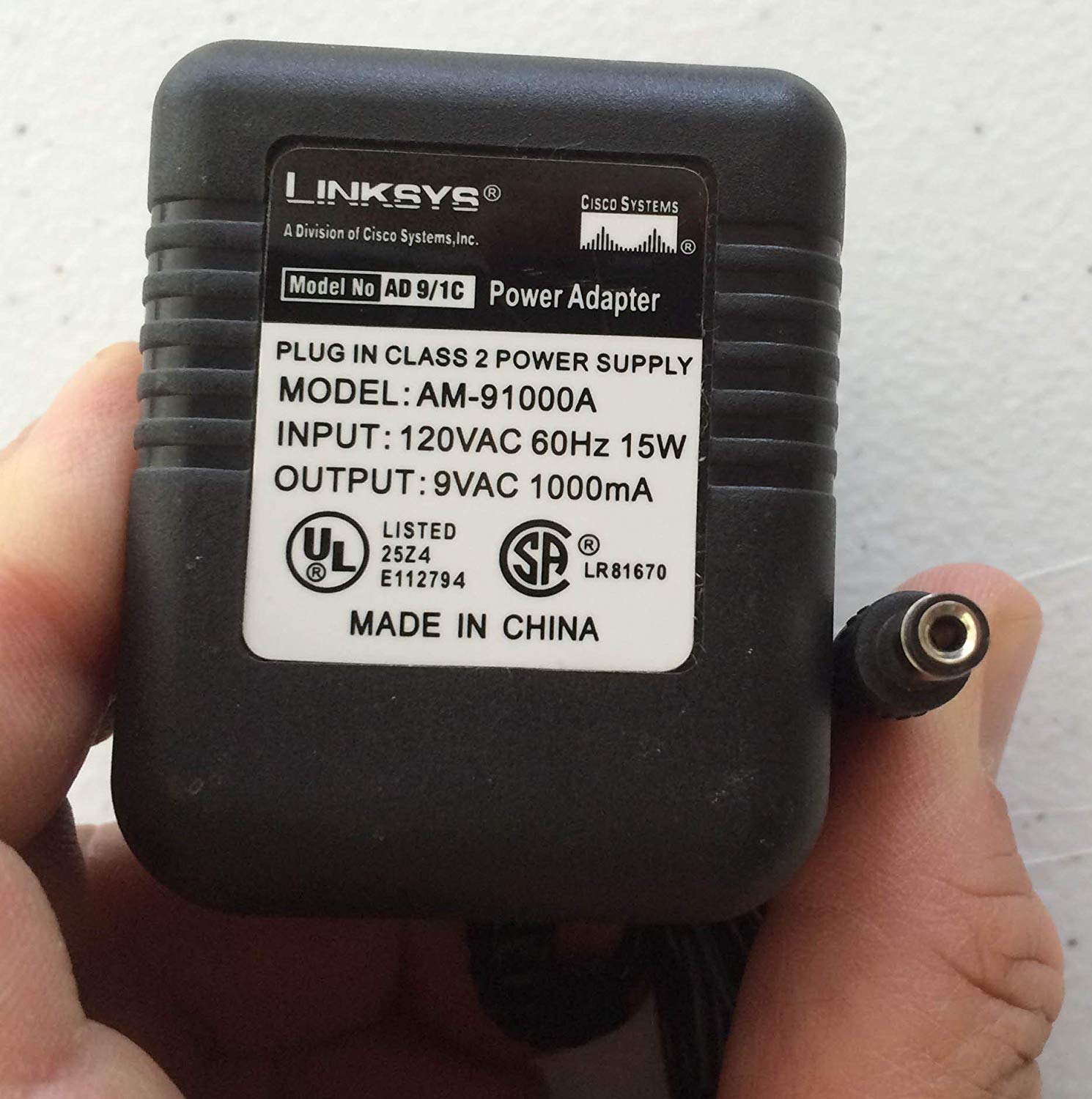
Image: The Linksys AC Adapter AD 9/1C, illustrating its compact design with the AC input prongs and the DC output connector. This adapter is designed to provide stable power to compatible electronic devices.
Operating Instructions
Once connected, the Linksys AC Adapter operates automatically to provide power to your device. No user interaction is required during operation.
- Ensure the adapter is securely plugged into both the wall outlet and the device.
- Avoid placing the adapter in areas with poor ventilation or direct sunlight to prevent overheating.
- If the device is not functioning, check all connections before troubleshooting.
Maintenance
The Linksys AC Adapter requires minimal maintenance to ensure long-term performance.
- Cleaning: Disconnect the adapter from both the power outlet and the device before cleaning. Use a soft, dry cloth to wipe the exterior. Do not use liquid cleaners or aerosols.
- Storage: When not in use, store the adapter in a cool, dry place, away from direct sunlight and moisture. Avoid wrapping the cable too tightly around the adapter.
- Inspection: Periodically inspect the adapter and its cable for any signs of damage, such as frayed wires or cracked casing. If damage is found, discontinue use immediately and replace the adapter.
Troubleshooting
If you encounter issues with your Linksys AC Adapter, refer to the following common problems and solutions:
| Problem | Possible Cause | Solution |
|---|---|---|
| Device not powering on. | Adapter not properly connected. | Ensure both the AC prongs and DC plug are fully inserted. |
| Device not powering on. | Power outlet is not active. | Test the outlet with another device or try a different outlet. |
| Device not powering on. | Adapter or device is faulty. | If possible, test the adapter with another compatible device or test the device with another compatible adapter. |
| Adapter feels hot. | Normal operation or poor ventilation. | A slight warmth is normal. Ensure the adapter is in a well-ventilated area. If it's excessively hot, unplug immediately and discontinue use. |
Specifications
| Feature | Detail |
|---|---|
| Model Number | AD 9/1C |
| Input Voltage | 100-240V AC, 50/60Hz |
| Output Voltage | 9V DC |
| Output Current | 1000mA (1 Amp) |
| Product Dimensions (L x W x H) | 2 x 3 x 3 inches |
| Item Weight | 9.6 ounces |
| Compatible Devices | Laptops, Other Rechargeable Gadgets, Routers, Smartphones, Tablets (Ensure 9V DC, 1000mA compatibility) |
| UPC | 028400043731 |
Warranty and Support
For warranty information or technical support, please refer to the documentation provided with your original Linksys device or visit the official Linksys website. Keep your purchase receipt as proof of purchase.


