
Introduction
The Motion Pro 08-0142 Quad Stake Rivet Kit is an accessory designed to be used in conjunction with the Motion Pro Jumbo Chain Tool (sold separately). This kit enables the user to create a factory-style quad stake rivet on master links, ensuring a secure and professional finish for motorcycle chain installations and repairs. This manual provides essential information for the proper setup, operation, and maintenance of the kit.
Safety Information
Always observe the following safety precautions when using this tool:
- Wear appropriate personal protective equipment, including safety glasses, to protect against flying debris.
- Read and understand all instructions in this manual and the Motion Pro Jumbo Chain Tool manual before use.
- Ensure the tool is clean and in good working condition before each use.
- Use the tool only for its intended purpose: riveting motorcycle chain master links.
- Keep hands and fingers clear of moving parts during operation.
- Store the tool in a dry, secure location away from children.
Parts List
The Motion Pro 08-0142 Quad Stake Rivet Kit includes the following components:
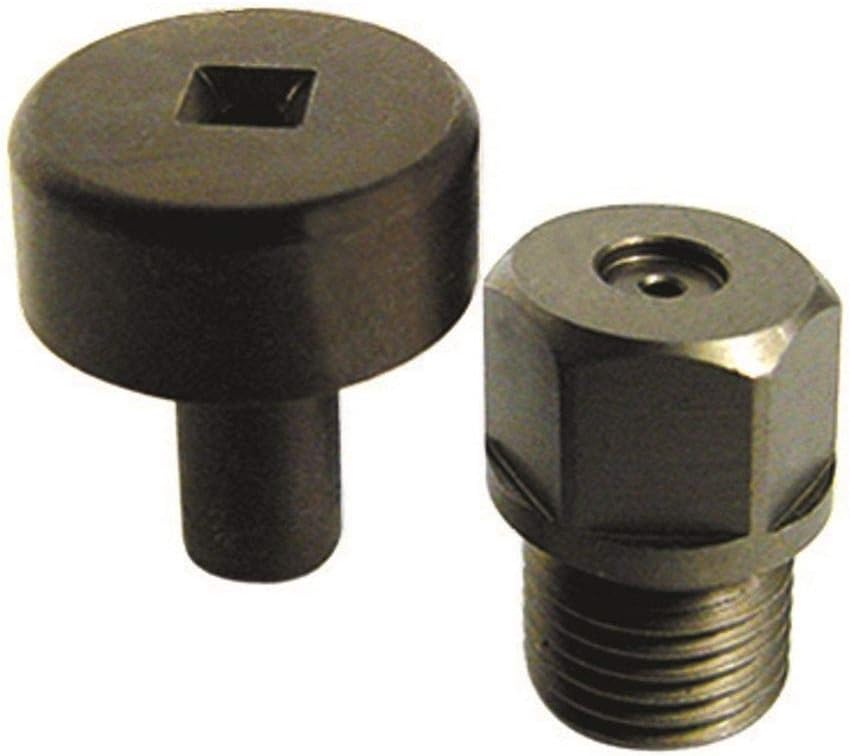
- Quad Stake Rivet Tool (2 pieces)
Setup Instructions
This kit is an accessory for the Motion Pro Jumbo Chain Tool. Ensure you have the Jumbo Chain Tool available and its instructions understood before proceeding.
- Refer to your Motion Pro Jumbo Chain Tool manual for instructions on removing the standard riveting tip and anvil.
- Identify the two components of the Quad Stake Rivet Kit: the staking punch (cylindrical with a square end) and the riveting anvil (hexagonal with internal threads).
- Install the riveting anvil into the appropriate position on the Jumbo Chain Tool, ensuring it is securely threaded and tightened according to the chain tool's instructions.
- Insert the staking punch into the plunger mechanism of the Jumbo Chain Tool, ensuring it is correctly seated and aligned.
- Confirm all components are properly installed and tightened before attempting to rivet a chain.
Operating Instructions
Once the Quad Stake Rivet Kit is installed on the Motion Pro Jumbo Chain Tool, follow these steps to rivet a master link:
- Prepare the chain: Ensure the new chain is correctly sized and positioned on the motorcycle. Install the master link side plate and O-rings (if applicable) onto the master link pins.
- Press the master link: Use the Motion Pro Jumbo Chain Tool (with the pressing plates, not the riveting kit) to press the master link side plate onto the pins until the correct width is achieved. Refer to your chain manufacturer's specifications for the correct width.
- Position for riveting: Place the chain with the master link between the installed Quad Stake Rivet Kit components on the Jumbo Chain Tool. Ensure the master link pin to be riveted is centered under the staking punch and resting on the riveting anvil.
- Rivet the pin: Slowly and carefully turn the handle of the Jumbo Chain Tool to advance the staking punch. Apply steady pressure to flare the end of the master link pin. The square recess in the staking punch will create the quad stake pattern.
- Inspect the rivet: After flaring, retract the staking punch and inspect the riveted pin. The flared portion should be evenly spread and securely hold the master link side plate. Repeat for the second master link pin.
- Verify chain movement: Ensure the master link moves freely without excessive stiffness. If stiff, gently work the link back and forth or re-check the pressing width.
Maintenance
Proper maintenance ensures the longevity and performance of your Quad Stake Rivet Kit:
- Cleaning: After each use, clean the components to remove any chain lubricant, grease, or debris. Use a clean cloth and a suitable degreaser if necessary.
- Inspection: Regularly inspect the staking punch and riveting anvil for wear, damage, or deformation. Replace components if they show signs of significant wear that could affect performance.
- Lubrication: Apply a light coat of oil to the threaded parts of the riveting anvil and the contact surfaces of the staking punch before storage to prevent rust.
- Storage: Store the kit in a dry environment, preferably in its original packaging or a dedicated tool box, to protect it from moisture and physical damage.
Troubleshooting
If you encounter issues while using the Quad Stake Rivet Kit, consider the following:
- Rivet not flaring correctly: Ensure the master link pin is properly centered. Verify that sufficient pressure is being applied. Check the staking punch for wear or damage.
- Master link too tight after riveting: This usually indicates the master link side plate was pressed too far. The chain tool's pressing function should be used carefully to achieve the correct width before riveting.
- Tool components not fitting: Double-check that you are using the Motion Pro Jumbo Chain Tool, as this kit is specifically designed for it. Ensure all components are clean and free of obstructions.
- Excessive force required: If excessive force is needed, re-evaluate the setup. The tool should operate smoothly. Do not force the tool, as this can cause damage to the tool or the chain.
Specifications
| Attribute | Detail |
|---|---|
| Manufacturer | Motion Pro |
| Brand | Motion Pro |
| Model Number | 08-0142 |
| Item Weight | 1.6 ounces |
| Product Dimensions | 4.8 x 3.8 x 1 inches |
Warranty and Support
For information regarding warranty coverage, technical support, or replacement parts for your Motion Pro 08-0142 Quad Stake Rivet Kit, please contact Motion Pro directly through their official website or customer service channels. Keep your purchase receipt as proof of purchase.