
Introduction
The Iomega Portable Hard Drive, Model 33634, is a compact and versatile external storage solution designed for mobile professionals. This 120GB drive offers both FireWire 400 and USB 2.0 connectivity, providing flexible options for connecting to your PC or Mac. Its bus-powered design eliminates the need for an external power supply, making it convenient for on-the-go use.
This manual provides detailed instructions for setting up, operating, and maintaining your Iomega Portable Hard Drive. Please read this manual thoroughly before using your device.
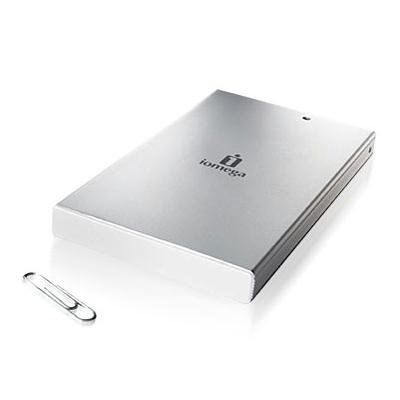
Figure 1: Iomega Portable Hard Drive 33634, a compact silver external hard drive.
Product Features
- Storage Capacity: 120GB for ample data storage.
- Dual Interface: Supports both Hi-Speed USB 2.0 (up to 480 Mbps) and FireWire 400 (IEEE-1394a, up to 400 Mbps) for broad compatibility.
- Bus-Powered: No external power supply required; powers directly from the USB or FireWire connection.
- Compact Design: Ultra-portable 2.5-inch form factor, fitting easily into a pocket or bag.
- Durability: Features drop shock technology for enhanced protection.
- Software Included: Comes with EMC Retrospect backup and disaster recovery software for PC/Mac.
- Operating System Support: Compatible with Windows 2000 Professional/XP Home/XP Professional and Mac operating systems.
Setup
Package Contents
Verify that your package contains the following items:
- Iomega Portable Hard Drive (Model 33634)
- USB 1.1/2.0 power cable
- FireWire 400 (1394a) cable
- One Solutions CD (includes Touch-Free automated backup and disaster recovery software, HTML User Manual, and Help Files)
- Quick Install Guide
System Requirements
- PC:
- 300 MHz processor or higher
- USB or FireWire controller
- Windows 2000 Professional, Windows XP Home, or Windows XP Professional
- USB 2.0 host connection or controller for USB 2.0 speeds
- 4X CD-ROM drive or higher (for software installation)
- Mac:
- Compatible Mac operating system (details on Solutions CD)
- USB or FireWire controller
Connecting the Hard Drive
- Choose your connection type: You can connect the drive using either the USB 2.0 cable or the FireWire 400 cable.
- Connect the cable to the drive: Plug one end of the chosen cable into the corresponding port on the Iomega Portable Hard Drive.
- Connect the cable to your computer: Plug the other end of the cable into an available USB or FireWire port on your computer.
- Power On: The drive is bus-powered and will turn on automatically once connected to a powered USB or FireWire port. No external power adapter is needed.
- Initial Recognition: Your operating system should detect the new hardware. Follow any on-screen prompts for driver installation, if necessary (typically automatic for modern OS).
Operating the Hard Drive
Data Transfer
Once connected and recognized by your computer, the Iomega Portable Hard Drive will appear as a removable storage device. You can transfer files to and from the drive using standard drag-and-drop operations or copy/paste functions.
- USB 2.0 Transfer Rate: Up to 480 Mbits/second.
- FireWire 400 Transfer Rate: Up to 400 Mbits/second.
Using Backup Software
The included Solutions CD contains EMC Retrospect backup and disaster recovery software. Install this software on your computer to utilize automated backup features. Refer to the software's documentation on the Solutions CD for detailed installation and usage instructions.
Safe Removal
Always safely remove the hard drive before disconnecting it from your computer to prevent data corruption.
- Windows: Click the "Safely Remove Hardware" icon in the system tray, then select the Iomega drive and choose "Eject."
- Mac: Drag the drive icon from your desktop to the Trash, or right-click (Control-click) the drive icon and select "Eject."
Maintenance
Care and Handling
- Avoid dropping the drive, despite its drop shock technology, as severe impacts can still cause damage.
- Keep the drive away from extreme temperatures, direct sunlight, and high humidity.
- Do not expose the drive to strong magnetic fields.
- Clean the exterior with a soft, dry cloth. Do not use liquid cleaners or solvents.
- Ensure proper ventilation when in use to prevent overheating.
Data Management
Regularly organize your files on the drive. Periodically check the drive's health using your operating system's disk utility tools. While the drive is designed for portability, it is recommended to maintain backups of critical data on multiple storage devices.
Troubleshooting
If you encounter issues with your Iomega Portable Hard Drive, refer to the following common troubleshooting steps:
- Drive Not Detected:
- Ensure the USB or FireWire cable is securely connected to both the drive and the computer.
- Try connecting to a different USB or FireWire port on your computer.
- If using a USB hub, try connecting the drive directly to the computer.
- Verify that your computer meets the minimum system requirements.
- Restart your computer and try connecting the drive again.
- Slow Transfer Speeds:
- Ensure you are connected to a USB 2.0 or FireWire 400 port for optimal speeds. Connecting to a USB 1.1 port will result in significantly slower performance.
- Close any unnecessary applications running in the background that might be consuming system resources.
- Check the condition of your cables; damaged cables can affect performance.
- Drive Not Powering On:
- Since the drive is bus-powered, ensure the USB or FireWire port on your computer is providing sufficient power. Try a different port or a different computer.
- Some older or low-power USB ports may not supply enough power.
- Data Corruption or Errors:
- Always use the "Safely Remove Hardware" (Windows) or "Eject" (Mac) function before disconnecting the drive.
- Run a disk check utility (e.g., Check Disk on Windows, Disk Utility on Mac) to scan and repair potential errors.
For more detailed troubleshooting, consult the Help Files available on the included Solutions CD.
Specifications
| Model Number | 33634 |
| Brand | Iomega |
| Storage Capacity | 120 GB |
| Hard Disk Form Factor | 2.5 Inches |
| Interface | USB 2.0/1.1, FireWire 400 (IEEE-1394a) |
| Transfer Rate (USB 2.0) | Up to 480 Mbits/second |
| Transfer Rate (FireWire 400) | Up to 400 Mbits/second |
| Rotational Speed | 5400 RPM |
| Cache Memory | 8MB buffer |
| Power Source | Bus-powered (via USB or FireWire) |
| Dimensions | 0.75 x 3.5 x 5.25 inches |
| Item Weight | 7.7 ounces |
| Compatible Devices | Laptop, Desktop PC/Mac |
| Color | Silver |
Warranty and Support
Limited Warranty
The Iomega Portable Hard Drive 33634 comes with a 1-year limited warranty. Please retain your proof of purchase for warranty claims. For specific terms and conditions of the warranty, refer to the documentation included on the Solutions CD or contact Iomega customer support.
Customer Support
For further assistance, technical support, or warranty service, please refer to the contact information provided on the Solutions CD or visit the official Iomega support website. The Solutions CD also contains additional HTML User Manuals and Help Files for comprehensive guidance.


