
1. Product Overview
The Eliminator Lighting E-137 Color Bar is a lighting effect designed to produce dynamic color chases. It features four distinct colors: red, yellow, blue, and green. This unit operates by responding to sound, creating an energetic visual display. It is designed for straightforward plug-and-play use and includes the necessary color lamps. Its design focuses on ease of use and low power consumption.
2. Safety Instructions
- Always connect the unit to a grounded power outlet.
- Ensure the voltage matches the unit's requirements (120V).
- Do not expose the unit to rain or moisture.
- Avoid looking directly into the light source to prevent eye strain.
- Disconnect power before performing any maintenance or bulb replacement.
- Ensure adequate ventilation around the unit to prevent overheating.
- Keep the unit away from flammable materials.
3. Package Contents
Verify that your package contains the following items:
- Eliminator Lighting E-137 Color Bar Unit
- 4x EL-R30 120V-60W Color Lamps (pre-installed)
- Hanging Bracket
4. Installation and Setup
The Eliminator Lighting E-137 Color Bar is designed for easy installation. It includes a hanging bracket for secure mounting.
- Mounting: Attach the included hanging bracket to a secure truss, ceiling, or stand. Ensure the mounting surface can support the unit's weight (7 pounds).
- Positioning: Position the unit to achieve the desired lighting effect.
- Power Connection: Plug the unit into a standard 120V AC power outlet.
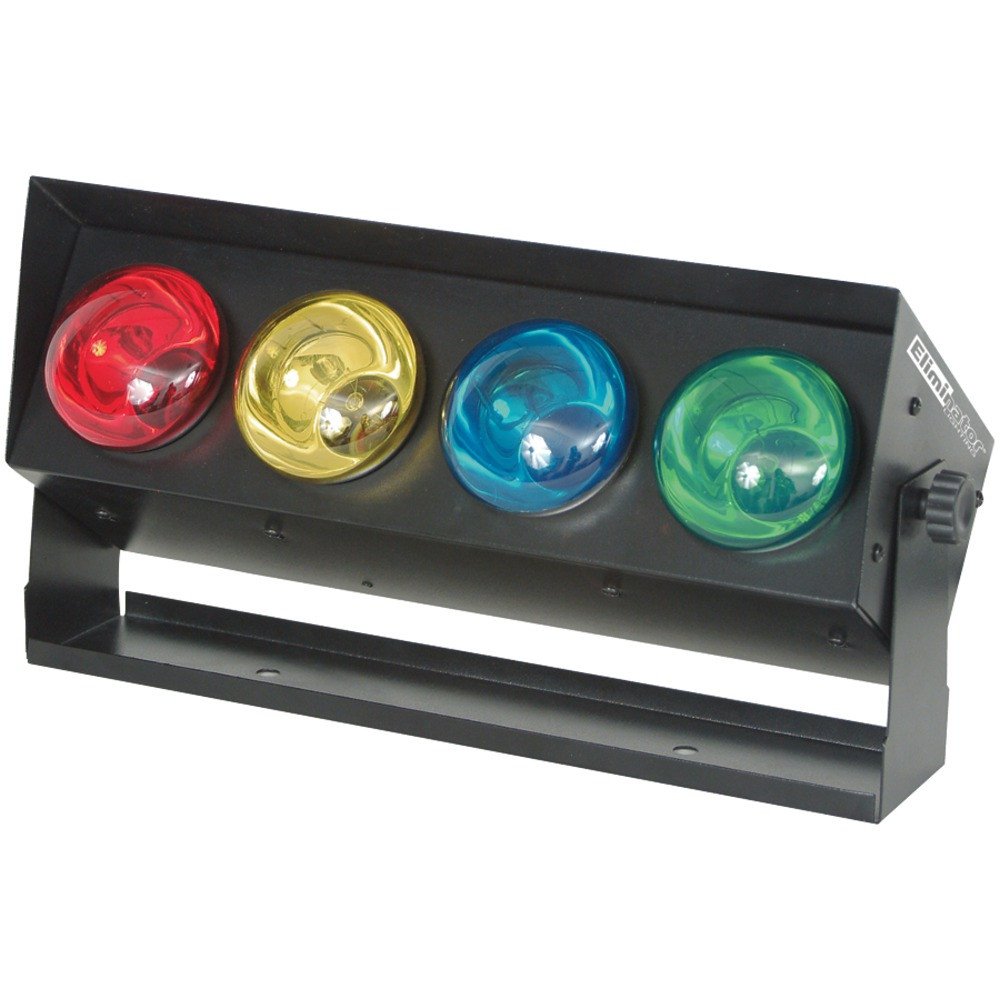
Image 1: Eliminator Lighting E-137 Color Bar showing its dimensions (16.25" L x 8" W x 4.5" H).
5. Operating Instructions
The E-137 Color Bar is designed for simple operation:
- Power On: Once connected to power, the unit will activate.
- Sound Activation: The unit features a built-in microphone that triggers the color chase effect in sync with music or ambient sound.
- Sound Sensitivity Knob: Located on the rear of the unit, this knob adjusts how sensitive the microphone is to sound. Turn clockwise to increase sensitivity (responds to quieter sounds) and counter-clockwise to decrease sensitivity (responds only to louder sounds).
- Speed Knob: Also on the rear, this knob controls the speed of the color chase effect. Turn clockwise for a faster chase and counter-clockwise for a slower chase. If the sound sensitivity knob is turned completely down, the speed knob will control a continuous chase pattern.
6. Key Features
- Equipped with 4x EL-R30 120V-60W bulbs.
- Sound-triggered color chase functionality.
- Adjustable sound sensitivity via a rear-mounted knob.
- Includes a hanging bracket for versatile mounting.
7. Maintenance
Regular maintenance ensures optimal performance and longevity of your unit.
- Cleaning: Periodically clean the exterior of the unit with a soft, dry cloth. Ensure the unit is unplugged before cleaning. Do not use harsh chemicals or abrasive cleaners.
- Bulb Replacement: If a bulb fails, disconnect the power. Allow the unit to cool completely. Carefully unscrew the old bulb and replace it with an EL-R30 120V-60W bulb. Ensure bulbs are securely seated.
- Inspection: Regularly check power cables for any signs of damage.
8. Troubleshooting Guide
| Problem | Possible Cause | Solution |
|---|---|---|
| Unit does not power on. | No power supply; faulty cable; outlet issue. | Check power connection; try a different outlet; inspect power cable for damage. |
| One or more lights not working. | Burnt out bulb; loose bulb connection. | Replace the faulty bulb (EL-R30 120V-60W); ensure bulbs are screwed in tightly. |
| Sound activation not responding. | Sound sensitivity too low; no sound input. | Increase the sound sensitivity knob; ensure music or sound is present near the unit. |
| Chase effect is too fast/slow. | Speed knob setting. | Adjust the speed knob to the desired rate. |
9. Technical Specifications
| Specification | Detail |
|---|---|
| Model Number | E137 |
| Brand | ADJ |
| Power Source | Corded Electric |
| Voltage | 120 Volts |
| Light Source Wattage | 60 Watts per bulb (4 bulbs total) |
| Bulb Type | EL-R30 |
| Number of Light Sources | 4 |
| Bulb Features | Sound Activation, Adjustable Sound Sensitivity |
| Color | Black (Housing) |
| Material | Metal |
| Finish Type | Painted |
| Mounting Type | Bracket Mount |
| Product Dimensions | 16.25" L x 8" W x 4.5" H |
| Item Weight | 7 Pounds |
| UPC | 855666000372 |
10. Warranty and Customer Support
For information regarding warranty coverage, technical support, or service inquiries, please refer to the official ADJ Products website or contact their customer service department directly. Keep your purchase receipt as proof of purchase for any warranty claims.


