Introduction
This manual provides detailed instructions for the proper use and maintenance of your Sony Hi-MD MZ-RH1 Walkman Portable Mini Disc Player. The MZ-RH1 is a versatile portable audio device designed for high-quality audio playback and recording on MiniDisc media, including support for Hi-MD discs. It features an Organic EL display for clear information display and robust connectivity options.
Key features include compatibility with Sony audio systems, a compact Walkman product line design, and a sleek black finish. This device is designed for use with laptops, personal computers, headphones, and earphones.
1. Setup
1.1 Unpacking and Initial Inspection
Carefully remove all components from the packaging. Verify that all included items, such as the main unit and any accessories (e.g., manual), are present and undamaged. If any items are missing or damaged, contact your retailer.
1.2 Powering the Device
The MZ-RH1 requires one Lithium-ion battery for operation. Insert the battery into the designated compartment according to the polarity indicators. Ensure the battery is fully charged before first use for optimal performance.
To charge the battery, connect the device to a power source using the appropriate charging cable (not specified if included, assume standard USB or proprietary). Refer to the charging indicator on the device for charging status.
1.3 Connecting Peripherals
- Headphones/Earphones: Connect your headphones or earphones to the stereo mini-jack output.
- Computer Connection: The device can be connected to a laptop or personal computer for data transfer (e.g., uploading/downloading audio files). Use the appropriate USB cable (if applicable) to connect the device to your computer.
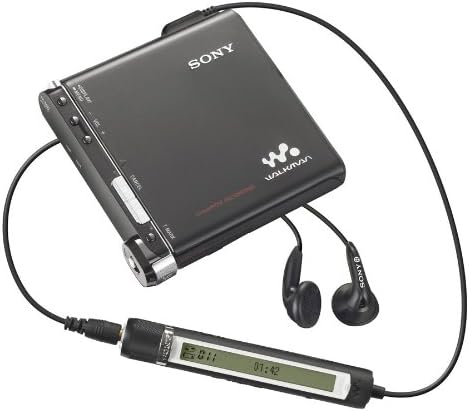
Figure 1.1: Sony MZ-RH1 connected to headphones and a wired remote control. This image illustrates the typical setup for audio playback, showing the compact player, connected earphones, and an inline remote for convenient control.
2. Operating Instructions
2.1 Basic Playback
- Insert MiniDisc: Open the disc compartment and gently insert a MiniDisc or Hi-MD disc with the label facing up. Close the compartment securely.
- Power On: Press and hold the power button until the display illuminates.
- Select Track: Use the navigation controls (e.g., skip forward/backward buttons) to select the desired track.
- Start Playback: Press the Play button.
- Adjust Volume: Use the Volume + and - buttons to adjust the listening level.
- Stop Playback: Press the Stop button.
2.2 Recording Audio
The MZ-RH1 supports Linear PCM recording, offering high-fidelity audio capture.
- Prepare Disc: Ensure a recordable MiniDisc or Hi-MD disc with sufficient free space is inserted.
- Connect Audio Source: Connect your audio source to the appropriate input jack (e.g., line-in, microphone-in).
- Adjust Recording Level: Use the REC LEVEL control (visible on the side of the device) to set the input level. Monitor the level meter on the display to avoid distortion.
- Start Recording: Press the REC button. The recording indicator will illuminate.
- Stop Recording: Press the Stop button to end the recording.
- Mark Tracks: Use the T MARK button to manually add track marks during recording or playback for easier navigation.

Figure 2.1: Top view of the Sony MZ-RH1 MiniDisc Player. This image highlights the main controls including DISPLAY/MENU, VOL +/-, CANCEL, T MARK, and the Organic EL display showing track information and recording levels. The REC LEVEL dial is visible on the right side.
2.3 Menu Navigation and Display
Use the DISPLAY/MENU button to access various settings and information. The Organic EL display provides clear text and graphical feedback, including track number, time elapsed, and recording levels.
3. Maintenance
3.1 Cleaning the Device
- Exterior: Wipe the exterior of the player with a soft, dry cloth. For stubborn dirt, slightly dampen the cloth with water and then wipe dry. Avoid using abrasive cleaners or solvents.
- Disc Compartment: Keep the disc compartment free of dust and debris. Do not insert foreign objects into the compartment.
3.2 Battery Care
- To prolong battery life, avoid exposing the device to extreme temperatures.
- If the device will not be used for an extended period, remove the battery.
- Dispose of used batteries according to local regulations.
4. Troubleshooting
This section addresses common issues you might encounter with your MZ-RH1. If the problem persists after trying these solutions, contact customer support.
| Problem | Possible Cause | Solution |
|---|
| Device does not power on. | Battery is depleted or incorrectly inserted. | Charge the battery. Ensure the battery is inserted with correct polarity. |
| No sound during playback. | Headphones not connected, volume too low, or disc error. | Check headphone connection. Increase volume. Try a different MiniDisc. |
| Cannot record. | Disc is full, protected, or input level is too low. | Use a new or empty recordable disc. Check if the disc is write-protected. Adjust REC LEVEL. |
| Display is blank or dim. | Device is off, battery low, or display settings. | Power on the device. Charge battery. Check display brightness settings in menu. |
5. Specifications
The following are the technical specifications for the Sony Hi-MD MZ-RH1 Walkman Portable Mini Disc Player:
- Model Name: Hi-MD MZ-RH1 Walkman
- Manufacturer: Sony
- Product Dimensions: 8.44 x 8.38 x 1.47 cm
- Item Weight: 582 g
- Color: Black
- Battery: 1 Lithium-ion battery required
- Display Technology: LCD (Organic EL)
- Screen Size: 3.45 Inch
- Media Type: MiniDisc
- Memory Storage Capacity: 1 GB (for Hi-MD discs)
- Connectivity Technology: Stereo mini-jack in/out
- Compatible Devices: Laptop, Personal computer, Headphones, Earphones
6. Warranty and Support
6.1 Product Warranty
For information regarding the warranty period and terms for your Sony MZ-RH1, please refer to the warranty card included with your product or visit the official Sony support website. Keep your proof of purchase for warranty claims.
6.2 Customer Support
If you require further assistance or encounter issues not covered in this manual, please contact Sony customer support. You can find contact information on the official Sony website or through the documentation provided with your product.
For online resources, visit the Sony Store on Amazon for product information and potential support links.


