
Nokia 0030957
Nokia 1112 Mobile Phone User Manual
Model: 1112 (Product Code: 0030957)
Introduction
The Nokia 1112 is designed for performance, quality, and ease of use at an affordable price. This mobile phone expands Nokia's range of user-friendly, reliable, and accessible devices. It features an intuitive user interface with graphic symbols and large fonts, making navigation simple, especially for first-time mobile phone users.
Key features include a white backlit display for high contrast, MP3-quality polyphonic ringtones, and voice output for clock and reminder functions in various languages. A demonstration mode is available to visually introduce basic phone functions, allowing users to explore features and play pre-installed games even without a SIM card inserted.
Safety Information
Please read these simple guidelines. Not following them may be dangerous or illegal. For more detailed information, refer to the full safety and regulatory information provided with your device.
- Road Safety First: Always drive safely and obey all traffic laws.
- Interference: All wireless devices may be susceptible to interference, which could affect performance.
- Switch Off in Restricted Areas: Switch the device off when mobile phone use is not allowed or when it may cause interference or danger, for example, in aircraft, near medical equipment, fuel, chemicals, or blasting areas.
- Qualified Service: Only qualified personnel may install or repair this product.
- Batteries, Chargers, and Other Accessories: Use only batteries, chargers, and other accessories approved by Nokia for use with this device.
Getting Started
This section guides you through the initial setup of your Nokia 1112 mobile phone.
Package Contents
Ensure your package contains the following items:
- Nokia 1112 Mobile Phone
- Standard Nokia Battery
- Standard Nokia Charger (ACP-7)
Inserting the SIM Card and Battery
- Remove the back cover of the phone by sliding it downwards from the top.
- Insert your SIM card into the SIM card slot with the gold contacts facing down and the cut corner aligned correctly.
- Insert the battery into its compartment, ensuring the contacts align with those in the phone.
- Replace the back cover by sliding it upwards until it clicks into place.
Charging the Battery
Before using your phone for the first time, the battery must be charged. Connect the charger to a wall outlet and then to the charging port at the bottom of your phone. The battery indicator on the screen will show the charging progress. Disconnect the charger once the battery is fully charged.
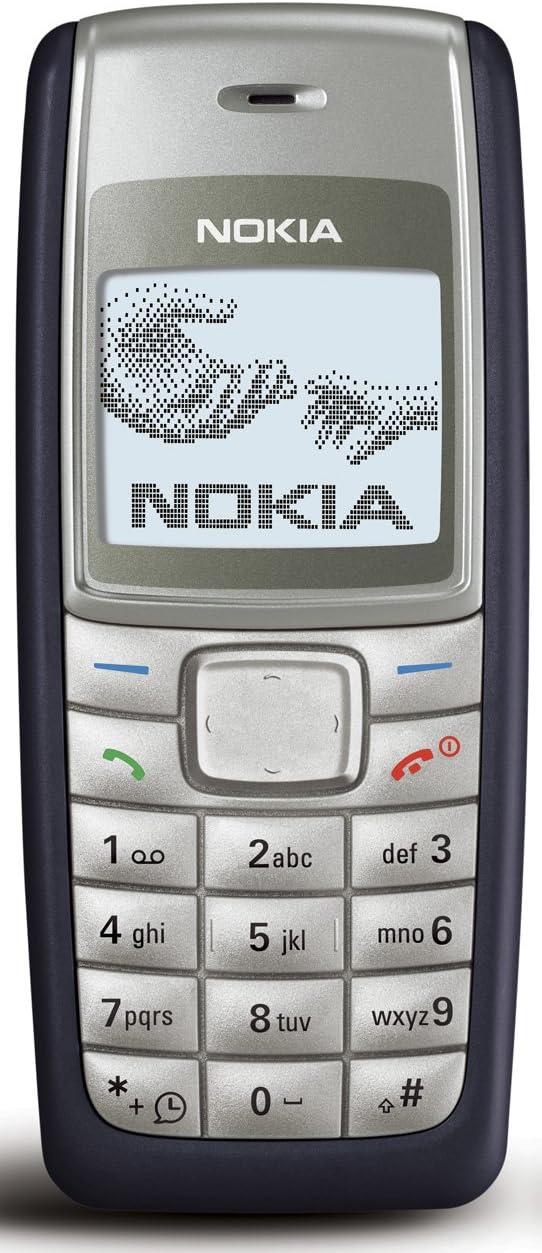
Image: Front view of the Nokia 1112 mobile phone, displaying its screen, keypad, and overall design. The screen shows a graphic of two hands reaching towards each other, with the Nokia logo below.
Setup
Powering On/Off
- To power on, press and hold the power key (red end call key) until the Nokia logo appears.
- To power off, press and hold the power key until "Goodbye" appears on the screen.
Initial Settings
Upon first power-on, you may be prompted to set the language, date, and time. Follow the on-screen instructions.
- Language: Select your preferred language from the list.
- Date and Time: Set the current date and time.
Operating the Phone
Basic Call Functions
- Making a Call: Enter the phone number using the keypad and press the green call key.
- Answering a Call: Press the green call key when the phone rings.
- Ending a Call: Press the red end call key.
Menu Navigation
The Nokia 1112 features a user-friendly interface with graphic symbols and large fonts for easy menu navigation. Use the navigation key (center button) to scroll through menu options and select items.
- Press the Menu key (left soft key) to access the main menu.
- Use the Up/Down navigation keys to scroll through menu items.
- Press the Select key (center navigation key) to open a selected item.
- Press the Back key (right soft key) to return to the previous screen.
Phonebook
Store your contacts in the phonebook for quick dialing. The phonebook supports graphic menu icons for simplified navigation.
- To add a new contact: Go to Menu > Phonebook > Add new.
- To find a contact: Go to Menu > Phonebook > Search.
Messaging
Send and receive text messages (SMS).
- To write a new message: Go to Menu > Messages > Write message.
- To read messages: Go to Menu > Messages > Inbox.
Clock and Reminders with Voice Output
The phone features a clock and reminder function with voice output in different languages, making it easy to keep track of appointments and time.
- Access clock settings via Menu > Clock.
- Set reminders via Menu > Reminders.
Ringtones
Enjoy MP3-quality polyphonic ringtones. You can customize ringtones for calls and messages.
- To change ringtone: Go to Menu > Settings > Tones.
Demonstration Mode
The demonstration mode visually introduces the phone's basic functions and helps first-time users optimize their device usage. In demo mode, you can also play pre-installed games and hear the time via voice output, even without a SIM card inserted.
- Access demo mode via Menu > Settings > Demo.

Image: Side view of the Nokia 1112 mobile phone, highlighting its slim design and the texture of its casing.
Maintenance
Proper care of your Nokia 1112 will ensure its longevity and optimal performance.
- Keep it Dry: Your device is not waterproof. Keep it dry.
- Avoid Extreme Temperatures: Extreme temperatures can shorten the life of electronic devices and distort or melt plastic parts.
- Clean Gently: Use a soft, clean, dry cloth to clean the surface of the device. Do not use harsh chemicals, cleaning solvents, or strong detergents.
- Handle with Care: Do not drop, knock, or shake the device. Rough handling can break internal circuit boards and fine mechanics.
Troubleshooting
If you encounter issues with your Nokia 1112, try the following solutions before seeking service.
| Problem | Possible Solution |
|---|---|
| Phone does not turn on. | Ensure the battery is correctly inserted and charged. Connect the charger and try to power on. |
| Cannot make or receive calls. | Check if the SIM card is properly inserted. Ensure you have network coverage. Contact your service provider if the issue persists. |
| Battery not charging. | Verify that the charger is securely connected to both the phone and the power outlet. Try a different power outlet. Ensure the charger is an original Nokia ACP-7 or compatible. |
| Poor call quality. | Move to an area with better network signal. The phone utilizes AMR (Adaptive Multi Rate) and SAIC (Single Antenna Interference Cancellation) for improved voice quality and network efficiency. |
| Keypad unresponsive. | Restart the phone. Ensure no debris is lodged under the keys. |
Specifications
| Feature | Detail |
|---|---|
| Brand | Nokia |
| Model Name | 1112 |
| Product Model Number | 0030957 |
| Color | Dark Blue |
| Product Type | Bar Phone |
| Operating System | Symbian |
| Screen Size | 1.8 inches |
| Display | Black and white with white backlight |
| Connections | GSM, Dual-band Cellular |
| Cellular Technology | 2G |
| Memory Storage Capacity | 4 MB |
| Weight | 80 grams |
| Talk Time | Up to 5 hours |
| Standby Time | Up to 15 days |
| Audio Jack | 2.5 mm |
Warranty and Support
Warranty information for your Nokia 1112 mobile phone is typically provided at the time of purchase or included with the product packaging. Please refer to these documents for details regarding warranty coverage, terms, and conditions.
For technical support or service inquiries, please contact your original point of purchase or refer to the official Nokia support channels available in your region. Keep your proof of purchase for any warranty claims.
Related documents0030957


Ask a question about this manual
Ask about setup, troubleshooting, compatibility, parts, safety, or missing instructions. Manuals+ will review the question and use this page’s manual context to help answer it.