
1. Introduction
The Snap Circuits FM Radio Kit offers an engaging way to explore the fundamentals of electronics by building a functional FM radio. Designed for ease of use, all components snap together without the need for soldering or special tools. This kit provides a hands-on learning experience, allowing users to understand how various electronic parts interact to create a working device. Please read this manual thoroughly before beginning assembly.
Important Note: This kit requires 3 AA batteries, which are not included. Ensure you have these batteries on hand before starting the assembly process.
2. Components Overview
The Snap Circuits FM Radio Kit includes various color-coded modules that represent different electronic components. These modules are designed to snap together easily on the provided base grid, forming complete circuits.
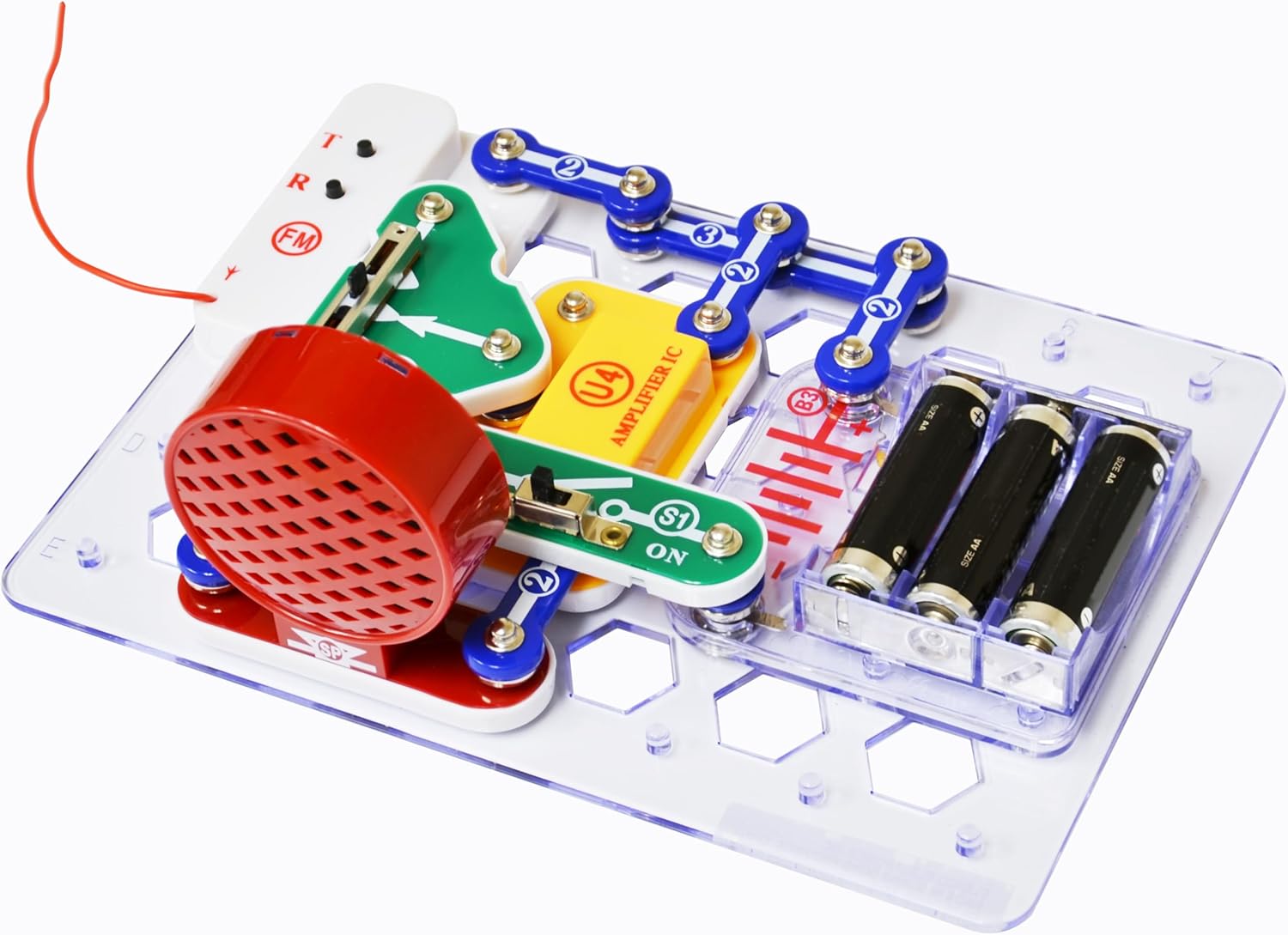
Image: A close-up of the assembled Snap Circuits FM Radio Kit, highlighting the various snap-together components including the speaker, amplifier IC, battery holder, and control switches.
Key Components:
- Base Grid: The transparent platform where all components are snapped into place.
- Battery Holder: Holds 3 AA batteries to power the circuit.
- Speaker: Outputs the audio from the radio.
- Amplifier IC (U4): Boosts the audio signal.
- ON/OFF Switch (S1): Controls the power to the circuit.
- Volume Control (RV): Adjusts the loudness of the radio.
- Tuning Buttons (FM): Used to scan and select FM radio stations.
- Connecting Wires/Snaps: Various lengths of snap wires to connect components.
- Antenna: A red wire used to receive FM signals.
3. Setup and Assembly
Follow the included illustrated manual for step-by-step instructions on assembling your FM radio circuit. The manual provides clear diagrams for each project.

Image: A child's hands are shown carefully snapping together components on the Snap Circuits base grid, with an instruction manual open beside the project.
Assembly Steps:
- Insert Batteries: Open the battery compartment and insert 3 AA batteries, ensuring correct polarity (+/-).
- Place Base Grid: Lay the transparent base grid on a flat, stable surface.
- Identify Components: Familiarize yourself with the different Snap Circuits modules by referring to the component list in your manual.
- Follow Circuit Diagrams: Carefully follow the circuit diagrams provided in your manual. Each diagram shows where to place each component and how to connect them using the snap wires.
- Snap Components: Gently press each module onto the base grid until it snaps securely into place. Ensure all connections are firm.
- Connect Antenna: Attach the red wire antenna to its designated snap point on the FM module. Extend the antenna for better reception.
Double-check all connections against the diagram before proceeding to operation.
4. Operating Instructions
Once your Snap Circuits FM Radio Kit is fully assembled and batteries are installed, you can begin operating it.

Image: A child's hand is shown interacting with the assembled Snap Circuits FM Radio Kit, specifically adjusting the volume control slider.
Using Your FM Radio:
- Power On: Locate the ON/OFF switch (S1) and slide it to the 'ON' position. You should hear a static sound from the speaker.
- Adjust Volume: Use the volume control slider (RV) to set your desired listening volume. Slide it up to increase volume and down to decrease it.
- Tune Stations: Press the tuning buttons (FM) to scan through available FM radio stations. Pressing the '+' button will move to higher frequencies, and '-' to lower frequencies.
- Optimize Reception: Extend and adjust the position of the red wire antenna to improve signal reception for clearer audio. Experiment with different antenna orientations and locations for best results.
- Power Off: When finished, slide the ON/OFF switch (S1) to the 'OFF' position to conserve battery life.
Video: An official Snap Circuits video demonstrating various projects that can be built with Snap Circuits kits, showcasing the ease of assembly and the interactive nature of the electronic components.
5. Maintenance
Proper maintenance ensures the longevity and continued functionality of your Snap Circuits FM Radio Kit.
Care and Storage:
- Cleaning: Wipe components with a soft, slightly damp cloth. Do not use harsh chemicals or abrasive cleaners. Ensure components are completely dry before storage or next use.
- Battery Replacement: Replace all 3 AA batteries when the radio's performance diminishes or stops working. Always replace all batteries at once and use new, identical batteries.
- Storage: Store the kit in its original packaging or a clean, dry container away from direct sunlight and extreme temperatures. Disassemble the circuit and remove batteries before long-term storage to prevent leakage.
- Handling: Handle components gently. Avoid bending or forcing the snap connections.
6. Troubleshooting
If your FM Radio Kit is not functioning as expected, try these troubleshooting steps:
- No Power:
- Ensure the ON/OFF switch is in the 'ON' position.
- Check that the 3 AA batteries are correctly inserted with the proper polarity.
- Replace old or depleted batteries with new ones.
- No Sound or Weak Sound:
- Verify the volume control (RV) is adjusted to an audible level.
- Check all snap connections to ensure they are firm and correctly aligned according to the circuit diagram.
- Ensure the speaker module is properly connected.
- Poor Reception or Static:
- Extend the red wire antenna fully.
- Adjust the antenna's position and orientation.
- Try operating the radio in a different location, away from potential interference sources like large metal objects or other electronic devices.
- Use the tuning buttons to scan for stronger signals.
- Circuit Not Working:
- Carefully re-examine your circuit assembly and compare it against the manual's diagram. Even a single misplaced component or loose connection can prevent the circuit from working.
- Ensure all components are facing the correct direction as indicated in the diagrams (e.g., arrows for current flow).
7. Specifications
| Feature | Detail |
|---|---|
| Model Number | SCP-02 |
| Product Dimensions | 17 x 17 x 18 inches |
| Item Weight | 10.5 ounces |
| Power Source | 3 AA batteries (not included) |
| Manufacturer Recommended Age | 8 - 17 years |
| Manufacturer | Elenco Electronics LLC |
| ASIN | B000FMNZBY |
| Release Date | June 12, 2006 |
8. Warranty and Support
For any questions, technical assistance, or concerns regarding your Snap Circuits FM Radio Kit, please contact Elenco Electronics LLC customer support. Refer to the product packaging or the official Snap Circuits website for the most current contact information.
While specific warranty details are not provided in this manual, Elenco Electronics LLC typically offers support for manufacturing defects. Please retain your proof of purchase for any warranty claims.
Visit the Snap Circuits Store for more information and other products.


