
Introduction
The BlueAnt Supertooth II is a portable Bluetooth handsfree speakerphone designed for in-vehicle communication. It offers wireless connectivity to your mobile phone, providing clear audio for calls without requiring installation. The device features a rechargeable lithium-ion battery, a noise-canceling microphone, and a high-performance speaker, making it suitable for handsfree operation while driving.
Package Contents
Before proceeding, please ensure all items are present in your package:
- BlueAnt Supertooth II Speakerphone Unit
- Magnetic Visor Clips (typically two)
- Car Charger
- Home Charger
- User Manual (this document)
Device Overview
Familiarize yourself with the main components of your Supertooth II speakerphone:
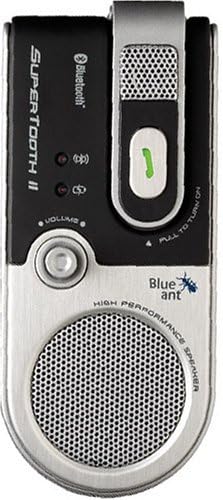
Image: Front view of the BlueAnt Supertooth II speakerphone, showing the speaker grille, volume knob, microphone arm, and indicator lights.
- Microphone Arm: Pivoting arm with noise-canceling microphone. Folding the arm typically powers the unit on/off.
- Speaker: High-performance speaker for clear audio output.
- Volume Control: Rotary knob for adjusting speaker volume.
- Call Buttons: Dedicated buttons for answering and ending calls.
- Indicator Lights: LEDs to show power, Bluetooth connection, and charging status.
- Charging Port: For connecting the car or home charger.
Setup
1. Charging the Device
Before initial use, fully charge your Supertooth II speakerphone. The built-in lithium-ion battery provides up to 20 hours of talk time and 800 hours of standby time when fully charged.
- Connect the provided car charger or home charger to the charging port on the Supertooth II.
- Plug the charger into a power source (vehicle's cigarette lighter socket or wall outlet).
- The indicator light will show charging status (refer to the device's specific LED behavior for full charge indication).
- Once fully charged, disconnect the charger.
2. Mounting the Speakerphone
The Supertooth II is designed for easy mounting on your vehicle's sun visor using the magnetic clips.

Image: The BlueAnt Supertooth II speakerphone securely attached to a car's sun visor, showing its position for optimal use.
- Slide one of the magnetic clips onto your vehicle's sun visor. Position it where the speakerphone will be easily accessible and the microphone arm can be directed towards you.
- Align the Supertooth II speakerphone with the magnetic clip. The magnets will secure the device in place.
- Adjust the position on the visor for optimal microphone pickup and speaker clarity.
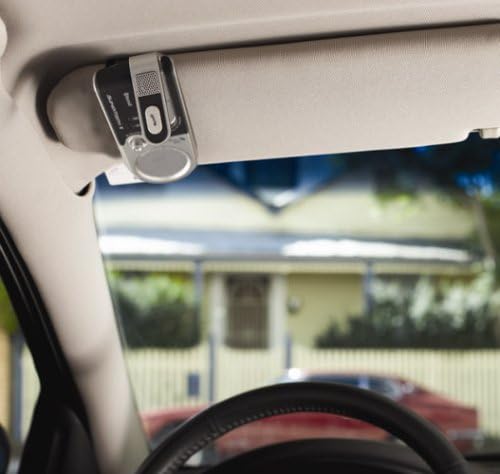
Image: A wider interior view of a car showing the BlueAnt Supertooth II speakerphone mounted on the sun visor, demonstrating its discreet placement.
3. Pairing with Your Mobile Phone
To use the Supertooth II, you must first pair it with your Bluetooth-enabled mobile phone.
- Power On: Fold down the microphone arm to power on the Supertooth II. The indicator light will illuminate.
- Enter Pairing Mode: Refer to your device's specific instructions for entering pairing mode. Typically, this involves holding down a specific button (e.g., the call button) until the indicator light flashes rapidly, indicating it is discoverable.
- Enable Bluetooth on Phone: On your mobile phone, go to the Bluetooth settings and ensure Bluetooth is enabled.
- Search for Devices: Instruct your phone to search for new Bluetooth devices.
- Select "Supertooth II": From the list of found devices, select "Supertooth II" (or similar name).
- Enter Passkey: If prompted, enter the passkey "0000" (four zeros).
- Confirm Connection: Once paired, the indicator light on the Supertooth II will change (e.g., slow flash or solid blue) to confirm a successful connection. Your phone may also display a confirmation message.
Note: The pairing process may vary slightly depending on your mobile phone model. Consult your phone's user manual for detailed Bluetooth pairing instructions.
Operating Instructions
Power On/Off
- To Power On: Fold down the microphone arm.
- To Power Off: Fold up the microphone arm.
Making and Receiving Calls
- Answering a Call: When a call comes in, press the dedicated "Answer" button (often the main call button).
- Ending a Call: During a call, press the dedicated "End Call" button (often the same main call button).
- Rejecting a Call: To reject an incoming call, press and hold the "End Call" button for a few seconds.
- Making a Call: Initiate a call from your mobile phone. The audio will automatically transfer to the Supertooth II if it is connected. Some phones may support voice dialing through the speakerphone; refer to your phone's manual.
- Transferring Audio: If a call is active on your phone and you wish to transfer it to the Supertooth II, or vice-versa, use the transfer function on your mobile phone.
Volume Adjustment
Adjust the call volume using the rotary volume knob located on the front of the Supertooth II. Turn the knob clockwise to increase volume and counter-clockwise to decrease volume.
Battery Status
The Supertooth II features an indicator light that provides information on battery status. Refer to the device's specific LED patterns for low battery warnings and charging status.
Maintenance
To ensure the longevity and optimal performance of your BlueAnt Supertooth II, follow these maintenance guidelines:
- Cleaning: Use a soft, dry, lint-free cloth to clean the device. Do not use abrasive cleaners, solvents, or strong chemicals, as these can damage the surface or internal components.
- Storage: When not in use for extended periods, store the device in a cool, dry place, away from direct sunlight and extreme temperatures.
- Battery Care: Avoid fully discharging the battery frequently. For long-term storage, it is recommended to charge the battery to about 50% capacity.
- Avoid Moisture: Keep the device away from water and excessive humidity. It is not waterproof.
- Handle with Care: Avoid dropping the device or subjecting it to strong impacts.
Troubleshooting
If you encounter issues with your Supertooth II, refer to the following common problems and solutions:
Device Does Not Power On
- Check Battery: Ensure the device is charged. Connect it to a charger and allow it to charge for at least 30 minutes before attempting to power on again.
- Microphone Arm: Ensure the microphone arm is fully folded down to power on the unit.
Cannot Pair with Phone
- Pairing Mode: Ensure the Supertooth II is in pairing mode (indicator light flashing rapidly).
- Phone Bluetooth: Verify that Bluetooth is enabled on your mobile phone and it is searching for devices.
- Distance: Ensure the speakerphone and phone are within close proximity (typically within 1 meter) during pairing.
- Previous Pairings: If you have previously paired the device with other phones, clear the pairing list on both the Supertooth II (if supported) and your phone, then attempt to pair again.
- Passkey: Confirm you are entering the correct passkey "0000" if prompted.
No Audio During Calls / Poor Sound Quality
- Volume: Adjust the volume knob on the Supertooth II. Also, check the volume settings on your mobile phone.
- Connection: Ensure the Supertooth II is actively connected to your phone. The indicator light should confirm connection.
- Microphone Position: For optimal outgoing audio, ensure the microphone arm is directed towards your mouth.
- Interference: Move away from other electronic devices that might cause interference.
Device Does Not Reconnect Automatically
- Manual Reconnection: Some phones or older Bluetooth versions may require manual reconnection. You may need to press the call button on the Supertooth II or select the device from your phone's Bluetooth menu to re-establish the link.
- Phone Settings: Check your phone's Bluetooth settings for options related to automatic reconnection.
Specifications
| Model Number | 091193 |
| Product Dimensions | 2.5 x 5.25 x 7.75 inches |
| Item Weight | 1.6 pounds |
| Wireless Communication | Bluetooth |
| Special Features | Microphone, Noise-Canceling, Speakerphone, Volume Control, Wireless |
| Battery Type | Built-in Rechargeable Lithium Ion |
| Talk Time | Up to 20 hours |
| Standby Time | Up to 800 hours |
Warranty and Support
The BlueAnt Supertooth II comes with a 2-year hardware warranty from the date of purchase. This warranty covers defects in materials and workmanship under normal use.
For warranty claims, technical support, or further assistance, please contact BlueAnt customer service. Keep your proof of purchase for warranty validation.
Note: Warranty terms and conditions may vary by region. Please refer to the official BlueAnt website or your product documentation for the most current warranty information.


