Introduction
This manual provides comprehensive instructions for the setup, operation, maintenance, and troubleshooting of your Kodak EasyShare V610 6 MP Digital Camera. Designed for ease of use, this camera features a 10x optical zoom dual-lens system and various advanced functionalities to capture high-quality images and videos.
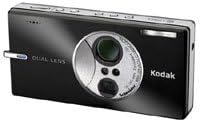
Figure 1: The Kodak EasyShare V610 Digital Camera, showcasing its compact design and dual-lens system. This image displays the camera from a slightly elevated angle, highlighting the lens assembly and top controls.
Setup
1. Battery Installation
- Locate the battery compartment door on the camera.
- Open the door and insert the compatible Lithium-ion battery, ensuring correct polarity as indicated inside the compartment.
- Close the battery compartment door securely.
2. Memory Card Installation
The camera supports SD memory cards and includes 32 MB of internal memory.
- Locate the SD card slot, typically near the battery compartment.
- Insert an SD memory card into the slot until it clicks into place. Ensure the card is oriented correctly.
- To remove, gently press the card to release it.
3. Initial Power On
Press the power button to turn on the camera. Follow any on-screen prompts for initial setup, such as setting the date and time.
Operating the Camera
Basic Photography
- Power On/Off: Press the Power button located on the camera body.
- Taking a Photo:
- Frame your shot using the 2.8-inch LCD display.
- Press the shutter button halfway down to focus. The camera will indicate when focus is achieved.
- Press the shutter button completely to capture the image.
- Zoom Function: Use the zoom control (often a lever around the shutter button) to adjust the 10x optical zoom. The camera also features a 4x digital zoom.
- Scene Modes: The camera offers 22 scene modes to optimize settings for various shooting conditions. Access these modes through the camera's menu system to select the appropriate setting (e.g., Portrait, Landscape, Night).
- Flash Modes: Adjust flash settings (Automatic, Fill-flash, Red-eye reduction, Off) via the camera menu to suit lighting conditions.
Advanced Features
- Bluetooth Connectivity: The V610 features Bluetooth wireless technology for transferring photos to compatible devices (e.g., mobile phones, PDAs, computers) up to 30 feet away.
- Enable Bluetooth on both the camera and the receiving device.
- Pair the devices according to their respective instructions.
- Select images on the camera and choose the option to send via Bluetooth.
- Video Recording: Record TV-quality (VGA) video at 30 frames per second with 10x optical video zoom, utilizing MPEG-4 compression.
- Switch the camera to video mode.
- Press the shutter button to start and stop recording.
- Built-in image stabilization helps reduce camera shake during video capture.
- Panorama Stitching: The camera can automatically combine three pictures into a single panorama.
- Select the panorama mode from the scene modes.
- Follow the on-screen guides to capture the first, second, and third images, ensuring proper overlap.
- The camera will automatically stitch them together.
- Kodak Perfect Touch Technology: This feature enhances pictures by bringing out detail in shadows without overexposing lighter areas. It can be applied to images after capture through the camera's playback menu.
- Favorites Mode: Store approximately 100 favorite pictures in an on-camera album for quick access and sharing. These favorites can also synchronize with online galleries.
Maintenance
- Cleaning the Camera:
- Use a soft, lint-free cloth to clean the camera body.
- For the lens and LCD screen, use a specialized lens cleaning cloth and solution, applying gently to avoid scratches.
- Avoid using abrasive cleaners or solvents.
- Battery Care:
- Charge the Lithium-ion battery fully before first use and whenever the battery indicator is low.
- Store the battery in a cool, dry place when not in use for extended periods.
- Do not expose the battery to extreme temperatures.
- Memory Card Management:
- Regularly transfer photos and videos to a computer or backup storage to free up space on the memory card.
- Format the memory card periodically within the camera to maintain optimal performance.
Troubleshooting
This section addresses common issues you might encounter with your Kodak EasyShare V610 camera.
| Problem | Possible Cause | Solution |
|---|---|---|
| Camera does not power on. | Battery is depleted or incorrectly inserted. | Ensure the battery is fully charged and inserted with correct polarity. |
| Images are blurry. | Camera shake, incorrect focus, or low light conditions. | Hold the camera steady, press the shutter button halfway to ensure focus, use flash in low light, or select a scene mode for specific conditions. |
| "Lens Error" message appears. | Obstruction in the lens mechanism or internal malfunction. | Turn the camera off and on again. Ensure no debris is blocking the lens. If the problem persists, contact customer support. |
| Cannot transfer photos via Bluetooth. | Bluetooth is not enabled, devices are not paired, or out of range. | Verify Bluetooth is active on both devices, ensure they are paired, and keep them within 30 feet of each other. |
For issues not covered here, please refer to the official Kodak support resources.
Specifications
| Brand | KODAK |
| Model Name | Kodak Easyshare V610 |
| Effective Still Resolution | 6 MP |
| Optical Zoom | 10x |
| Digital Zoom | 4x |
| Image Stabilization | Optical |
| Screen Size | 2.8 Inches LCD |
| Photo Sensor Technology | CCD |
| Video Resolution | 640 x 480 (VGA) at 30 fps |
| Connectivity Technology | Bluetooth |
| Internal Memory | 32 MB |
| Supported File Format | JPEG, MPEG-4 |
| Power Source | Lithium-ion Battery |
| Item Weight | 0.43 Pounds |
Warranty and Support
For warranty information and technical support, please refer to the official KODAK website or contact KODAK customer service. Keep your purchase receipt as proof of purchase for warranty claims.
Online Resources: Visit www.kodak.com for product registration, software downloads, and frequently asked questions.


