
Panasonic TH-42PX60U 42-Inch Plasma HDTV User Manual
Model: TH-42PX60U
1. Introduction
This manual provides essential information for the safe and efficient operation of your Panasonic TH-42PX60U 42-Inch Plasma HDTV. This television features a 16:9 aspect ratio, a 1024 x 768-pixel resolution, and an integrated NTSC/ATSC/QAM tuner for receiving various broadcast signals. It is designed to deliver a high-quality viewing experience with a contrast ratio of 10,000:1 and advanced picture processing.
2. Safety Information
Please read all safety instructions carefully before operating the television. Retain this manual for future reference.
- Power Source: Connect the television only to the specified power supply. Ensure the power cord is not damaged or pinched.
- Ventilation: Do not block ventilation openings. Allow adequate space around the television for proper airflow to prevent overheating.
- Water and Moisture: Do not expose the television to rain or moisture. Do not place objects filled with liquids, such as vases, on the television.
- Cleaning: Unplug the television from the wall outlet before cleaning. Use a soft, dry cloth. Do not use liquid cleaners or aerosol cleaners.
- Placement: Place the television on a stable, level surface. Avoid placing it in direct sunlight or near heat sources.
- Servicing: Do not attempt to service this product yourself. Refer all servicing to qualified service personnel.
3. What's in the Box
Verify that all components are present upon unpacking:
- Panasonic TH-42PX60U 42-Inch Plasma HDTV
- Remote Control (with batteries)
- Pedestal Base
- Power Cord
- Operating Instructions (this manual)
4. Setup
4.1 Attaching the Pedestal Base
If you are not wall-mounting the television, attach the included pedestal base according to the instructions provided in the separate pedestal assembly guide. Ensure all screws are securely fastened for stability.
4.2 Connecting Devices
The TH-42PX60U offers various connection options for external devices:
- HDMI (High-Definition Multimedia Interface): For high-quality digital audio and video. The TV has 2 HDMI inputs. Use an HDMI cable to connect devices like Blu-ray players, game consoles, or cable/satellite boxes.
- Component Video (Y/Pb/Pr): For high-quality analog video. The TV has 2 component inputs. Connect devices using three RCA cables for video (red, green, blue) and two RCA cables for audio (red, white).
- Composite Video (RCA A/V): For standard-definition analog video and audio. The TV has 3 composite inputs (1 front, 2 rear). Connect devices using a single yellow RCA cable for video and red/white RCA cables for audio.
- S-Video: For improved standard-definition analog video. The TV has 3 S-Video inputs (1 front, 2 rear).
- Antenna/Cable Input: Connect your antenna or cable TV coaxial cable to the RF input on the back of the television.
4.3 Power Connection
After connecting all desired devices, plug the power cord into the AC inlet on the television and then into a wall outlet.
4.4 Initial Setup and Channel Scan
Upon first power-on, the television will guide you through an initial setup process. This typically includes selecting your language, time zone, and performing an automatic channel scan to find available broadcast channels (NTSC, ATSC, and QAM). Ensure your antenna or cable is connected before initiating the scan.
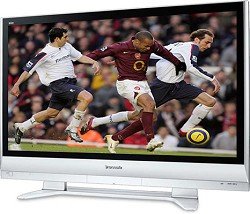
Image 1: Front view of the Panasonic TH-42PX60U 42-Inch Plasma HDTV with its included pedestal stand. This image illustrates the television's design and how it appears when set up on a flat surface.
5. Operating Instructions
5.1 Basic Functions
- Power On/Off: Press the Power button on the remote control or the TV to turn the unit on or off.
- Input Selection: Use the 'Input' or 'TV/Video' button on the remote to cycle through available input sources (HDMI1, HDMI2, Component1, Component2, Video1, Video2, S-Video1, S-Video2, TV).
- Volume Control: Use the 'Volume Up' and 'Volume Down' buttons to adjust the sound level.
- Channel Selection: Use the 'Channel Up' and 'Channel Down' buttons or the number pad to select channels.
5.2 Picture Settings
Access the picture menu to adjust settings for optimal viewing:
- Picture Mode: Select from preset modes (e.g., Standard, Dynamic, Cinema) or customize settings.
- Contrast: Adjusts the difference between light and dark areas of the picture.
- Brightness: Controls the overall lightness or darkness of the image.
- Color: Adjusts the intensity of colors.
- Tint: Fine-tunes the color balance (red-green).
- Sharpness: Enhances or softens the edges of objects in the picture.
- Aspect Ratio: Adjusts the picture display format (e.g., Full, Zoom, Just, 4:3) to match the content.
5.3 Tuner Operation
The integrated NTSC/ATSC/QAM tuners allow reception of various broadcast types:
- NTSC: Standard analog television broadcasts.
- ATSC: Digital terrestrial broadcasts, including High-Definition (HD) signals (480p/720p/1080i).
- QAM: Unscrambled digital cable television signals, including HD channels, directly from a cable connection without a separate set-top box.
5.4 SD Memory Card Slot
The television includes a Secure Digital (SD) memory card slot. Insert an SD card from a digital camera or camcorder to view photos directly on the screen. This feature also supports firmware updates for the television.
5.5 Additional Features
- V-Chip Parental Controls: Use the V-Chip system to block programming based on ratings.
- On/Off Sleep Timers: Set the television to automatically turn off after a specified period.
- Closed-Caption Decoding: Display closed captions for compatible broadcasts.
- Video Input Labeling: Customize names for your input sources (e.g., "DVD Player," "Game Console").
6. Maintenance
6.1 Cleaning the Screen
Gently wipe the screen with a soft, dry, lint-free cloth. For stubborn marks, lightly dampen the cloth with water. Do not use harsh chemicals, abrasive cleaners, or alcohol-based solutions, as these can damage the screen surface.
6.2 Cleaning the Cabinet
Wipe the television cabinet with a soft, dry cloth. Avoid using any liquid cleaners directly on the cabinet.
6.3 Preventing Image Retention (Burn-in)
While modern plasma displays are less susceptible to permanent image retention, it is advisable to avoid displaying static images (e.g., channel logos, video game HUDs, computer desktop elements) for extended periods. Utilize screen savers or vary content to minimize risk.
7. Troubleshooting
If you encounter issues with your television, refer to the following common solutions:
- No Power:
- Ensure the power cord is securely plugged into both the TV and the wall outlet.
- Check if the wall outlet is functioning by plugging in another device.
- Press the power button on the TV itself, not just the remote.
- No Picture/No Sound:
- Verify that the correct input source is selected (e.g., HDMI1, Component).
- Check all cable connections between the TV and external devices.
- Ensure the volume is not muted or set to minimum.
- Remote Control Not Working:
- Replace the batteries in the remote control.
- Ensure there are no obstructions between the remote and the TV's remote sensor.
- Point the remote directly at the TV's sensor.
- Poor Picture Quality:
- Adjust picture settings (contrast, brightness, sharpness, color).
- Ensure you are using high-quality cables for connections (e.g., HDMI for HD sources).
- For broadcast channels, check antenna positioning or cable signal strength.
If the problem persists after trying these solutions, contact Panasonic customer support or a qualified service technician.
8. Specifications
| Model Name | TH-42PX60U |
| Screen Size | 42 inches |
| Display Technology | Plasma |
| Resolution | 1024 x 768 pixels (720p compatible) |
| Aspect Ratio | 16:9 |
| Contrast Ratio | 10,000:1 |
| Tuner Type | NTSC, ATSC, QAM |
| HDMI Inputs | 2 |
| Component Video Inputs | 2 |
| Composite Video Inputs | 3 (1 front, 2 rear) |
| S-Video Inputs | 3 (1 front, 2 rear) |
| SD Memory Card Slot | Yes |
| Audio Output Power | 20 watts (10W x 2) |
| Item Weight | 70.5 pounds |
| Special Features | V-Chip, Sleep Timer, Closed Caption, Video Input Labeling |
9. Warranty and Support
For warranty information and customer support, please refer to the warranty card included with your product or visit the official Panasonic website. Keep your purchase receipt as proof of purchase for warranty claims.
For technical assistance or service inquiries, please contact Panasonic customer service directly.


