
1. Introduction
The Optronics SD-100 Thermal Dri Boot Dryer is designed to safely and effectively dry footwear such as boots, shoes, and waders. Utilizing thermal convection, this dryer circulates warm air naturally, preventing damage to delicate materials like leather. It operates without fans, ensuring a gentle drying process suitable for various types of footwear.
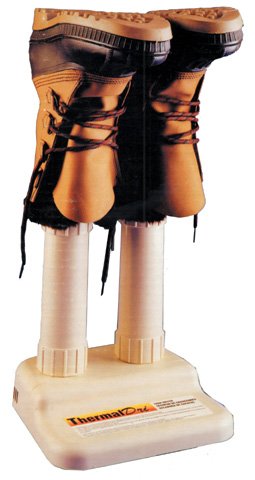
Figure 1: Optronics SD-100 Thermal Dri Boot Dryer. This image displays the compact design of the boot dryer, featuring its base unit and two upward-extending drying posts where footwear is placed.
2. Important Safety Information
- Read all instructions before using the appliance.
- Do not immerse the dryer in water or other liquids.
- Ensure the power cord is not damaged. If damaged, contact qualified personnel for repair.
- Use only in a well-ventilated area.
- Do not block the air vents on the unit.
- Unplug the dryer from the outlet when not in use and before cleaning.
- This appliance is not intended for use by persons (including children) with reduced physical, sensory, or mental capabilities, or lack of experience and knowledge, unless they have been given supervision or instruction concerning use of the appliance by a person responsible for their safety.
- Keep children away from the appliance.
- Not recommended for gloves or mittens.
3. Setup Instructions
- Unpack the Dryer: Carefully remove the Optronics SD-100 Boot Dryer from its packaging.
- Choose a Location: Place the dryer on a flat, stable surface in a well-ventilated area. Ensure there is sufficient space around the unit for proper air circulation.
- Power Connection: Plug the dryer into a standard 110-volt electrical outlet.
- Optional Extension Tubes: If drying boots taller than 10 inches, consider purchasing and attaching the 8-inch extension tubes (model OP1080, sold separately) to the drying posts.
4. Operating Instructions
- Prepare Footwear: Remove any excess mud or debris from the footwear before placing it on the dryer.
- Place Footwear: Invert your boots, shoes, or waders and place them over the drying posts. Ensure the footwear is fully seated on the posts to allow warm air to circulate effectively inside.
- Activate Drying: The dryer begins operating once plugged in. There is no on/off switch; the unit heats up automatically.
- Drying Time: Drying time will vary depending on the material, thickness, and saturation level of the footwear. Allow several hours, typically overnight, for thorough drying. The thermal convection process is gentle and gradual.
- Remove Footwear: Once dry, carefully remove the footwear from the posts.
Note: The Optronics SD-100 uses a natural thermal convection process, which means it operates quietly without a fan. This method is designed to protect and preserve the integrity of your footwear materials, especially leather, by avoiding excessive heat or forced air.
5. Maintenance
- Cleaning: Before cleaning, always unplug the dryer from the electrical outlet. Wipe the exterior surfaces with a soft, damp cloth. Do not use abrasive cleaners or immerse the unit in water.
- Storage: When not in use, store the dryer in a cool, dry place, away from direct sunlight and moisture.
- Inspection: Periodically inspect the power cord and the unit for any signs of damage. If damage is observed, discontinue use and contact customer support.
6. Troubleshooting
| Problem | Possible Cause | Solution |
|---|---|---|
| Dryer does not heat up. | No power supply. | Ensure the dryer is securely plugged into a working 110-volt outlet. Check the circuit breaker. |
| Footwear is not drying effectively. | Footwear not properly placed; excessive moisture; insufficient drying time. | Ensure footwear is fully inverted over the posts. Remove excess water before drying. Allow more time for drying, especially for heavily saturated items. Ensure the unit is in a well-ventilated area. |
| Unusual odor during operation. | New unit odor; dust accumulation. | A slight odor may occur during initial use; this is normal and should dissipate. Ensure the unit is clean and free of dust. If the odor persists or is strong, discontinue use and contact support. |
7. Specifications
- Model: SD-100
- Power Input: 110 Volt
- Drying Method: Thermal Convection
- Dimensions: Approximately 13 x 11 x 5 inches (Product Dimensions)
- Item Weight: Approximately 3 pounds
- Material: Designed for various materials including leather.
- Certifications: ETL and UL approved.
- Manufacturer: OPTRONICS
- UPC: 047286651007
8. Warranty & Support
The Optronics SD-100 Thermal Dri Boot Dryer comes with a full 5-year warranty from the date of purchase. This warranty covers defects in materials and workmanship under normal use.
For warranty claims, technical support, or inquiries regarding optional accessories like the 8-inch extension tubes (model OP1080), please contact Optronics customer service. Refer to your purchase documentation for specific contact details or visit the official Optronics website.