
Introduction
This manual provides detailed instructions for the proper setup, operation, and maintenance of your Fossil AM3898 Men's Watch. Please read this guide thoroughly to ensure optimal performance and longevity of your timepiece.
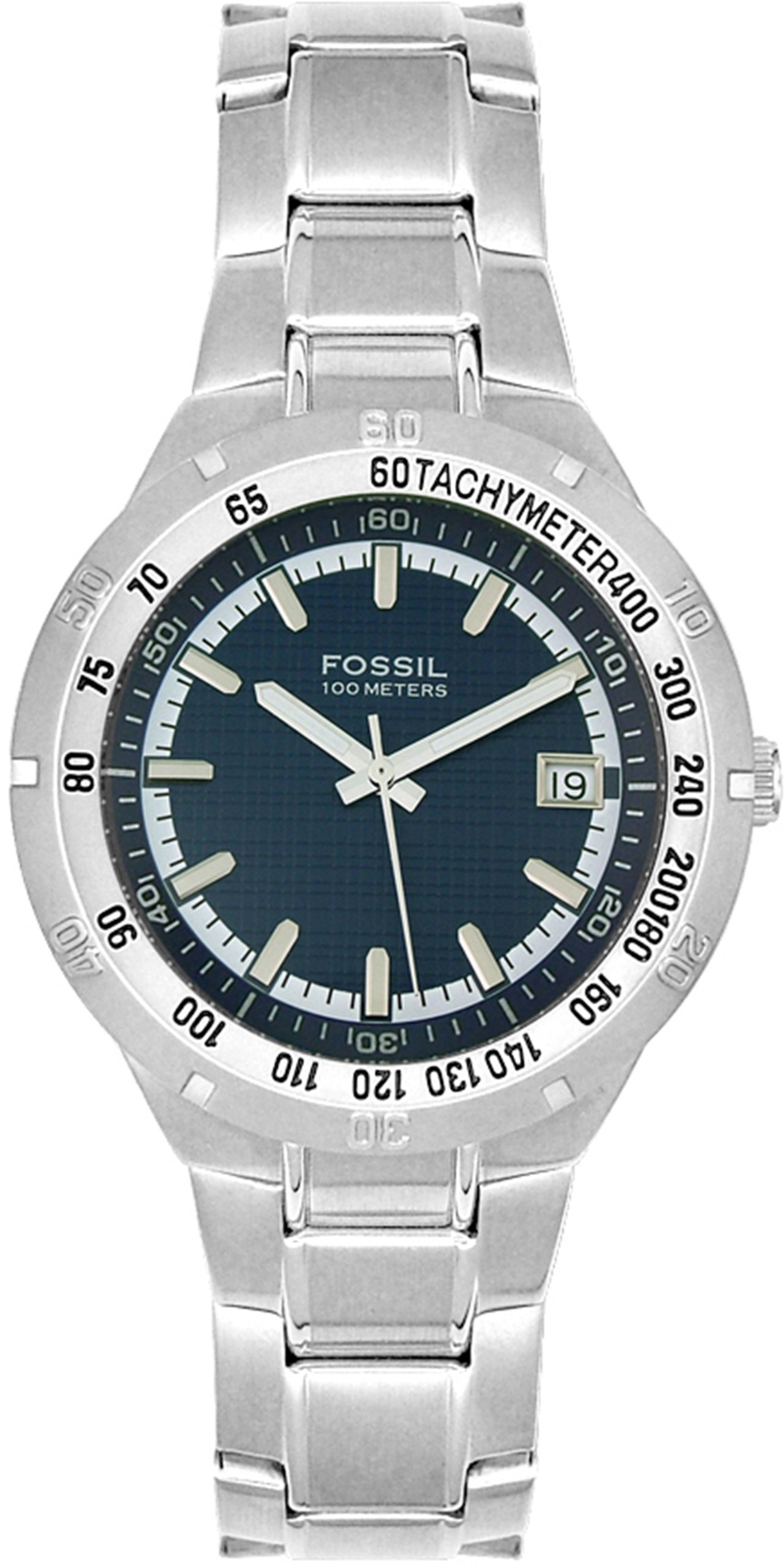
Figure 1: Fossil AM3898 Men's Watch. This image displays the watch's overall design, featuring a silver stainless steel case and bracelet, and a blue dial with three-hand quartz movement and a date function.
Setup
1. Setting the Time and Date
- Pull out the crown: Gently pull the crown (the small knob on the side of the watch) out to position 2.
- Set the time: Rotate the crown clockwise or counter-clockwise to move the hands to the desired time. For watches with a date function, ensure you set the time correctly for AM/PM to avoid the date changing at noon.
- Set the date: Push the crown in halfway to position 1. Rotate the crown to adjust the date. If your watch has a day function, this will also be adjusted in this position.
- Push in the crown: Once the time and date are set, push the crown back into position 0 (normal operating position) to start the watch.
Note: Avoid setting the date between 9 PM and 3 AM, as this can interfere with the date change mechanism.
2. Adjusting the Bracelet
The stainless steel bracelet can be adjusted by removing or adding links. This procedure typically requires specialized tools and is best performed by a qualified jeweler or watch technician to prevent damage.
Operating Your Watch
1. Basic Timekeeping
Your Fossil AM3898 watch features a reliable Japanese-Quartz movement, providing accurate timekeeping. Once set, the watch will continuously display the current time.
2. Date Function
The watch includes a date display. The date will automatically advance once every 24 hours. If the watch has been stopped or if the month has fewer than 31 days, you may need to manually adjust the date as described in the "Setting the Time and Date" section.
3. Water Resistance Guidelines
This watch is water resistant to 100 meters (330 feet). This makes it suitable for snorkeling and swimming. However, it is not suitable for diving. To maintain water resistance:
- Ensure the crown is fully pushed in before any contact with water.
- Do not operate the crown or pushers while the watch is wet or submerged.
- Avoid exposing the watch to extreme temperature changes (e.g., hot showers followed by cold water).
- Water resistance is not a permanent condition and may diminish over time. It is recommended to have the water resistance checked periodically by an authorized service center.
Maintenance
1. Cleaning Your Watch
To keep your watch looking its best, wipe the case and bracelet regularly with a soft, dry cloth. For stainless steel bracelets, a slightly damp cloth can be used, followed by a dry cloth. Avoid using harsh chemicals or abrasive materials.
2. Battery Replacement
Your quartz watch is powered by a battery. When the battery runs low, the watch may stop or the second hand may skip. Battery replacement should be performed by a qualified watch technician to ensure the correct battery type is used and the water resistance seal is properly maintained.
3. Storage
When not wearing your watch, store it in a cool, dry place away from direct sunlight and strong magnetic fields. The original collectible tin provided with your watch is ideal for storage.
Troubleshooting
- Watch not running:
Check if the crown is fully pushed in. If it is, the battery may need replacement. Contact an authorized service center.
- Date not changing at midnight:
The time may be set for PM instead of AM. Advance the time by 12 hours. Ensure you are not setting the date between 9 PM and 3 AM.
- Condensation inside the crystal:
This indicates a potential breach in the water resistance. Have the watch inspected immediately by a qualified technician to prevent further damage to the movement.
Specifications
| Feature | Detail |
|---|---|
| Model Number | AM3898 |
| Movement Type | Japanese Quartz |
| Display Type | Analog |
| Case Material | Stainless Steel |
| Case Diameter | 41 mm |
| Band Material | Stainless Steel |
| Band Width | 22 mm |
| Crystal Material | Mineral |
| Dial Color | Blue |
| Water Resistance Depth | 100 meters (330 feet) |
| Clasp Type | Deployment Clasp With Safety |
Warranty and Support
Warranty Information
Your Fossil AM3898 watch comes with an 11-year limited warranty. This warranty covers manufacturing defects in materials and workmanship under normal use. It does not cover damage resulting from improper handling, accidents, or unauthorized repairs. For specific terms and conditions, please refer to the warranty card included with your purchase or visit the official Fossil website.
Customer Support
For technical assistance, service, or warranty claims, please contact Fossil customer support. You can typically find contact information on the official Fossil website or through your retailer.
Note: Always ensure that any repairs or battery replacements are carried out by authorized service centers to maintain the watch's warranty and water resistance.
