
Introduction
This manual provides comprehensive instructions for the safe and efficient operation of your Coby TF-DVD7107 7-Inch Portable DVD Player. Please read this manual thoroughly before using the device to ensure proper setup, usage, and maintenance. Keep this manual for future reference.
Safety Information
Observe the following safety precautions to prevent damage to the device and ensure user safety:
- Do not expose the device to rain, moisture, or extreme temperatures.
- Avoid placing the device near heat sources or in direct sunlight.
- Use only the specified power adapters and accessories provided by Coby.
- Do not attempt to open or repair the device yourself. Refer all servicing to qualified personnel.
- Keep the device away from strong magnetic fields.
- Ensure proper ventilation to prevent overheating.
Package Contents
Verify that all items are present in the package:
- Coby TF-DVD7107 Portable DVD Player
- Remote control
- AV cable
- 100-240V UL listed AC adaptor
- DC car adapter
- Stereo headphones
- Lithium-ion Rechargeable battery
Product Overview
The Coby TF-DVD7107 is a compact portable DVD player designed for on-the-go entertainment. It features a 7-inch widescreen TFT color display and supports various media formats.
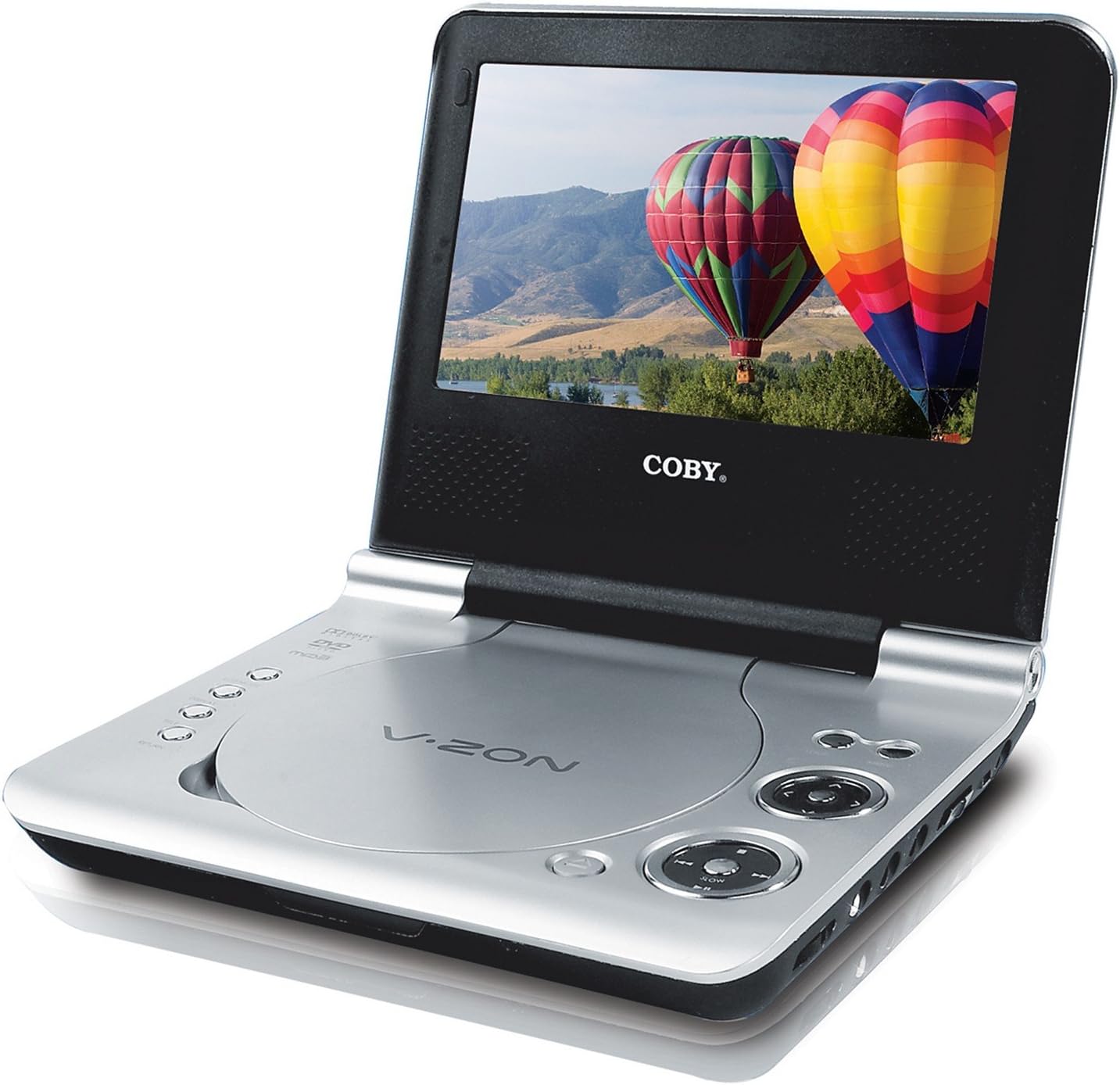
An image of the Coby TF-DVD7107 portable DVD player. The device is open, revealing a 7-inch widescreen display and the disc compartment. The screen shows a vibrant image of hot air balloons over a landscape. The player features a silver finish with black accents around the screen and control buttons.
Key Features:
- 7-inch Widescreen (16:9) TFT Color Display
- Compatibility with DVD, DVD±R/RW, CD, CD±R/RW, JPEG, and MP3 formats
- Built-in anti-skip circuitry for uninterrupted playback
- Multiple subtitle and viewing angle options
- Slow/Fast motion play and zoom operation
- Convenient on-screen display
- Headphone jack for private listening
Setup
1. Charging the Battery:
Before first use, fully charge the included Lithium-ion rechargeable battery. Connect the AC adaptor to the DC IN 9V port on the player and then to a power outlet. The charging indicator light will illuminate. Once fully charged, the light may change color or turn off, depending on the model.
2. Installing the Battery:
Locate the battery compartment on the underside of the player. Insert the Lithium-ion battery, ensuring correct polarity, and secure the compartment cover.
3. Powering the Device:
- AC Power: Connect the AC adaptor to the player and a wall outlet.
- Car Power: Use the DC car adapter to power the player from your vehicle's 12V accessory socket.
- Battery Power: Ensure the internal battery is charged for portable use.
Operating Instructions
Basic Playback:
- Power On: Press the POWER button to turn on the player.
- Insert Disc: Gently open the disc cover and place a DVD or CD onto the spindle with the label side facing up. Close the cover securely.
- Playback: The player will typically begin playback automatically. If not, navigate to the PLAY option using the control buttons or remote and press ENTER.
- Controls: Use the PLAY/PAUSE, STOP, FAST FORWARD, REWIND, NEXT, and PREVIOUS buttons on the player or remote control to manage playback.
- Volume: Adjust the volume using the dedicated volume controls.
- Headphones: For private listening, plug stereo headphones into the headphone jack(s).
Advanced Features:
- Subtitles: During DVD playback, press the SUBTITLE button on the remote to cycle through available subtitle tracks.
- Viewing Angles: If a DVD supports multiple camera angles, press the ANGLE button on the remote to switch between them.
- Slow/Fast Motion: Use the appropriate buttons on the remote to adjust playback speed.
- Zoom: Press the ZOOM button to enlarge a portion of the screen. Use navigation buttons to move the zoomed area.
- On-Screen Display (OSD): The OSD provides information about playback status, track number, time, and other settings.
Region-Free Playback (Advanced User Information):
The Coby TF-DVD7107 is typically set to a specific DVD region. Some users have reported success in modifying the device to play DVDs from all regions. This procedure is not officially supported by the manufacturer and may void your warranty. Proceed at your own risk.
Reported Procedure:
- Ensure the unit is powered on and a DVD is inserted, but do not start playback. The player should be on the neutral blue screen.
- Using the remote control, press the SETUP button. A menu box should appear.
- Press the Fast Forward (>>) button.
- Press the Fast Rewind (<<) button.
- Press the Next Chapter (>>|) button.
- Press the Previous Chapter (|<<) button.
- A number representing the current region should appear. Use the right arrow button (next to "ENTER" on the remote) to change this number to 255.
- Press the SETUP button again until the setup menu disappears.
Your device should now be set to region-free. Note down your original region setting if you wish to revert the change.
Maintenance
Cleaning the Device:
- Use a soft, dry cloth to clean the exterior of the player.
- For the screen, use a soft, lint-free cloth specifically designed for electronics displays. Do not use abrasive cleaners or solvents.
- Keep the disc compartment free of dust and debris.
Battery Care:
- To prolong battery life, avoid fully discharging the battery frequently.
- If storing the device for an extended period, charge the battery to approximately 50% and store in a cool, dry place.
- Do not expose the battery to high temperatures.
Troubleshooting
If you encounter issues with your Coby TF-DVD7107, refer to the following common problems and solutions:
- No Power:
- Ensure the AC adapter is securely connected to both the player and a working power outlet.
- If using battery power, ensure the battery is charged and correctly installed.
- Check the power switch is in the 'ON' position.
- Disc Not Playing / Disc Error:
- Verify the disc is clean and free of scratches or smudges.
- Ensure the disc is inserted correctly with the label side facing up.
- Check if the disc format (DVD, CD, MP3, JPEG) is supported by the player.
- The built-in anti-skip circuitry helps, but severe vibrations can still cause interruptions.
- No Sound:
- Adjust the volume level.
- If using headphones, ensure they are fully plugged in and functional.
- Check if the audio output is muted.
- Poor Picture Quality:
- Clean the screen with a soft, lint-free cloth.
- Ensure the disc is clean and undamaged.
- Adjust display settings if available in the menu.
- Unusual Odors or Sounds:
If you detect any burning smell or unusual sounds, immediately disconnect the power adapter and turn off the device. Do not attempt to use or repair the unit. Contact qualified service personnel.
Specifications
| Feature | Detail |
|---|---|
| Brand | Coby |
| Model Number | TF-DVD7107 |
| Screen Size | 7 Inches |
| Display Type | LCD |
| Media Type Supported | DVD, DVD±R/RW, CD, CD±R/RW, JPEG, MP3 |
| Color | Silver |
| Item Weight | 3.55 pounds |
| Product Dimensions | 8 x 6 x 2 inches |
| Batteries | 1 Lithium-ion Rechargeable battery (included) |
| Power Input | 100-240V AC (with adaptor), 12V DC (with car adaptor) |
Warranty and Support
For warranty information and technical support, please refer to the documentation provided at the time of purchase or contact Coby customer service directly. The product's legal disclaimer states, "Item sold as is. No refunds." This may indicate specific terms regarding returns or exchanges from the point of sale. Any claims regarding defects or service should be directed to the manufacturer or the retailer from whom the product was purchased.


