
Weller TB100PK
Weller TB100PK Therma-Boost Heat Tool Instruction Manual
Model: TB100PK
Introduction
The Weller TB100PK Therma-Boost Heat Tool is a versatile electric tool designed for a variety of tasks including soldering, cutting, and shaping. It features a dual-wattage capability, operating at a standard 30 watts and offering a temporary boost to 130 watts for demanding applications. This manual provides essential information for the safe and effective operation, maintenance, and troubleshooting of your heat tool.

Image: The Weller TB100PK Therma-Boost Heat Tool, shown with its included stand and a selection of multi-use tips.
Safety Information
Please read and understand all safety warnings and operating instructions before using this tool. Failure to follow these instructions may result in electric shock, fire, or serious injury.
- Proposition 65 Warning: This product may expose you to chemicals known to the State of California to cause cancer and birth defects or other reproductive harm. Wash hands after handling.
- Electrical Safety: Always ensure the tool is unplugged before changing tips or performing maintenance. Do not operate in wet conditions. Use only with a properly grounded outlet.
- Heat Hazard: The tip and barrel of the tool become extremely hot during operation. Avoid direct contact with skin or flammable materials. Use the included stand to rest the hot tool.
- Ventilation: Use in a well-ventilated area. Fumes from soldering or melting certain materials can be harmful.
- Eye Protection: Always wear safety glasses or goggles to protect your eyes from splashes, fumes, or debris.
- Children and Pets: Keep the tool out of reach of children and pets.
- Proper Use: Use the tool only for its intended purpose. Do not modify the tool or use non-approved accessories.
Package Contents
Verify that all items listed below are present in your package:
- Weller TB100PK Therma-Boost Heat Tool (30 Watt/130 Watt)
- Tool Stand
- 6 Multi-Use Tips:
- Soldering Tip
- Rope Cutting Tip
- Foam Cutting Tip
- Smoothing Tip
- Scoring Tip
- Screwdriver Tip (often included for general use)
- Instruction Manual (this document)

Image: The Weller TB100PK kit as it appears in its retail packaging, illustrating the heat tool, stand, and various tips.
Setup
Attaching Tips
- Ensure the heat tool is unplugged and completely cool before attaching or changing tips.
- Select the appropriate tip for your task. The kit includes tips for soldering, cutting, shaping, smoothing, and scoring.
- Loosen the small screw on the barrel of the heat tool using a screwdriver (a small flathead or the included screwdriver tip may be used).
- Insert the desired tip into the barrel, ensuring it is fully seated.
- Tighten the screw firmly to secure the tip in place. Do not overtighten.

Image: A close-up view of the heat tool's barrel, showing the screw used to secure the interchangeable tips.
Power Connection
- Place the heat tool on its included stand on a stable, heat-resistant surface.
- Plug the power cord into a standard 120V AC grounded electrical outlet. The tool will begin to heat up to its standard 30-watt operating temperature.
- Allow approximately 45 seconds for the tool to reach its initial operating temperature.
Operating Instructions
Basic Operation (30 Watt Mode)
Once plugged in, the tool operates at a continuous 30 watts, suitable for most light-duty tasks. The tip will maintain a consistent temperature for general use.
Therma-Boost Mode (130 Watt)
For tasks requiring higher heat, such as cutting thicker materials or quick soldering, press and hold the red trigger on the handle. This activates the Therma-Boost feature, increasing the wattage to 130 watts for a temporary period. Release the trigger to return to the standard 30-watt mode.
Note: The Therma-Boost feature is designed for intermittent use. Continuous holding of the trigger may lead to overheating and reduced tool lifespan. Allow the tool to cool down between boost cycles if performing prolonged high-heat tasks.
Applications
The Weller TB100PK is designed for a range of hobby and light-duty applications:
- Soldering: Use the soldering tip for electrical connections and small electronic repairs. Ensure surfaces are clean and use appropriate solder.
- Rope and Foam Cutting: The specialized cutting tips, combined with the Therma-Boost, allow for clean, sealed cuts in synthetic ropes and foam materials, preventing fraying.
- Smoothing and Scoring: Utilize the smoothing and scoring tips for plastic modeling, crafting, and other applications where precise heat application is needed to shape or mark materials.
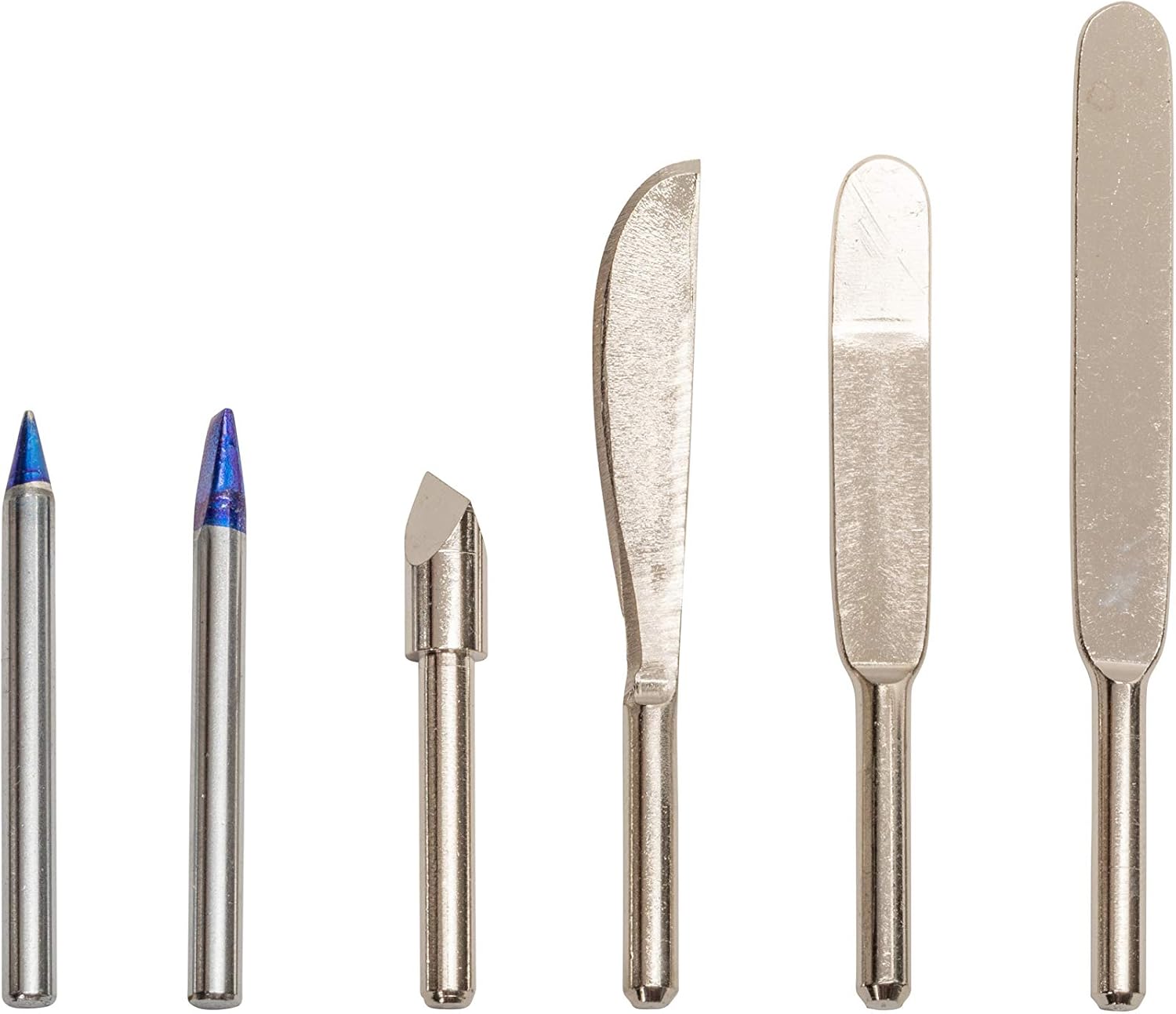
Image: A selection of the various interchangeable tips included with the Weller TB100PK, designed for different applications like soldering, cutting, and shaping.
Maintenance
Proper maintenance ensures the longevity and optimal performance of your heat tool.
- Tip Cleaning: After use, especially for soldering, wipe the tip with a damp sponge or brass wool while it is still warm (but unplugged and carefully handled). Do not file or sand the tip, as this can damage the plating.
- Tool Body Cleaning: Clean the body of the tool with a soft, dry cloth. Do not use abrasive cleaners or solvents.
- Storage: When not in use, ensure the tool is unplugged and completely cool. Store the tool and its tips in a dry, safe place, away from moisture and extreme temperatures.
- Cord Inspection: Regularly inspect the power cord for any signs of damage, cuts, or fraying. If damaged, discontinue use immediately and have it repaired by a qualified technician.
Troubleshooting
If you encounter issues with your Weller TB100PK, refer to the following table for common problems and solutions.
| Problem | Possible Cause | Solution |
|---|---|---|
| Tool does not heat up. | Not plugged in; faulty outlet; damaged cord; internal fault. | Ensure tool is securely plugged into a working outlet. Check for cord damage. If problem persists, seek professional repair. |
| Tool heats slowly or not hot enough (30W mode). | Loose tip; dirty tip; incorrect voltage. | Ensure tip is securely tightened. Clean the tip. Verify power outlet provides correct voltage (120V AC). |
| Therma-Boost (130W) not activating or inconsistent. | Trigger not fully depressed; internal switch issue; prolonged use causing thermal cutout. | Ensure trigger is fully pressed. Allow tool to cool down if used continuously in boost mode. If issue persists, professional service may be required. |
| Tips are difficult to change. | Screw overtightened; residue buildup. | Ensure tool is cool. Apply gentle force to loosen screw. Clean any residue from the tip and barrel area. |
Specifications
| Feature | Detail |
|---|---|
| Model Number | TB100PK |
| Power Source | Corded Electric |
| Wattage | 30 Watts (Standard), 130 Watts (Therma-Boost) |
| Voltage | 120V AC (Standard North American) |
| Heat-up Time | Approximately 45 seconds |
| Included Components | Heat Tool, Stand, 6 Multi-Use Tips |
| Item Weight | 9.6 ounces |
| Country of Origin | China |
Warranty and Support
The Weller TB100PK Therma-Boost Heat Tool comes with a manufacturer's warranty. For specific warranty details, terms, and conditions, please refer to the warranty information provided with your product packaging or visit the official Weller website.
For technical support, replacement parts, or further assistance, please contact Weller customer service or visit the official Weller store online:
Related documentsTB100PK

Ask a question about this manual
Ask about setup, troubleshooting, compatibility, parts, safety, or missing instructions. Manuals+ will review the question and use this page’s manual context to help answer it.