
Introduction
Thank you for choosing the Holmes HASF1650-U 3-Speed 16-Inch Indoor/Outdoor Stand Fan. This fan is designed to provide powerful and efficient air circulation for both indoor and outdoor environments. Featuring a durable metal construction, three speed settings, adjustable tilt, and oscillation, it offers versatile cooling comfort. Please read this manual thoroughly before assembly and operation to ensure safe and optimal performance.
Important Safety Instructions
When using electrical appliances, basic safety precautions should always be followed to reduce the risk of fire, electric shock, and injury to persons. Please read all instructions carefully before using this fan.
- Read all instructions before operating this fan.
- Use this fan only as described in this manual. Other uses not recommended by the manufacturer may cause fire, electric shock, or injury to persons.
- To protect against electrical shock, do not immerse the unit, plug, or cord in water or spray with liquids.
- Close supervision is necessary when any appliance is used by or near children.
- Unplug the fan from the outlet when not in use, when moving the fan from one location to another, and before cleaning.
- Do not operate any fan with a damaged cord or plug, or after the fan malfunctions or has been dropped or damaged in any manner.
- Do not run cord under carpeting. Do not cover cord with throw rugs, runners, or similar coverings. Do not route cord under furniture or appliances. Arrange cord away from traffic area and where it will not be tripped over.
- Avoid contact with moving parts.
- Do not insert or allow fingers or foreign objects to enter any ventilation or exhaust opening as this may cause an electric shock or fire, or damage the fan.
- Do not block air openings or tamper with the fan in any way while it is in operation.
- Always place the fan on a stable, flat, level surface during operation to prevent the fan from overturning.
- This fan is suitable for indoor and outdoor use. When used outdoors, ensure it is placed in a covered area, protected from direct rain and extreme weather conditions.
- Do not use the fan near a window. Rain may create an electrical hazard.
- This product employs overload protection (a fuse). A blown fuse indicates an overload or short-circuit situation. If the fuse blows, unplug the product from the outlet. Replace the fuse as per the servicing instructions (follow product marking for proper fuse rating) and check the product. If the replacement fuse blows, a short-circuit may be present and the product should be discarded or returned to an authorized service facility for examination and/or repair.
Package Contents
Please check the package contents to ensure all parts are present:
- Fan Head Assembly (includes motor, blades, front and rear grilles)
- Adjustable Height Pole
- Base
- Power Cord (integrated)
- Assembly Hardware (screws, washers, etc.)
Setup and Assembly
The Holmes HASF1650-U fan arrives partially assembled. Follow these steps to complete the assembly:
- Attach the Pole to the Base: Place the base on a flat, stable surface. Insert the bottom end of the adjustable height pole into the center opening of the base. Secure it using the provided screw and washer from underneath the base. Tighten firmly.
- Attach the Fan Head Assembly: Carefully place the fan head assembly onto the top of the adjustable height pole. Align the mounting holes and secure it with the provided screw and nut. Ensure the fan head is stable and does not wobble.
- Adjust Height: Loosen the height adjustment knob on the pole. Extend or retract the pole to your desired height. Tighten the knob securely to lock the height in place.
- Positioning: Place the assembled fan on a firm, level surface. Ensure the power cord is not obstructed and is safely routed away from foot traffic.
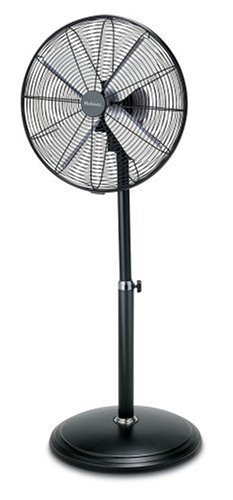
Figure 1: Fully assembled Holmes HASF1650-U Stand Fan. This image shows the fan's overall structure, including the round base, adjustable pole, and the 16-inch fan head with its protective grille.
Operating Instructions
Follow these steps to operate your Holmes stand fan:
- Plug In: Insert the three-prong grounded power cord into a standard 120V AC electrical outlet.
- Power On and Speed Selection: Locate the rotary control knob on the fan motor housing. Turn the knob clockwise to select your desired speed setting:
- OFF: Fan is off.
- I: Low speed.
- II: Medium speed.
- III: High speed.
- Oscillation Control: To activate the oscillation feature, push down the oscillation knob located on top of the motor housing. To stop oscillation and direct airflow in a fixed direction, pull up the oscillation knob.
- Adjust Tilt: To adjust the vertical angle of the airflow, loosen the tilt adjustment knob on the side of the fan head. Tilt the fan head up or down to the desired position, then tighten the knob securely.
- Power Off: To turn off the fan, rotate the control knob counter-clockwise to the 'OFF' position. Unplug the fan from the outlet when not in use.
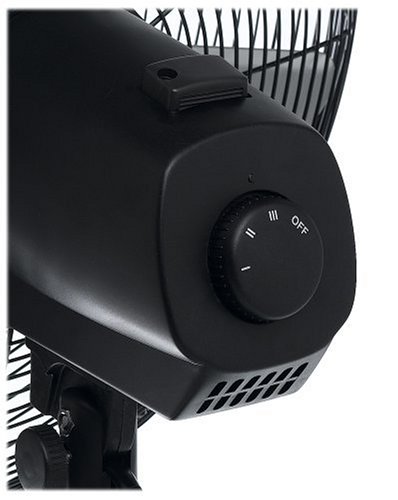
Figure 2: Close-up view of the control panel on the Holmes HASF1650-U fan. This image clearly shows the rotary knob for power and speed selection (OFF, I, II, III) and the oscillation control button on top of the motor housing.
Maintenance
Regular cleaning and maintenance will help prolong the life of your fan.
- Cleaning: Always unplug the fan before cleaning. Use a soft, damp cloth to wipe the exterior surfaces of the fan. Do not use abrasive cleaners or solvents as they may damage the finish.
- Grille Cleaning: To clean the fan blades, you may need to remove the front grille. Refer to the assembly instructions for reverse steps. Use a soft cloth or a vacuum cleaner with a brush attachment to remove dust from the blades and grilles. Ensure all parts are dry before reassembling and operating the fan.
- Storage: When storing the fan, keep it in its original packaging or cover it to protect it from dust. Store in a cool, dry place.
- No Lubrication: The fan motor is permanently lubricated and requires no additional oiling.
Troubleshooting
If your fan is not operating correctly, please check the following common issues:
- Fan Does Not Turn On:
- Ensure the power cord is securely plugged into a working electrical outlet.
- Check if the control knob is turned to one of the speed settings (I, II, or III) and not 'OFF'.
- Verify the household circuit breaker or fuse is not tripped or blown.
- Check the fuse in the fan's plug (if applicable). Refer to safety instructions for fuse replacement.
- Airflow is Weak:
- Ensure the fan is set to a higher speed setting.
- Clean any dust or debris from the fan blades and grilles.
- Fan is Noisy:
- Ensure the fan is placed on a stable, level surface.
- Check for any loose parts or obstructions around the blades.
- Clean the blades and grilles to remove any accumulated dust.
- Oscillation Not Working:
- Ensure the oscillation knob on top of the motor housing is pushed down to engage oscillation.
Specifications
| Model Number | HASF1650-U |
| Brand | Holmes |
| Blade Diameter | 16 inches |
| Speed Settings | 3 (Low, Medium, High) |
| Usage | Indoor / Outdoor |
| Special Features | Adjustable Height, Adjustable Tilt, Oscillating |
| Power Source | Electric |
| Control Method | Rotary Knob |
| Color | Black |
| Item Weight | 6.3 kg (13.88 lbs) |
| Product Dimensions (LxWxH) | 45.72 x 15.24 x 60.96 cm (18 x 6 x 24 inches) |
| Safety Certification | UL Listed |
Warranty and Support
This Holmes HASF1650-U Stand Fan comes with a 3-Year Limited Warranty from the date of purchase. This warranty covers defects in material and workmanship under normal use. It does not cover damage resulting from misuse, accident, commercial use, or unauthorized repair.
For warranty service, technical support, or to inquire about replacement parts, please contact Holmes customer service. Keep your proof of purchase for warranty claims.
Customer Support: Please refer to the contact information provided on the product packaging or the official Holmes website for the most current support details.