
Introduction
The BOSS DR-880 Dr. Rhythm Drum Machine is a powerful rhythm programming device featuring a wide array of drum, percussion, and bass sounds derived from Roland's SRX library, alongside original waveforms. This unit is designed for musicians seeking versatile rhythm accompaniment, offering both detailed programming capabilities and intuitive composition tools. It integrates seamlessly into various setups with its comprehensive input/output options.
Key Features
- Innovative EZ Compose Feature: Enables quick and hassle-free pattern programming.
- Extensive Sound Library: Includes 440 world-class drum and percussion sounds, plus 40 bass sounds with COSM bass-amp models.
- Integrated Effects: Features 3 independent insert effects (EQ and compression), TSC (Total Sound Control) with 3-band EQ, and high-quality ambience.
- Pattern Versatility: Offers 1,000 patterns (500 preset, 500 user) with easy addition of fills, ghost notes, and chord progressions.
- Velocity-Sensitive Pads: Equipped with 20 velocity-sensitive pads for expressive performance.
- Guitar/Bass Input: Allows direct connection for playing through built-in COSM Drive/Amp models and multi-effects.
- Connectivity: Includes individual outputs, digital out, and a USB port for versatile integration.
Setup Guide
Before operating your DR-880, ensure all connections are secure and the unit is placed on a stable surface. Use only the specified power adapter.
Power Connection
- Connect the dedicated AC adapter to the DC IN jack on the rear panel.
- Plug the AC adapter into a standard AC outlet.
Audio Connections
The DR-880 offers various audio output options for different setups.
- Main Output: Connect the L/MONO and R MASTER OUT jacks to your mixer or amplifier.
- Individual Outputs: For separate processing of drum parts, use the INDIVIDUAL OUT (1-4) jacks.
- Digital Output: Use the DIGITAL OUT jack for high-quality digital audio connection to compatible devices.
- Headphones: Connect headphones to the PHONES jack for private monitoring.
MIDI and USB Connections
- MIDI: Connect MIDI IN/OUT to other MIDI devices for synchronization or control.
- USB: Use the USB port for data backup and transfer to a computer.
Guitar/Bass Input
- Connect your guitar or bass to the GUITAR/BASS INPUT jack to utilize the built-in COSM effects and amp models.
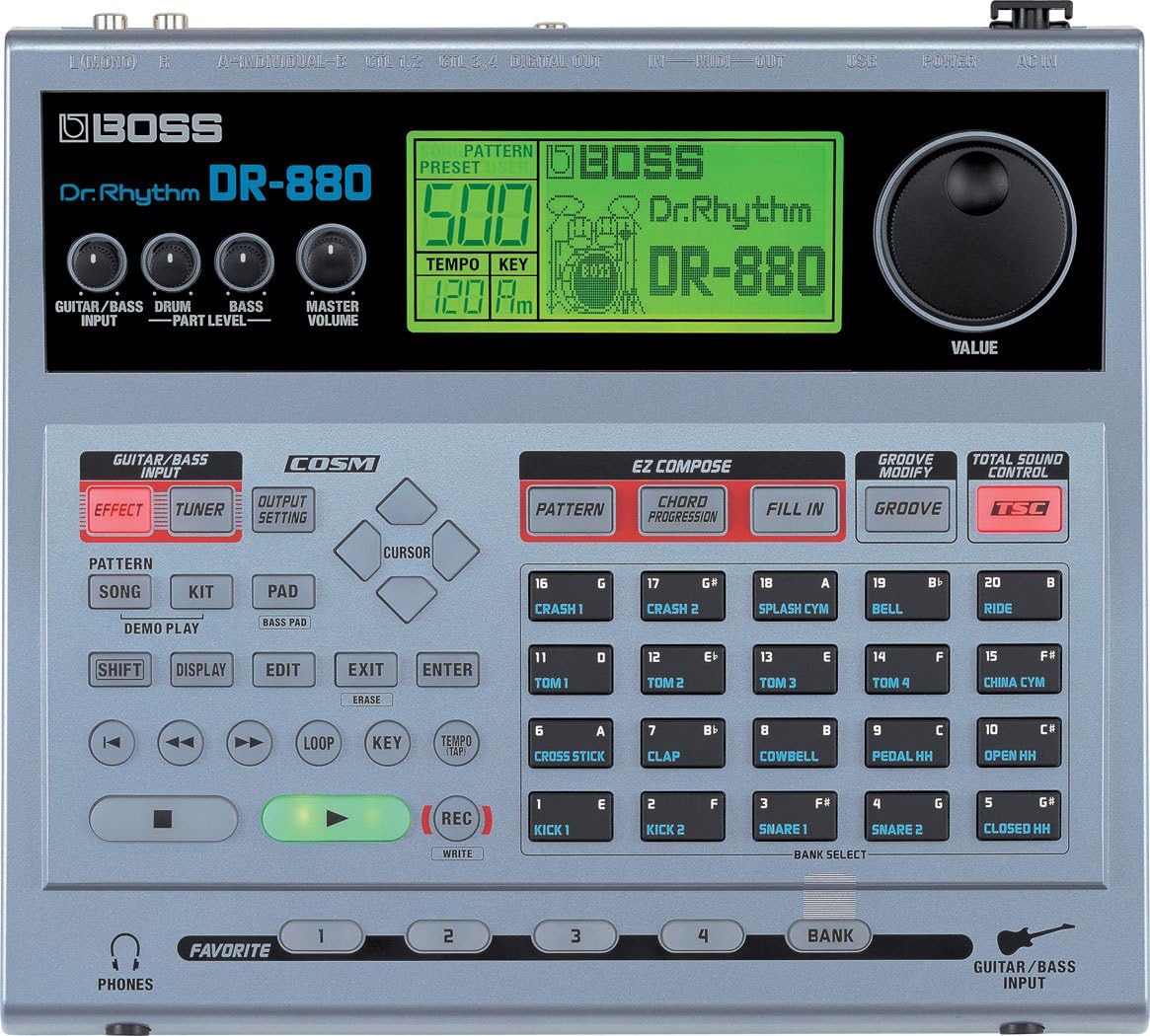
Image: Front panel of the BOSS DR-880 Dr. Rhythm Drum Machine, showing the display, pads, and control knobs.
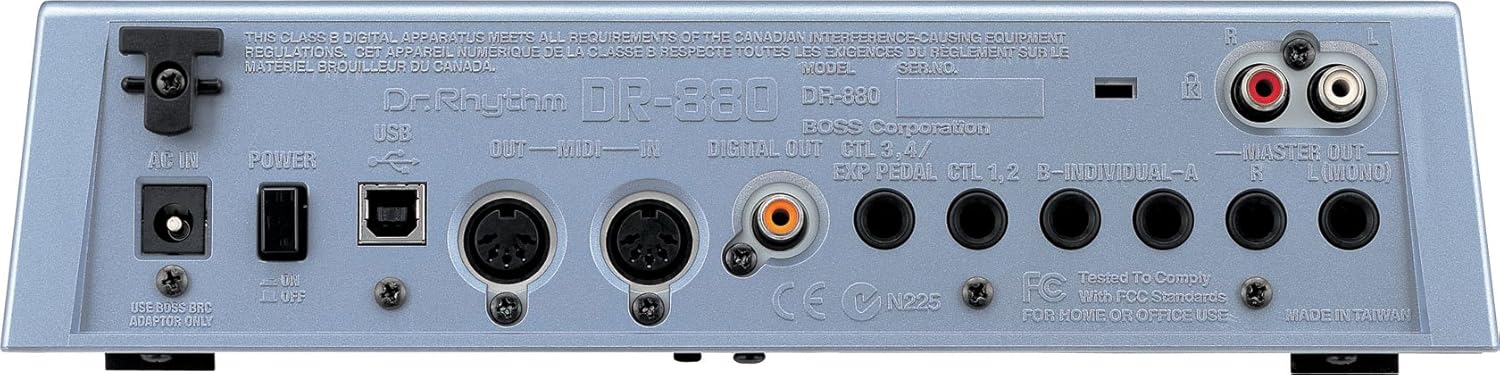
Image: Rear panel of the BOSS DR-880 Dr. Rhythm Drum Machine, detailing all input and output ports including power, USB, MIDI, audio outputs, and footswitch inputs.
Operating Instructions
The DR-880 offers both simplified and in-depth methods for creating rhythms.
Basic Pattern Creation with EZ Compose
- Press one of the EZ Compose buttons (PATTERN, CHORD PROGRESSION, FILL IN, GROOVE) to quickly generate rhythm patterns without note-by-note programming.
- Use the TSC (Total Sound Control) feature to adjust the overall sound character with 3-band EQ and ambience settings.
Sound Selection and Editing
- Use the KIT button to select different drum kits.
- Press the PAD button to access individual drum and percussion sounds assigned to the 20 velocity-sensitive pads.
- Adjust individual sound parameters (e.g., pitch, decay, level) using the dedicated knobs and the display.
Effects and Guitar/Bass Processing
- Apply insert effects (EQ, compression, chorus, flanger, phaser, delay, reverb) to individual parts or the master output.
- When a guitar or bass is connected, select EFFECT to access COSM amp models and multi-effects.
Video: A product demonstration of the BOSS DR-880, showcasing its features and sound capabilities.
Maintenance
To ensure the longevity and optimal performance of your DR-880, follow these maintenance guidelines:
- Keep the unit clean by wiping it with a soft, dry cloth. Avoid abrasive cleaners or solvents.
- Store the DR-880 in a cool, dry place away from direct sunlight, extreme temperatures, and high humidity.
- Protect the unit from dust and spills.
- Regularly check for available firmware updates from the BOSS website to ensure you have the latest features and bug fixes.
Troubleshooting
If you encounter issues with your DR-880, refer to the following common solutions:
- No Sound or Muffled Audio: Perform a factory reset to clear any corrupted settings. Ensure all audio cables are correctly connected and not damaged.
- Unit Resets or Loses Data: This may indicate a need for a firmware update. Connect the unit to a PC with a MIDI interface to perform the update.
- Difficulty with Programming: The DR-880 has extensive features. Refer to the detailed user manual (if available separately) or online tutorials for in-depth guidance. Utilize the EZ Compose features for simpler pattern creation.
- Power Issues: Ensure the correct AC adapter is used and securely connected. Check the power outlet.
Technical Specifications
| Feature | Specification |
|---|---|
| Brand | BOSS |
| Model Number | DR-880 |
| Item Weight | 6 Pounds |
| Color | Black, Silver |
| Power Source | Corded Electric |
| Hardware Interface | USB |
| Audio Output Effects | EQ, Compression, Chorus, Flanger, Phaser, Delay, Reverb |
| Controls Type | Pad, Footswitch |
Warranty and Support
For warranty information, product registration, or technical support, please visit the official BOSS website or contact your local BOSS distributor. Ensure you have your model number (DR-880) and proof of purchase available when seeking support.


