
Product Overview
The Intermatic LX58720P Malibu Lawn Light Combo Kit provides a low-voltage lighting solution for garden landscaping, pathways, and steps. This kit is designed for easy do-it-yourself installation and includes a variety of lights and a power pack to illuminate your outdoor spaces.
Key features include:
- 12-volt low-voltage lighting system.
- Includes 14 tier lights and 6 zoom floodlights.
- Floodlights can be adjusted to spot lights with a simple turn.
- Comes with 100 feet of cable for flexible arrangement.
- 80-watt Photo Control power pack for automatic operation.
- Plastic light housings for durability.
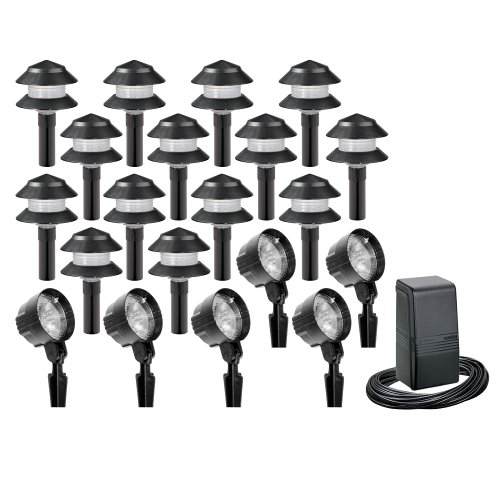
An image showing the various components of the Intermatic LX58720P Malibu Lawn Light Combo Kit, including tier lights, floodlights, and the power pack.
Package Contents
Verify that all components are present before beginning installation:
- 14 x Tier Lights
- 6 x Zoom Floodlights
- 1 x 80-Watt Photo Control Power Pack
- 1 x 100 feet of Low-Voltage Cable
- Assembly hardware (as required for light housings)
Setup and Installation
Assembly is required for the light fixtures. Follow these general steps for installation:
- Plan Your Layout: Determine the desired placement for your tier lights and floodlights along your lawn, garden, or pathways. Consider the 100-foot cable length for optimal coverage.
- Assemble Lights: Follow the instructions provided with each light fixture for assembly. Ensure all components are securely fastened.
- Connect Fixtures to Cable: The fixtures attach to the low-voltage cable using a quick clamp system. Position each light where desired and securely clamp it onto the cable. Ensure a firm connection for proper electrical contact.
- Connect Cable to Power Pack: Route the low-voltage cable to the 80-watt Photo Control Power Pack. Connect the cable ends to the designated terminals on the power pack according to the power pack's specific instructions.
- Mount Power Pack: Mount the power pack in a suitable outdoor location, ensuring it is protected from direct heavy rain and accessible to a standard grounded household outlet.
- Plug In Power Pack: Once all connections are secure and the power pack is mounted, plug the power pack into a standard grounded 120V AC household outlet.
Important: Ensure all connections are tight and secure to prevent electrical issues. Do not overload the power pack; the included 20 lights are within the 80-watt capacity.
Operating Instructions
The Intermatic LX58720P system is designed for automatic operation:
- Automatic On/Off: The 80-watt Photo Control Power Pack features a built-in photocell sensor. This sensor detects ambient light levels and will automatically turn the lights on at dusk and off at dawn.
- Floodlight Adjustment: The 6 zoom floodlights can be adjusted from a wide flood beam to a more focused spot beam by simply turning the light housing or lens. Experiment with the adjustment to achieve your desired lighting effect.
- Manual Override (if applicable): Refer to the power pack's specific manual for any manual override options for the photocell, such as a timer setting or a manual on/off switch.
Maintenance
Regular maintenance helps ensure the longevity and optimal performance of your lighting system:
- Cleaning: Periodically clean the light housings and lenses with a soft, damp cloth to remove dirt, dust, and debris. This helps maintain light output and appearance. Avoid abrasive cleaners.
- Inspect Connections: Annually inspect all cable connections to the lights and the power pack. Ensure they remain tight and free from corrosion.
- Bulb Replacement: If a light stops working, first check the bulb. Replace with a compatible 12-volt, 4-watt bulb as specified by Intermatic. Always disconnect power before replacing bulbs.
- Cable Inspection: Check the low-voltage cable for any signs of damage, such as cuts or fraying, especially after gardening activities. Repair or replace damaged sections promptly.
- Power Pack Care: Ensure the power pack's photocell is not obstructed by dirt or vegetation, which could interfere with its automatic operation.
Troubleshooting
If your lighting system is not functioning as expected, try these troubleshooting steps:
- Lights Not Turning On:
- Check if the power pack is securely plugged into a working grounded outlet.
- Verify that the photocell on the power pack is not obstructed and is detecting darkness.
- Inspect all cable connections to the lights and power pack for looseness or corrosion.
- Check individual bulbs for burnout and replace as needed.
- Lights Flickering or Dim:
- Ensure all connections are tight. Loose connections can cause flickering.
- Check for damaged sections of the low-voltage cable.
- Confirm that the total wattage of all connected lights does not exceed the 80-watt capacity of the power pack.
- Only Some Lights Working:
- Check the bulbs in the non-working lights.
- Inspect the quick clamp connections for the non-working lights to ensure they are properly seated and making contact with the cable.
If these steps do not resolve the issue, contact Intermatic customer support for further assistance.
Specifications
| Brand | Intermatic |
| Model Number | LX58720P |
| Part Number | LX58720P |
| Item Weight | 12.4 pounds |
| Product Dimensions | 13.25 x 11.88 x 18.63 inches |
| Assembled Height | 18.63 inches |
| Assembled Length | 13.25 inches |
| Assembled Width | 11.88 inches |
| Style | Traditional |
| Color | Black |
| Material | Plastic |
| Finish Types | Black |
| Number of Lights | 20 (14 Tier, 6 Flood) |
| Voltage | 12 Volts (Low Voltage) |
| Special Features | Waterproof |
| Power Source | Plug-in Electric |
| Switch Installation Type | Floor Mount (for lights) |
| Type of Bulb | Intermatic LX58720P Malibu LAWN LIGHT (12V, 4W) |
Warranty and Support
Intermatic provides the following warranty coverage for this product:
- Lights: 3-year limited warranty.
- Power Pack: 5-year limited warranty.
For warranty claims, technical support, or further assistance, please contact Intermatic customer service. Refer to the official Intermatic website or the packaging for the most current contact information.
Online Resources: For additional product information, FAQs, or to locate authorized service centers, visit the official Intermatic website: www.intermatic.com