
1. Introduction
Thank you for choosing the Citizen SDC 8430te professional desktop calculator. This manual provides essential information for the proper setup, operation, and maintenance of your calculator. Please read it thoroughly before use and keep it for future reference.
2. Safety Information
- Do not expose the calculator to extreme temperatures, direct sunlight for prolonged periods (beyond normal operation), or high humidity.
- Avoid dropping the calculator or subjecting it to strong impacts.
- Do not attempt to disassemble or modify the calculator. This may void the warranty and cause damage.
- Keep the calculator away from liquids.
- Use a soft, dry cloth for cleaning. Do not use abrasive cleaners or solvents.
3. Product Overview
The Citizen SDC 8430te is a professional desktop calculator designed for efficiency and ease of use. Key features include:
- Type: Professional desktop/display calculator
- Power Source: Solar powered
- Display: Inclined display for improved visibility
- Printing Functionality: No
- Material: Plastic casing
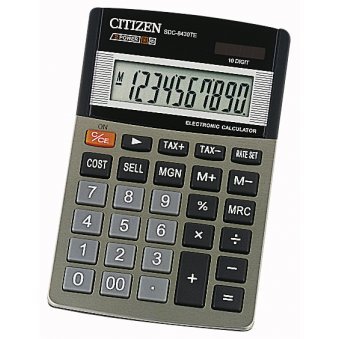
Image showing the front view of the Citizen SDC 8430te calculator, highlighting its display and keypad.
4. Setup
The Citizen SDC 8430te calculator is solar-powered and requires no external power source or batteries for typical operation. To begin using your calculator:
- Unpack: Carefully remove the calculator from its packaging.
- Light Exposure: Place the calculator in a well-lit area. The solar panel, typically located above the display, will convert light into power. The display should activate automatically.
- Initial Check: Press the ON/AC button (if present) or any number key to ensure the display is functioning correctly.
5. Operating Instructions
This section covers basic operations of your calculator.
5.1 Basic Calculations
- Addition: Enter the first number, press +, enter the second number, press =.
- Subtraction: Enter the first number, press -, enter the second number, press =.
- Multiplication: Enter the first number, press x, enter the second number, press =.
- Division: Enter the first number, press ÷, enter the second number, press =.
5.2 Clearing Entries
- Press AC (All Clear) to clear all entries and reset the calculator.
- Press CE (Clear Entry) to clear the last entered number without affecting previous calculations.
5.3 Memory Functions
Your calculator may include memory functions (M+, M-, MR, MC). Refer to the key labels on your specific unit for exact functionality.
- M+: Adds the displayed value to the memory.
- M-: Subtracts the displayed value from the memory.
- MR: Recalls the value stored in memory to the display.
- MC: Clears the memory.
6. Maintenance
- Cleaning: Wipe the calculator with a soft, dry cloth. For stubborn dirt, slightly dampen the cloth with water and then wipe dry immediately. Do not use chemical cleaners.
- Storage: When not in use for extended periods, store the calculator in a cool, dry place away from direct sunlight and extreme temperatures.
- Solar Panel: Ensure the solar panel remains clean and unobstructed for optimal performance.
7. Troubleshooting
| Problem | Possible Cause | Solution |
|---|---|---|
| Display is blank or dim. | Insufficient light for the solar panel. | Move the calculator to a brighter area. Allow a few moments for it to power up. |
| Incorrect calculation results. | Incorrect key input or sequence. | Press AC to clear all entries and restart the calculation. Double-check your input. |
| Keys are unresponsive. | Calculator may be in a low power state or a temporary malfunction. | Ensure adequate light. If the problem persists, try pressing AC. |
8. Specifications
- Model: SDC 8430te
- Brand: Citizen
- Manufacturer: Citizen
- Power Source: Solar power
- Material: Plastic
- Display: Inclined
- Printing Function: No
- GTIN (Global Trade Item Number): 04966006706215
- ASIN: B000E13GSS
9. Warranty and Support
For warranty information and customer support, please refer to the documentation included with your purchase or visit the official Citizen website. Keep your proof of purchase for warranty claims.
If you encounter issues not covered in this manual, please contact Citizen customer service for assistance.
Official Website: www.citizen-systems.co.jp/english/calculator/


