
1. Introduction
Thank you for purchasing the Pentax Optio W10 Digital Camera. This manual provides essential information for the safe and effective use of your camera. The Optio W10 is a compact 6.0-megapixel digital camera featuring a 3x optical zoom lens, designed for capturing high-quality still images and video. Its robust design makes it suitable for various environments.
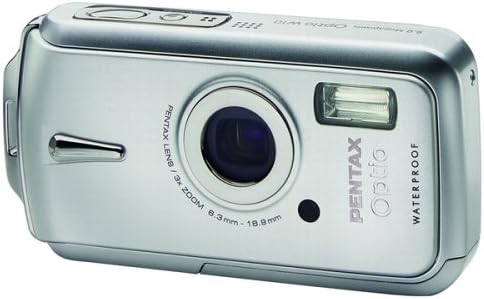
Figure 1.1: Front view of the Pentax Optio W10 Digital Camera, showcasing the lens, flash, and branding.
2. Safety Information
Please read and understand all safety precautions before using the camera. Failure to do so may result in injury or damage to the product.
- Do not attempt to disassemble or modify the camera.
- Keep the camera away from extreme temperatures, direct sunlight, and high humidity.
- Ensure all compartment covers (battery, memory card) are securely closed and locked before exposing the camera to water or dust.
- Use only the specified battery type (Lithium-ion DL-I8) and charger.
- Keep out of reach of children.
3. Package Contents
Verify that all items are present in your camera package:
- Pentax Optio W10 Digital Camera
- Lithium-ion Battery DL-I8
- Battery Charger
- AC Power Cord
- USB Cable (for computer connection)
- Strap
- Software CD-ROM
- Instruction Manual (this document)
4. Setup
4.1. Battery Installation
- Locate the battery/memory card compartment cover on the bottom of the camera.
- Slide the lock switch to the 'OPEN' position and open the cover.
- Insert the Lithium-ion battery DL-I8 into the compartment, ensuring the correct orientation as indicated inside the compartment.
- Close the cover and slide the lock switch to the 'LOCK' position until it clicks securely.

Figure 4.1: Bottom view of the camera, illustrating the battery and SD card compartment with the lock switch.
4.2. Memory Card Installation
The Pentax Optio W10 uses SD memory cards.
- Open the battery/memory card compartment cover as described in Section 4.1.
- Insert the SD memory card into the designated slot with the label facing the correct direction, pushing gently until it clicks into place.
- Close the cover and slide the lock switch to the 'LOCK' position.
4.3. Initial Power On and Date/Time Setting
- Press the ON/OFF button located on the top of the camera.
- Upon first power-on, the camera will prompt you to set the date and time. Use the directional buttons on the back of the camera to navigate and the OK button to confirm.
- Follow the on-screen instructions to complete the initial setup.

Figure 4.2: Top view of the camera, highlighting the ON/OFF button and 6.0 Megapixels branding.
5. Operating the Camera
5.1. Basic Photography
To take a still picture:
- Turn on the camera by pressing the ON/OFF button.
- Frame your shot using the 2.5-inch LCD monitor.
- Press the shutter button halfway down to focus. The focus frame will turn green when focus is achieved.
- Press the shutter button all the way down to capture the image.

Figure 5.1: Rear view of the camera, displaying the LCD screen and various control buttons for navigation and settings.
5.2. Shooting Modes
The Optio W10 offers various shooting modes accessible via the MODE button. Refer to the on-screen menu for specific options such as Program Auto, Scene Modes, and Movie Mode.
5.3. Video Recording
To record a video:
- Switch to Movie Mode using the MODE button.
- Press the shutter button to start recording. The camera can capture QuickTime motion JPEG videos at 640 x 480 resolution at 30 frames per second.
- Press the shutter button again to stop recording.
5.4. Playback
To view captured images and videos:
- Press the Playback button (usually indicated by a triangle icon).
- Use the directional buttons to scroll through your photos and videos.
- Press the OK button to view a video or zoom into a photo.
5.5. Connecting to a Computer
To transfer images and videos to a computer:
- Ensure the camera is turned off.
- Connect the camera to your computer using the provided USB cable.
- Turn on the camera. It should be recognized as a removable disk or a PTP device.
- Follow your computer's operating system instructions to access and transfer files.
6. Maintenance
6.1. Cleaning
- Camera Body: Wipe with a soft, dry cloth. For stubborn dirt, use a slightly damp cloth and then dry thoroughly.
- Lens: Use a lens brush or a soft, clean lens cloth. Avoid touching the lens surface with your fingers.
- LCD Monitor: Gently wipe with a soft, dry cloth. Avoid pressing hard on the screen.
- Waterproof Seals: Regularly inspect the rubber seals around the battery/memory card compartment for dirt, sand, or damage. Clean gently with a soft cloth. Do not use sharp objects.
6.2. Storage
When not in use for extended periods, store the camera in a cool, dry, and well-ventilated place. Remove the battery to prevent leakage. Avoid storing in areas with high humidity or extreme temperature fluctuations.
7. Troubleshooting
If you encounter issues with your Pentax Optio W10, refer to the following common solutions:
| Problem | Possible Cause / Solution |
|---|---|
| Camera does not turn on | Battery is depleted or incorrectly inserted. Recharge the battery or reinsert it correctly. |
| Cannot take pictures | Memory card is full, locked, or not inserted. Delete unnecessary files, unlock the card, or insert it correctly. |
| Images are blurry | Lens is dirty, camera shake, or incorrect focus. Clean the lens, hold the camera steady, or ensure proper focus. |
| Water inside compartment | Compartment cover not securely closed or seal is damaged. Ensure cover is locked. If seal is damaged, contact service. |
For further assistance, please refer to the official Pentax support website or contact customer service.
8. Specifications
Key technical specifications for the Pentax Optio W10 Digital Camera:
- Effective Still Resolution: 6.0 Megapixels
- Photo Sensor Technology: CCD (1/2.5-inch)
- Optical Zoom: 3x
- Digital Zoom: 4x
- Maximum Focal Length: 114 mm
- Minimum Focal Length: 38 mm
- LCD Screen Size: 2.5 Inches
- Image Stabilization: Digital, Optical
- Video Resolution: 640 x 480, 30/15 fps (QuickTime Motion JPEG)
- Supported File Format: JPEG (Still Images), MJPEG (Video)
- Storage Media: SD/MMC card, Internal Memory
- Battery Type: Lithium-ion (DL-I8)
- Special Feature: Waterproof (Note: Ensure all seals are properly closed before water exposure)
- Minimum Shutter Speed: 4 seconds
- Maximum Shutter Speed: 1/2000 seconds
- ISO Range: Auto, 64, 100, 200, 400, 800
- Item Weight: 5.6 ounces
- Model Number: 19033
9. Warranty and Support
For information regarding warranty coverage, service, or technical support for your Pentax Optio W10 camera, please refer to the warranty card included with your product or visit the official Pentax website. Keep your proof of purchase for warranty claims.
Online Support: Ricoh Imaging Global Support (Pentax is a brand of Ricoh Imaging)


