
1. Product Overview
The Brookstone Heated Aqua-Jet Foot Spa is designed to provide an invigorating and soothing foot massage experience. It features powerful hydro jets and built-in heating to maintain water temperature, helping to relieve muscle tension and relax tired feet.

Image 1.1: The Brookstone Heated Aqua-Jet Foot Spa, showcasing its design with water and the integrated pumice stone.
Key Features:
- Invigorating water jets and soothing built-in heat for ultimate massage.
- Two powerful hydro jets deliver a rejuvenating stream of water to increase circulation, relieve tight muscles, and relax tired feet.
- Rotating jets with two adjustable speeds for a personalized massage.
- Quickly heats water up to 115°F (46°C) and maintains temperature, eliminating the need to add hot water.
- Comfortably fits up to a Men's Size 14.
2. Safety Information
Please read all safety warnings and instructions before using this product to prevent injury or damage.
- Avoid immersing hands or other body parts in the water while the jets are active.
- Do not use while sleeping or unattended.
- Keep electrical cords away from water.
- Always follow the instructions for proper use and maintenance.
- Do not use if you have any medical conditions that could be affected by heat or water pressure. Consult a physician if unsure.
- Always test the water temperature before use to prevent burns.
- Unplug the device when not in use and allow it to cool before storing.
3. Setup Guide
Follow these steps to prepare your Brookstone Heated Aqua-Jet Foot Spa for use:
- Insert Rollers: When first unpacking your foot spa, locate the two massage rollers. Place these rollers into the designated openings at the bottom of the spa, designed to massage the arch of your foot.
- Place Pumice Stone: Insert the removable pumice stone into the slot located in the middle of the spa. This stone can be used to exfoliate rough skin.
- Fill with Water: Fill the tub with water up to the indicated fill line. Ensure not to overfill to prevent splashing.
- Position and Plug In: Place the foot spa in your desired location on a flat, stable surface. Plug the unit into a standard AC outlet. The power cord is a 3-prong plug.
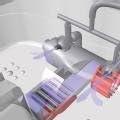
Image 3.1: Internal view illustrating the placement of the massage rollers and pumice stone within the foot spa.
Video 3.1: A demonstration of the Brookstone Heated Aqua-Jet Foot Spa setup and basic operation, including roller and pumice stone placement, water filling, and initial power-on.
4. Operating Instructions
Once the foot spa is set up, you can begin your relaxing experience:
- Power On: Press the power button on the control panel to turn on the foot spa. A green indicator light will illuminate.
- Activate Heat (Optional): To add heat to the water, press the 'HEAT' button on the control panel. A red indicator light will show that the heating function is active. The spa will quickly heat the water up to 115°F (46°C) and maintain this temperature.
- Adjust Hydro Jets: The hydro jets can be adjusted by simply turning them with your hand to direct the water flow as desired.
- Adjust Jet Intensity: Press the 'JETS' button to cycle between high and low intensity settings for the hydro jets. Corresponding indicator lights will show the selected intensity.
- Adjust Air Flow: To modify the air flow within the jets, turn the 'AIR' dial located to the right of the power button. Turn it to the right to increase air flow and to the left to decrease it, customizing the bubbling sensation.

Image 4.1: The control panel of the foot spa, showing the power button, heat and jets controls, and the air flow adjustment dial.
5. Maintenance
Proper maintenance ensures the longevity and hygiene of your foot spa:
- Emptying Water: When you are finished using the spa, unplug the unit. Use the built-in water drain located at the bottom of the unit to empty the water. Position the spa over a sink or tub and remove the drain plug to allow water to flow out.
- Cleaning: After each use, rinse the tub thoroughly with clean water. Wipe down the interior and exterior surfaces with a soft, damp cloth. Do not use abrasive cleaners or harsh chemicals.
- Drying: Allow the foot spa to air dry completely before storing. You may leave it upside down overnight to ensure all water drains.
- Storage: Store the foot spa in a cool, dry place, away from direct sunlight and extreme temperatures.
6. Troubleshooting
If you encounter any issues with your Brookstone Heated Aqua-Jet Foot Spa, consider the following:
- Unit Not Turning On: Ensure the power cord is securely plugged into a working electrical outlet. Check if the outlet itself is functioning by plugging in another device.
- No Heat: Verify that the 'HEAT' button has been pressed and its indicator light is on. Ensure the unit is powered on.
- Jets Not Functioning: Confirm the unit is powered on and the 'JETS' button has been pressed. Check that the water level is above the jets.
- Water Leaks: Inspect the drain plug at the bottom of the unit to ensure it is securely closed. If a leak persists, discontinue use and contact customer support.
For persistent issues not resolved by these steps, please contact Brookstone customer support.
7. Specifications
| Brand | Brookstone |
| Model Number | 728219 |
| Product Dimensions | 15.5 x 9.5 x 18 inches |
| Item Weight | 13 Pounds |
| Power Source | Corded Electric |
| Material | Stone (referring to pumice stone component) |
| Use For | Feet |
| Date First Available | May 5, 2003 |
8. Warranty and Support
Warranty information for the Brookstone Heated Aqua-Jet Foot Spa is not explicitly provided in the available product data. For detailed warranty terms, product support, or to inquire about replacement parts, please visit the official Brookstone website or contact their customer service directly.
Please note that the product information indicates "NO return possible" for this item. Always review the retailer's return policy at the time of purchase.
You can visit the Brookstone website for more information: Brookstone Store on Amazon
