
1. Introduction
This manual provides essential information for the proper handling, installation, and maintenance of your Standard Motor Products EM1346 Engine Control Module (ECM). The EM1346 is a remanufactured Electronic Control Unit (ECU) designed to meet or exceed original equipment specifications, ensuring reliable performance for your vehicle's engine management system.
2. Product Overview
The EM1346 Engine Control Module is a critical component in modern vehicle engine management systems. It processes data from various sensors throughout the engine and vehicle, controlling actuators such as fuel injectors, ignition timing, and idle speed to ensure optimal engine performance, fuel efficiency, and emissions control.
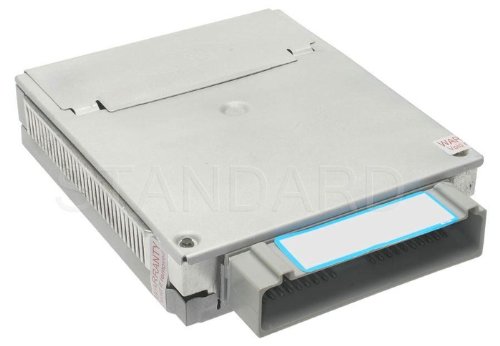
An image showing the Standard Motor Products EM1346 Engine Control Module, a rectangular silver electronic unit with a grey multi-pin connector on one side.
3. Setup and Installation
Installation of an Engine Control Module requires specialized knowledge and tools. It is highly recommended that installation be performed by a certified automotive technician to ensure proper function and to prevent damage to the module or vehicle.
General Installation Guidelines:
- Safety First: Disconnect the vehicle's battery before beginning any work to prevent electrical shorts or damage.
- Locate Old Module: Identify the location of the existing ECM in your vehicle. This can vary by make and model.
- Disconnect Wiring: Carefully disconnect all wiring harnesses from the old ECM. Note their positions if not clearly marked.
- Remove Old Module: Unbolt or unclip the old ECM from its mounting bracket.
- Install New Module: Mount the EM1346 in the same location as the old module. Ensure it is securely fastened.
- Connect Wiring: Reconnect all wiring harnesses to the new EM1346. Ensure all connections are firm and correctly seated.
- Battery Reconnection: Reconnect the vehicle's battery.
- Programming/Relearn: Many ECMs require programming or a relearn procedure after installation to synchronize with the vehicle's immobilizer, keys, and other systems. Consult a service manual or a qualified technician for specific procedures for your vehicle. Failure to do so may result in a no-start condition or improper engine operation.
4. Operating Principles
The EM1346 ECM continuously monitors various engine and vehicle parameters through sensors, including engine speed, throttle position, oxygen levels, coolant temperature, and vehicle speed. Based on this data and pre-programmed maps, it calculates and adjusts critical engine functions in real-time. This includes:
- Fuel injection timing and duration
- Ignition timing
- Idle air control
- Variable valve timing (if applicable)
- Transmission shift points (in some integrated systems)
- Emissions control systems
The ECM also stores diagnostic trouble codes (DTCs) when it detects a malfunction, which can be retrieved using an OBD-II scanner to aid in troubleshooting.
5. Maintenance
The EM1346 Engine Control Module is a sealed electronic unit and generally requires no routine maintenance. However, to ensure its longevity and proper function, consider the following:
- Environmental Protection: Ensure the ECM is protected from excessive moisture, extreme temperatures, and physical impact.
- Wiring Integrity: Periodically inspect the wiring harnesses connected to the ECM for signs of wear, corrosion, or damage. Ensure connections are secure.
- Vehicle Electrical System: Maintain a healthy vehicle electrical system, including a properly functioning battery and alternator, to prevent voltage spikes or drops that could affect the ECM.
- Avoid Tampering: Do not attempt to open or modify the ECM, as this can void warranties and cause irreversible damage.
6. Troubleshooting
If you suspect an issue with your ECM, consider the following general troubleshooting steps. Always consult a qualified technician for accurate diagnosis and repair.
- Check Diagnostic Trouble Codes (DTCs): Use an OBD-II scanner to retrieve any stored DTCs. These codes provide valuable clues about system malfunctions.
- Inspect Wiring and Connections: Ensure all electrical connections to the ECM are clean, tight, and free from corrosion or damage.
- Verify Power and Ground: Confirm that the ECM is receiving proper power and ground signals.
- Sensor Inputs: Malfunctioning sensors can send incorrect data to the ECM, leading to performance issues. Test relevant sensors (e.g., O2 sensor, MAF sensor, coolant temperature sensor).
- Professional Diagnosis: If basic checks do not resolve the issue, a professional diagnostic service is recommended. Specialized equipment can test ECM functionality and identify complex electrical problems.
7. Specifications
| Attribute | Value |
|---|---|
| Brand | Standard Motor Products |
| Model Number | EM1346 |
| Item Weight | 2.1 pounds |
| Package Dimensions | 10.88 x 7.2 x 3.99 inches |
| Manufacturer Part Number | EM1346 |
| ASIN | B000C7ZGUK |
| UPC | 091769203030 |
| Date First Available | October 10, 2007 |
8. Warranty and Support
For information regarding the warranty of your Standard Motor Products EM1346 Engine Control Module, please refer to the documentation provided with your purchase or visit the official Standard Motor Products website. For technical support or assistance with product-related inquiries, please contact Standard Motor Products customer service directly.
Manufacturer: Standard Motor Products