
1. Product Overview
The Standard Motor Products TW20 Turn Signal Switch is a genuine replacement component designed for automotive applications. This switch is crucial for controlling the vehicle's turn signals and may also incorporate multifunction capabilities depending on the vehicle's original equipment design. Manufactured by Standard Motor Products, a company with a long history in the automotive aftermarket, this product is engineered for reliable performance.
Key features include:
- Designed for vehicle-specific fitment.
- Manufactured in China.
- Compact dimensions for easy integration.
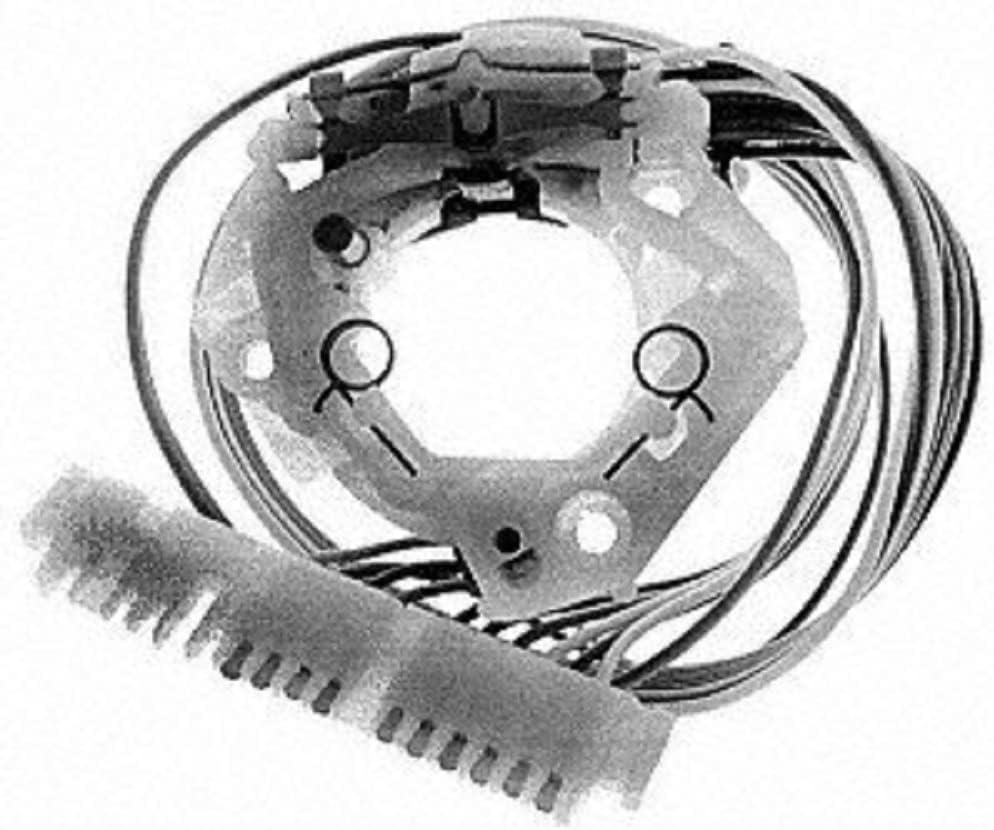
Figure 1: An overhead view of the Standard Motor Products TW20 Turn Signal Switch, showing its internal wiring and connector. This image illustrates the physical appearance of the switch component.
2. Safety Information
Always prioritize safety when working with automotive electrical systems. Failure to follow proper safety procedures can result in serious injury or damage to the vehicle.
- Disconnect the vehicle's battery before beginning any electrical work to prevent accidental short circuits or electrical shock.
- Wear appropriate personal protective equipment, including safety glasses and gloves.
- Ensure the vehicle is stable and secure before working underneath or inside the dashboard.
- If you are unsure about any step of the installation process, consult a qualified automotive technician.
- Proposition 65 Warning: This product may contain chemicals known to the State of California to cause cancer and birth defects or other reproductive harm. For more information, visit www.P65Warnings.ca.gov.
3. Package Contents
Upon opening the package, verify that all components are present and undamaged.
- 1 x Standard Motor Products TW20 Turn Signal / Multifunction Switch
4. Setup and Installation
The TW20 Turn Signal Switch is designed for vehicle-specific applications. Installation typically involves accessing the steering column or dashboard area where the original switch is located. Due to the complexity of automotive electrical systems and the need for precise fitment, professional installation is highly recommended.
General Installation Steps (Consult Vehicle Service Manual for Specifics):
- Preparation: Park the vehicle on a level surface, engage the parking brake, and disconnect the negative terminal of the vehicle's battery.
- Access: Carefully remove any trim panels, steering column covers, or dashboard components necessary to gain access to the existing turn signal switch. Refer to your vehicle's service manual for exact procedures.
- Removal of Old Switch: Disconnect the electrical connector(s) from the old switch. Unfasten any mounting screws or clips securing the switch in place and carefully remove it.
- Installation of New Switch: Align the new Standard Motor Products TW20 switch with the mounting points. Ensure all tabs and connectors are correctly oriented. Secure the switch with the original screws or clips.
- Connection: Reconnect the electrical connector(s) to the new switch. Ensure connections are firm and secure.
- Testing: Before reassembling all trim panels, reconnect the vehicle's battery. Test the functionality of the turn signals (left, right), hazard lights, and any other integrated functions of the switch. Ensure the turn signal cancellation mechanism operates correctly.
- Reassembly: Once functionality is confirmed, reassemble all removed trim panels and covers in reverse order of removal.
Note: Some users have reported that new switches may feel stiff initially. This is often normal and the switch typically breaks in with use. Ensure proper alignment during installation to prevent operational issues.
5. Operating Instructions
The Standard Motor Products TW20 Turn Signal Switch operates identically to the original equipment switch it replaces. Its primary function is to activate the vehicle's turn signals and potentially other integrated functions.
- Left Turn Signal: Push the turn signal lever downward to activate the left turn signal. The signal will flash until the lever is manually returned to the neutral position or automatically cancels after a turn.
- Right Turn Signal: Push the turn signal lever upward to activate the right turn signal. The signal will flash until the lever is manually returned to the neutral position or automatically cancels after a turn.
- Lane Change Signal (Momentary): Lightly tap the lever up or down without engaging it fully to activate the turn signal for a few flashes, typically for lane changes. The lever will return to the neutral position automatically.
- Hazard Lights: If your vehicle's hazard light function is integrated into this switch, typically pull the lever towards you or press a button on the end of the lever to activate all four turn signals simultaneously. Refer to your vehicle's owner's manual for specific operation.
6. Maintenance
The Standard Motor Products TW20 Turn Signal Switch is designed for long-term, maintenance-free operation. However, general care can help ensure its longevity:
- Keep the surrounding area clean and free from dust or debris.
- Avoid spilling liquids on the switch or its electrical connections.
- Periodically check the electrical connections for any signs of corrosion or looseness.
- Do not apply excessive force when operating the lever.
7. Troubleshooting
If you experience issues with your turn signal switch, consider the following common troubleshooting steps. For complex issues, professional diagnosis is recommended.
| Problem | Possible Cause | Solution |
|---|---|---|
| Turn signals do not activate. | Blown fuse, faulty bulbs, loose electrical connection, or faulty switch. | Check vehicle's fuse box for blown fuses. Inspect turn signal bulbs. Verify electrical connections to the switch are secure. If all else fails, the switch may need replacement or professional inspection. |
| Turn signals do not cancel after a turn. | Faulty cancellation mechanism within the switch or improper installation. | Ensure the switch is correctly seated and aligned during installation. If the issue persists, the internal cancellation mechanism of the switch may be defective. |
| Switch feels stiff or difficult to operate. | New component stiffness, or internal friction. | New switches can sometimes be stiff initially; continued use may resolve this. Ensure no obstructions are preventing smooth operation. |
| Hazard lights not working (if integrated). | Blown fuse, faulty flasher relay, or issue with the switch's hazard function. | Check the vehicle's fuse for hazard lights. Inspect the flasher relay. If the turn signals work but hazards do not, the issue may be specific to the hazard circuit within the switch or vehicle wiring. |
Always consult a certified mechanic for complex electrical diagnostics and repairs.
8. Specifications
| Attribute | Detail |
|---|---|
| Brand | Standard Motor Products |
| Model | TW20 (Turn Signal / Multifunction Switch) |
| Manufacturer Part Number | TW-20 |
| UPC | 091769089771 |
| Item Weight | 5.6 ounces |
| Product Dimensions (L x W x H) | 5 x 4 x 5 inches |
| Operation Mode | Motor |
| Contact Type | Normally Open |
| Connector Type | Screw Terminal |
| Terminal | Screw |
| Circuit Type | 2-way |
| Mounting Type | Panel Mount |
| Actuator Type | Push Button |
| Contact Material | Copper |
| International Protection Rating | IP54 |
| Number of Positions | 2 |
| Color | Black |
| Country Of Origin | China |
9. Warranty and Support
For specific warranty information regarding the Standard Motor Products TW20 Turn Signal Switch, please refer to the warranty documentation included with your purchase or contact Standard Motor Products directly through their official website. Warranty terms and conditions may vary.
For technical support or further assistance with installation and troubleshooting, it is recommended to consult a qualified automotive technician or refer to your vehicle's specific service manual.