
Stanley 1-77-176
Stanley 177176 Digital Measuring Wheel DMW30 User Manual
Model: DMW30 (1-77-176)
Introduction
This manual provides comprehensive instructions for the safe and effective operation, setup, maintenance, and troubleshooting of your Stanley 177176 Digital Measuring Wheel DMW30. Please read this manual thoroughly before using the device to ensure proper functionality and to prevent damage or injury.
The Stanley DMW30 is a precision instrument designed for accurate distance measurement in various applications, featuring a digital display and advanced functionalities.
Safety Information
Always observe the following safety precautions to reduce the risk of injury or damage to the measuring wheel:
- Keep the measuring wheel clean and free from debris.
- Do not expose the device to extreme temperatures or moisture.
- Avoid dropping the device or subjecting it to strong impacts.
- Ensure the handle is securely locked in place before use.
- Store the device in a safe place when not in use to prevent accidental damage.
- Do not attempt to disassemble or repair the device yourself. Contact qualified service personnel for repairs.
Package Contents
Verify that all items are present in the package:
- Stanley 177176 Digital Measuring Wheel DMW30
- User Manual (this document)
- (Note: Batteries are not included and must be purchased separately.)
Setup
1. Unfolding the Measuring Wheel
Carefully remove the measuring wheel from its packaging. The handle is foldable for compact storage.
- Locate the folding mechanism on the handle shaft.
- Release the locking lever or button to allow the handle to extend.
- Extend the handle fully until it clicks into place, ensuring it is rigid and stable.
- Ensure the kickstand is folded away if not needed for standing.

Image: The Stanley DMW30 Digital Measuring Wheel fully unfolded and ready for use, showing the handle, digital display, wheel, and kickstand.

Image: A close-up view of the robust folding mechanism on the handle shaft, which allows the measuring wheel to be compactly stored or extended for operation.
2. Installing Batteries
The Stanley DMW30 requires 3 AA batteries (not included).
- Locate the battery compartment on the digital display unit.
- Open the battery compartment cover.
- Insert 3 AA batteries, ensuring correct polarity (+/-).
- Close the battery compartment cover securely.
Operating Instructions
1. Power On/Off
- To power on, press the ON/OFF button. The display will illuminate.
- The device features automatic shut-off to conserve battery life after a period of inactivity.
- To manually power off, press and hold the ON/OFF button.

Image: A detailed view of the digital display and control buttons on the handle, including the ON/OFF, UNITS, MEM, and SAVE buttons.
2. Selecting Units of Measurement
The DMW30 supports automatic unit conversion.
- Press the UNITS button to cycle through available measurement units (e.g., meters, feet, inches).
- The selected unit will be displayed on the screen.
3. Taking a Measurement
- Place the wheel at the starting point of your measurement.
- Ensure the wheel is in full contact with the surface.
- Roll the wheel along the path you wish to measure. The digital display will show the accumulated distance.
- The device supports bi-directional measurement, meaning it will accurately measure distance whether rolled forwards or backwards.
- Stop at the end point of your measurement. The final distance will be shown on the display.
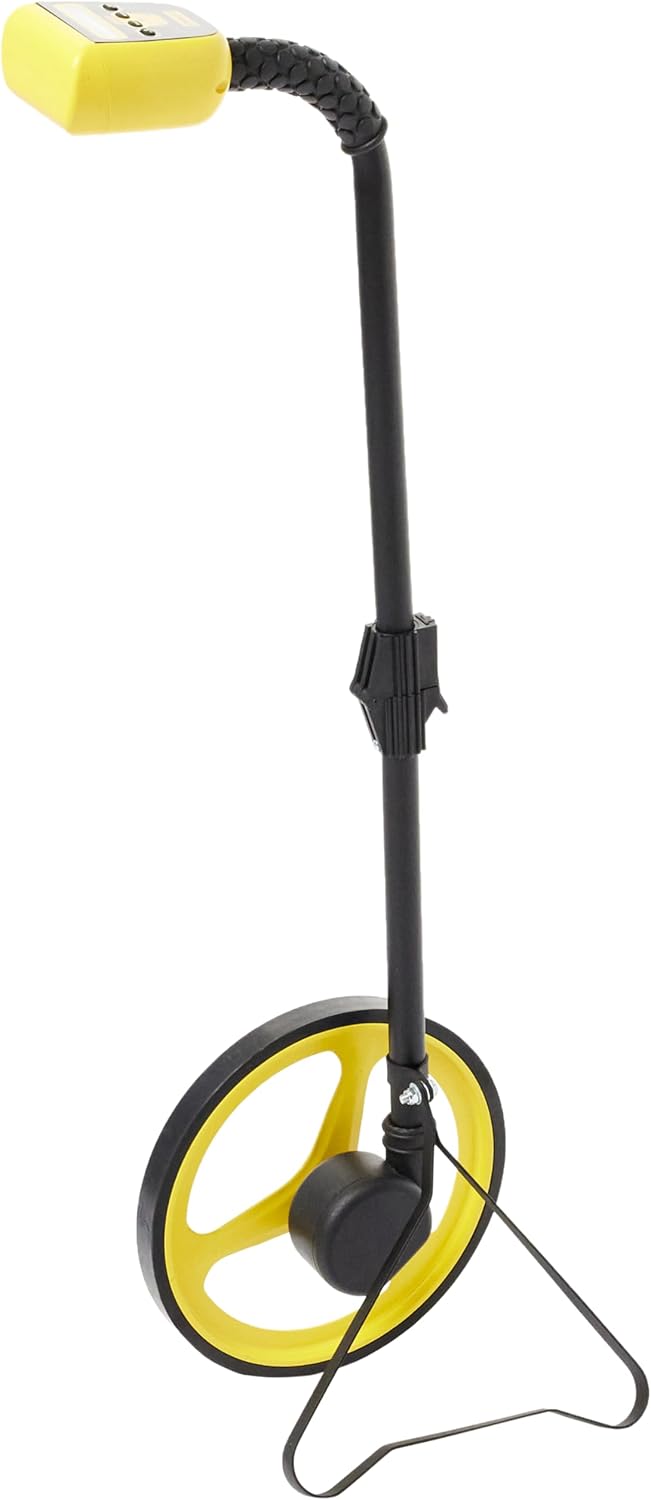
Image: The Stanley DMW30 Digital Measuring Wheel standing upright with its integrated kickstand deployed, demonstrating stability when not in motion.

Image: A close-up view of the yellow measuring wheel with its black rubberized tread, highlighting the robust construction designed for accurate rolling.
4. Memory Function
The DMW30 can store up to 8 measurements.
- To save a measurement, press the SAVE button after completing a measurement.
- To recall stored measurements, press the MEM button. Repeated presses will cycle through the stored values.
- To clear the current measurement, press the CLR button.
Maintenance
Regular maintenance ensures the longevity and accuracy of your Stanley DMW30:
- Cleaning: Wipe the wheel and handle with a damp cloth after each use, especially if used in dirty or dusty environments. Do not use abrasive cleaners or solvents.
- Storage: Store the measuring wheel in a dry, cool place, away from direct sunlight and extreme temperatures. Fold the handle for compact storage.
- Battery Replacement: Replace batteries when the low battery indicator appears on the display or if the device fails to power on. Always use new AA alkaline batteries.
- Inspection: Periodically check the wheel for any damage or excessive wear. Ensure the handle locking mechanism operates smoothly.
Troubleshooting
| Problem | Possible Cause | Solution |
|---|---|---|
| Device does not power on. | Dead or incorrectly installed batteries. | Check battery polarity; replace with new AA batteries. |
| Inaccurate measurements. | Wheel slipping; debris on wheel; uneven surface. | Ensure firm contact with surface; clean wheel; measure on smooth, consistent surfaces. |
| Display is blank or flickering. | Low battery; environmental interference. | Replace batteries; move away from strong electromagnetic fields. |
| Handle does not lock securely. | Folding mechanism not fully extended or debris in joint. | Ensure handle is fully extended until it clicks; clear any obstructions from the joint. |
Specifications
- Model: Stanley DMW30 (1-77-176)
- Manufacturer: Stanley
- Dimensions (L x W x H): 54.5 x 26 x 13.4 cm (21.5 x 10.2 x 5.3 inches)
- Weight: 1.98 kg (4.37 lbs)
- Power Source: 3 x AA Alkaline Batteries (not included)
- Color: Yellow
- Features: Bi-directional measurement, Automatic unit conversion, Memory storage (up to 8 measurements), Automatic/Manual shut-off, Foldable metal handle with rubber grip.
Warranty and Support
Stanley products are manufactured to high quality standards and are guaranteed against defects in materials and workmanship. For specific warranty terms and conditions, please refer to the warranty card included with your purchase or visit the official Stanley website.
For technical support, spare parts, or service inquiries, please contact Stanley customer service through their official website or the contact information provided in your product packaging. Please have your model number (1-77-176) and purchase date available when contacting support.
Official Stanley Website: www.stanleytools.com
Related documents1-77-176

Ask a question about this manual
Ask about setup, troubleshooting, compatibility, parts, safety, or missing instructions. Manuals+ will review the question and use this page’s manual context to help answer it.