
1. Introduction
Thank you for choosing the STANLEY SharpShooter Plus TR250 Heavy-Duty Staple and Brad Nailer. This versatile tool is designed for a variety of fastening tasks, functioning as a staple gun, brad nailer, cable tacker, and wire tacker. Its robust construction and user-friendly features ensure reliable performance for both professional and home improvement projects. Please read this manual thoroughly before operation to ensure safe and effective use.
2. Safety Information
WARNING: Always wear safety glasses when operating this tool. Failure to do so may result in serious eye injury.
- Keep fingers and body parts away from the staple/nail exit area.
- Never point the tool at yourself or others.
- Ensure the work surface is stable and clear of obstructions.
- Always engage the lock-down handle for safe storage when not in use.
- Remove all staples/brads from the tool before storing or performing maintenance.
- Do not use the tool in wet or damp conditions.
- Keep children and unauthorized persons away from the work area.
3. Product Features
- Aircraft-Aluminum Housing: Provides long-lasting durability and a lightweight design.
- All-Metal Drive Channel: Ensures consistent and better penetration of fasteners.
- Easy-Squeeze Mechanism: Reduces hand fatigue while delivering strong driving power.
- Hi/Lo Power Lever: Allows adjustment for use with hard or soft materials.
- Flush-Nose Design: Facilitates stapling in tight and confined spaces.
- Lock-Down Handle: Secures the handle for safe storage and transport.
- Quick-View Window: Simplifies identification of the loaded staple type and quantity.
- Easy-Slide Full-Stick Staple Load: For quick and convenient reloading.
- Pinch Point Free Design: Enhances user safety during operation.
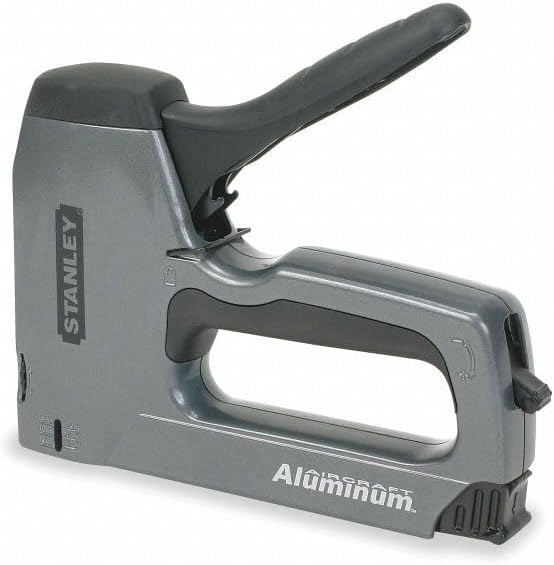
Figure 1: Side view of the STANLEY SharpShooter Plus TR250, highlighting its ergonomic design and aluminum construction.
4. Setup and Loading Fasteners
4.1 Compatible Fasteners
The TR250 uses STANLEY SharpShooter TRA700 series or Arrow T-50 heavy-duty narrow crown staples. It also accepts 1/2-inch, 9/16-inch, and 5/8-inch brads.

Figure 2: Packaging detail illustrating compatible staple (TRA700 series) and brad (SWKBN050, SWKBN0625) types and sizes.
4.2 Loading Staples/Brads
- Ensure the tool is unloaded and the handle is locked down for safety.
- Locate the pusher rod at the rear of the tool. Press the release button or tab to slide the pusher rod out.
- Insert a full stick of compatible staples or brads into the magazine channel with the points facing down.
- Slide the pusher rod back into the magazine until it locks securely in place.
- Check the quick-view window to confirm the fastener type and quantity.
5. Operating Instructions
5.1 Adjusting Power (Hi/Lo Lever)
The TR250 features a Hi/Lo power lever to adjust the driving force. Set the lever to 'Hi' for harder materials or when maximum penetration is required. Use 'Lo' for softer materials to prevent over-penetration or damage.
5.2 Firing Staples/Brads
- Unlock the handle by releasing the lock-down mechanism.
- Place the nose of the tool firmly against the material where the fastener is to be driven. Ensure the tool is held perpendicular to the surface.
- Squeeze the handle firmly and completely to drive the staple or brad.
- Release the handle to reset the firing mechanism.

Figure 3: Demonstrating proper grip and positioning of the STANLEY SharpShooter Plus TR250 for effective fastening.
5.3 Cable and Wire Tacking
The TR250 can be used for tacking cables and wires. Utilize the integrated wire guide (if present) to position the cable between the staple points, preventing damage to the wire insulation. Use the 'Lo' power setting for delicate applications.
6. Maintenance
- Cleaning: Keep the tool clean and free of debris. Wipe down the exterior with a dry cloth. Do not use solvents.
- Lubrication: No regular lubrication is required for this tool.
- Storage: Store the tool in a dry, secure location, out of reach of children. Always ensure the handle is locked down and the magazine is empty before storage.
- Inspection: Periodically inspect the tool for any signs of damage or wear. Do not use a damaged tool.
7. Troubleshooting
| Problem | Possible Cause | Solution |
|---|---|---|
| Staples/Brads not firing | Magazine empty; Pusher rod not engaged; Fastener jam; Handle not fully squeezed. | Reload magazine; Ensure pusher rod is locked; Clear jam; Squeeze handle completely. |
| Fasteners not fully penetrating | Low power setting; Hard material; Tool not held firmly against surface. | Switch to 'Hi' power setting; Apply more pressure to the tool; Use appropriate fastener length for material. |
| Fastener jam | Incorrect fastener size; Damaged fasteners; Debris in magazine. | Remove pusher rod and clear jammed fasteners; Use only recommended fasteners; Clean magazine channel. The TR250 features an AntiJam mechanism to minimize this issue. |
| Tool not resetting | Handle not fully released. | Ensure the handle is allowed to return to its full open position after each shot. |
8. Specifications
- Model Number: TR250
- Brand: STANLEY
- Material: Aluminum
- Color: Gray/Black (Silver)
- Product Dimensions: 12"L x 11"W
- Item Weight: 16 ounces
- Operation Mode: Manual
- Compatible Staples: STANLEY SharpShooter TRA700 series, Arrow T-50 heavy duty narrow crown staples
- Compatible Brads: 1/2-inch, 9/16-inch, 5/8-inch
9. Warranty and Support
9.1 Warranty Information
The STANLEY SharpShooter Plus TR250 is covered by a Limited Lifetime Warranty. For specific terms and conditions, please refer to the warranty card included with your product or visit the official STANLEY website.
9.2 Customer Support
For technical assistance, replacement parts, or warranty claims, please contact STANLEY customer service. Contact information can be found on the official STANLEY website or on your product packaging.
Online Resources: www.stanleytools.com


