1. Product Overview
The Hunter 27182 Fan-Light Dual Slide Wall Control is designed to provide convenient and precise control over your ceiling fan and its integrated lighting. This unit features two independent slide controls: one for adjusting fan speed across three settings and another for full-range light dimming. It is engineered for installation in a standard 3-wire single-box wall switch configuration.
This control is rated for fans up to 1.6 Amps and fan lighting up to 300 watts. The preset feature allows you to maintain your preferred fan and light settings. Please note that a rocker switch plate is not included with this unit.

Figure 1: Hunter 27182 Fan-Light Dual Slide Wall Control, showing the two slide controls and wiring connections.
2. Setup and Installation
WARNING: Before beginning any electrical installation, ensure the power supply to the circuit is turned OFF at the circuit breaker or fuse box. Failure to do so may result in serious injury or death.
2.1 Wiring Instructions
This control is designed for a standard 3-wire single-box wall switch installation. Follow the wiring diagram below and ensure all connections are secure.
- Wire 1 (Black): Connects to the Hot In (incoming power) wire.
- Wire 2 (Blue): Connects to the Fan Out (wire leading to the fan motor) wire.
- Wire 3 (Red): Connects to the Light Out (wire leading to the fan light) wire.
- Ground Wire (Green): Connects to the bare copper ground wire in the electrical box.
After wiring, carefully push the control unit into the wall box and secure it with the provided screws. Install a compatible wall plate (not included) over the control.
3. Operating Instructions
The Hunter 27182 wall control features two distinct slide levers for independent operation of your fan and light.
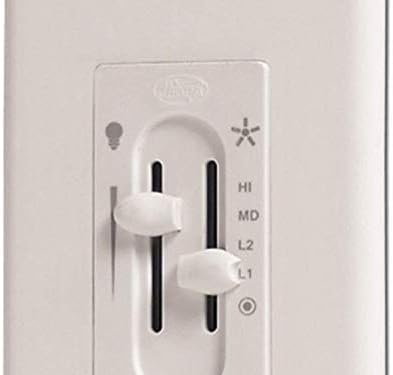
Figure 2: Close-up view of the control's operational sliders.
3.1 Fan Speed Control
Use the right-hand slide lever, marked with a fan icon and numbers 1, 2, 3 (or HI, MD, LO depending on model variant), to adjust the fan speed:
- Slide the lever up for higher fan speeds.
- Slide the lever down for lower fan speeds.
- Move the lever to the lowest position (marked with a circle) to turn the fan OFF.
3.2 Light Dimming Control
Use the left-hand slide lever, marked with a light bulb icon, to control the light intensity:
- Slide the lever up to increase light brightness.
- Slide the lever down to decrease light brightness.
- Move the lever to the lowest position to turn the light OFF.
The preset feature allows the control to remember your last light dimming setting when turned off and on.
4. Maintenance
To ensure optimal performance and longevity of your Hunter Fan-Light Dual Slide Wall Control, follow these simple maintenance guidelines:
- Cleaning: Periodically wipe the surface of the control with a soft, dry cloth. For stubborn marks, a slightly damp cloth with mild soap can be used, followed by drying thoroughly. Avoid abrasive cleaners or solvents, as these can damage the finish.
- Inspection: From time to time, visually inspect the control for any signs of damage or loose connections. If any issues are observed, consult a qualified electrician.
- Power Off for Cleaning: For safety, always turn off the power to the control at the circuit breaker before cleaning.
5. Troubleshooting
If you experience issues with your Hunter Fan-Light Dual Slide Wall Control, refer to the following common troubleshooting steps:
| Problem | Possible Cause | Solution |
|---|---|---|
| Fan or Light Not Responding | No power to the control; Loose wiring connection; Faulty fan/light bulb. | Check circuit breaker. Ensure all wiring connections are secure. Replace fan/light bulb. |
| Light Does Not Dim Properly | Incompatible light bulbs (e.g., non-dimmable LEDs); Faulty dimmer. | Ensure dimmable bulbs are used. If issue persists, control may need replacement. |
| Fan Speeds Are Incorrect or Inconsistent | Incorrect wiring for fan speed; Fan motor issue. | Verify fan wiring connections. Consult fan manual or a qualified electrician if motor issues are suspected. |
If the problem persists after attempting these solutions, please contact Hunter Customer Support or a qualified electrician.
6. Specifications
- Model: 27182
- Brand: Hunter
- Fan Rating: 1.6 Amps
- Light Rating: 300 Watts
- Voltage: 120 Volts
- Dimensions: 2 x 6.25 x 8 inches (Product Dimensions)
- Weight: 4.8 ounces (approx. 0.3 lbs)
- Mounting Type: Wall Mount
- Switch Style: Rocker Switch, Slide Switch
- Color: Off White
7. Warranty and Support
This Hunter 27182 Fan-Light Dual Slide Wall Control comes with a 1-year limited warranty from the date of purchase. This warranty covers defects in materials and workmanship under normal use.
For warranty claims, technical support, or additional information, please visit the official Hunter Fan Company website or refer to the contact information provided with your product packaging.
You can also find the official User Manual (PDF) here.


