
Introduction
This manual provides instructions for the Taylor Window Thermometer, Model 5153. This weather-resistant thermometer features a large, easy-to-read display and an adjustable offset bracket for multi-directional viewing. It is designed for outdoor use to accurately measure ambient temperature.

Figure 1: Front view of the Taylor Window Thermometer.
Setup and Installation
The Taylor Window Thermometer is designed for easy installation on an outdoor surface, typically near a window for convenient viewing. It comes with an offset bracket for versatile mounting.
Mounting Instructions:
- Select Location: Choose an outdoor location that is easily visible from inside your home, such as near a window. Ensure the location is protected from direct sunlight for the most accurate temperature readings.
- Prepare Surface: Clean the mounting surface thoroughly to ensure proper adhesion or secure screw placement.
- Attach Bracket: The thermometer features an offset bracket. Position the bracket against the desired mounting surface.
- Secure Thermometer: Use appropriate screws (not included) to securely fasten the bracket to the surface. The thermometer can then be attached to this bracket.
- Adjust Viewing Angle: The adjustable offset bracket allows for multi-directional viewing. Adjust the thermometer's position on the bracket to optimize visibility from your preferred viewing point.
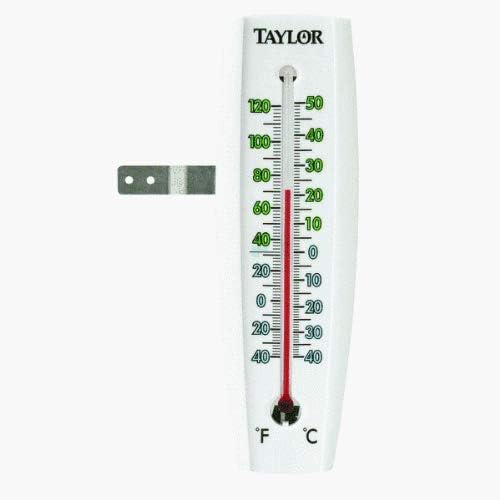
Figure 2: Side view illustrating the offset bracket for mounting.

Figure 3: Example of the thermometer mounted for outdoor viewing.
Operating Instructions
The Taylor Window Thermometer is an analog device that requires no batteries or external power. It operates continuously to provide real-time temperature readings.
Reading the Temperature:
- The thermometer displays temperature in both Fahrenheit (°F) and Celsius (°C) scales.
- Locate the red indicator line within the thermometer tube. The top of this line indicates the current ambient temperature.
- Read the corresponding value on either the Fahrenheit scale (typically on one side) or the Celsius scale (typically on the other side) to determine the temperature.
- Ensure the thermometer is positioned for clear visibility of the indicator line and scales.
Care and Maintenance
To ensure the longevity and accuracy of your Taylor Window Thermometer, follow these simple care guidelines:
- Cleaning: Wipe the thermometer's surface with a soft, damp cloth as needed to remove dust or dirt. Avoid abrasive cleaners that could scratch the display or housing.
- Weather Resistance: The thermometer is designed to be weather-resistant and rust-proof. However, extreme weather conditions may affect its appearance over time.
- Placement: While durable, avoid placing the thermometer in locations where it might be subject to physical impact or excessive vibration.
- Storage: If storing the thermometer for an extended period, keep it in a clean, dry place.
Troubleshooting
This analog thermometer is designed for simplicity and reliability. Most issues can be resolved with basic checks.
- Inaccurate Readings:
- Ensure the thermometer is not in direct sunlight, which can cause artificially high readings.
- Verify that the thermometer is not placed near a heat source (e.g., a vent, exhaust fan) or a cold source (e.g., an air conditioner unit).
- Allow sufficient time (at least 15-30 minutes) for the thermometer to acclimate to the ambient outdoor temperature after installation or relocation.
- Liquid Column Separation: If the liquid column appears separated, gently tap the thermometer against your palm a few times. This can help reunite the liquid. If separation persists, the thermometer may be damaged.
- Physical Damage: Inspect the thermometer for any visible cracks or damage to the glass tube or housing. Damaged units should be replaced.
Specifications
| Feature | Detail |
|---|---|
| Brand | Taylor |
| Model Number | 5153 |
| Display Type | Analog |
| Indoor/Outdoor Usage | Outdoor |
| Outer Material | Metal |
| Special Feature | Large Display, Offset Bracket |
| Item Length | 5.5 Inches |
| Temperature Range | -40°F to 120°F (-40°C to 50°C) |
| Power Source | None (Analog) |
| Reusability | Reusable |
| Weather Resistant | Yes |
| Rust Proof | Yes |
| Product Care Instructions | Freezer Safe |
Warranty and Support
Specific warranty information for the Taylor Window Thermometer Model 5153 is not provided in the product details. For warranty claims or technical support, please refer to the official Taylor website or contact their customer service directly.
You can visit the Taylor Store on Amazon for more information or to find contact details.

