
1. Introduction
The Bachmann Digital Commander DCC Equipped Ready To Run Electric Train Set provides a comprehensive introduction to digital model railroading. This set includes the E-Z Command digital system, allowing independent control of speed, direction, and lighting for two decoder-equipped locomotives. The set is designed for ease of use and offers an engaging experience for model train enthusiasts.
Key Features:
- Complete Ready-To-Run Train Set with 2 DCC Equipped Locomotives and E-Z Command Digital Control System.
- Includes an EMD GP40 Locomotive and an EMD FT-A Locomotive, both with operating headlights.
- Bachmann’s E-Z Command digital system for independent control of speed, direction, and lighting.
- Rolling stock includes a Plug Door Box Car, Open Quad Hopper Car, and Wide-Vision Caboose.
- 56" x 38" oval of Nickel Silver E-Z Track with turnout and siding.
- Power pack and E-Z Command Controller included.

Figure 1: Complete Bachmann Digital Commander Train Set with oval track layout.
2. What's in the Box
Your Bachmann Digital Commander set includes the following components:
- 1 x DCC-equipped EMD GP40 locomotive with operating headlight
- 1 x DCC-equipped EMD FT-A locomotive with operating headlight
- 1 x Plug-door box car
- 1 x Open quad hopper
- 1 x Wide-vision caboose
- 1 x E-Z Command Control Center with wall pack and plug-in wiring
- Body-mounted E-Z Mate couplers
- 56" x 38" oval of nickel silver E-Z Track (12 curved, 4 straight, 1 terminal rerailer, 1 manual turnout - left, 1 Hayes bumper)
- 1 x Under-track magnet with brakeman figure
- Illustrated instruction manual

Figure 2: All components included in the Digital Commander set.
3. Setup
3.1 Track Assembly
- Choose a flat, stable surface for your layout.
- Carefully snap together the E-Z Track pieces to form the 56" x 38" oval layout as shown in the included manual or on the back of the product box. Ensure all track connectors are fully engaged.
- Place the terminal rerailer track section in a convenient location within your oval.
- Integrate the manual turnout and Hayes bumper as desired to create a siding.
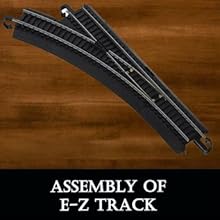
Figure 3: Snap together E-Z Track sections to form your layout.
3.2 Connecting the E-Z Command Control Center
- Connect the power pack to the E-Z Command Control Center.
- Connect the E-Z Command Control Center to the terminal rerailer track section using the provided plug-in wiring.
- Ensure the E-Z Command Control Center is switched to the "On" position.
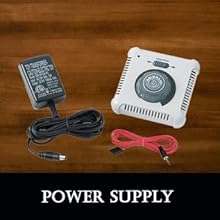
Figure 4: The E-Z Command Control Center and power pack.
3.3 Placing Locomotives and Rolling Stock
- Carefully place the locomotives and rolling stock onto the track. Ensure all wheels are properly seated on the rails.
- Connect the rolling stock to the locomotives and to each other using the body-mounted E-Z Mate couplers.
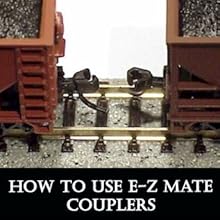
Figure 5: E-Z Mate couplers for connecting rolling stock.
4. Operation
4.1 Basic Control
- Turn on the E-Z Command Control Center. The power indicator light will illuminate.
- By default, both locomotives are set to address 3. To control a single locomotive, press the '3' button on the control center.
- Slowly rotate the speed dial clockwise to increase the locomotive's speed. Rotate counter-clockwise to decrease speed.
- To change direction, press the 'Direction' button. The locomotive will stop and then proceed in the opposite direction when speed is applied.
- To activate the operating headlight, press the 'Function' button.
4.2 Independent Control of Two Locomotives
The E-Z Command system allows you to control two locomotives independently. To do this, you will need to change the address of one of the locomotives.
- Place only one locomotive on the track.
- Ensure the E-Z Command Control Center is on.
- Press the '3' button to select the default address.
- Press and hold the 'Program' button until the red light flashes.
- While the light is flashing, press a new address button (e.g., '1' or '2') for the locomotive. The light will stop flashing, indicating the address has been set.
- Remove the first locomotive and repeat the process for the second locomotive, assigning it a different address (e.g., '2' if the first was '1').
- Once both locomotives have unique addresses, you can place them both on the track and control them independently by selecting their respective address buttons on the E-Z Command Control Center.
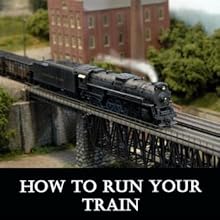
Figure 6: A locomotive in operation on the track.
4.3 Official Product Video: Digital Commander Overview
Video 1: An overview of the Bachmann Digital Commander DCC Equipped Ready To Run Electric Train Set, demonstrating its features and operation.
5. Maintenance
Regular maintenance ensures optimal performance and longevity of your train set.
5.1 Track Cleaning
Keep your nickel silver E-Z Track clean and free of dust, dirt, and debris. Use a soft, lint-free cloth or a specialized track cleaning tool. Dirty track can lead to poor electrical contact and erratic train operation.
5.2 Locomotive Wheel Cleaning
Periodically inspect and clean the wheels of your locomotives. Dirt and grime can accumulate on the wheels, affecting electrical pickup and causing poor performance. Use a cotton swab dampened with a small amount of rubbing alcohol to gently clean the wheel treads.
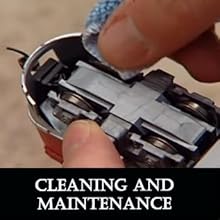
Figure 7: Cleaning locomotive wheels for optimal performance.
5.3 General Care
- Store your train set in a dry, dust-free environment when not in use.
- Handle locomotives and rolling stock carefully to avoid damage to delicate parts.
- Avoid excessive force when connecting or disconnecting track sections.
6. Troubleshooting
If you encounter issues with your train set, refer to the following common problems and solutions:
6.1 Train Not Moving or Erratic Operation
- Check Power Connection: Ensure the power pack is securely connected to the E-Z Command Control Center and the control center is connected to the terminal rerailer track. Verify the control center is switched "On".
- Track Continuity: Inspect all track connections to ensure they are fully seated and there are no gaps. Dirty track can also cause poor electrical contact; clean the track as described in the Maintenance section.
- Locomotive Placement: Confirm that all locomotive wheels are properly on the rails.
- Correct Address Selected: Ensure you have selected the correct address for the locomotive you are trying to control on the E-Z Command Control Center.
6.2 Derailments
- Track Alignment: Verify that all track sections are perfectly aligned and flat. Misaligned track is a common cause of derailments.
- Wheel Alignment: Check that all wheels on your locomotives and rolling stock are properly seated on their axles and are not bent or damaged.
- Speed: Excessive speed, especially on curves or through turnouts, can cause derailments. Reduce speed when operating through these sections.
6.3 Short Circuits
- A short circuit can occur if track sections are improperly connected, especially in complex layouts with multiple loops or turnouts. Ensure that track polarity is consistent throughout your layout.
- Check for any metal objects or loose wires touching the rails that could cause a short.
7. Specifications
| Feature | Detail |
|---|---|
| Brand Name | Bachmann |
| Model Name | Digital Commander DCC Equipped Ready To Run Electric Train Set |
| Model Number | 501 |
| Scale | HO Scale (1:87) |
| Rail Gauge | 16.5 mm |
| Controller Type | E-Z Command Digital Control System |
| Power Source | Battery Powered (no batteries required for operation, power pack included) |
| Item Dimensions | 3 x 18 x 28 inches (packaging) |
| Item Weight | 8.6 Pounds |
| Material Type | Plastic |
| Assembly Required | No (assembly of track and components) |
| Assembly Time | 30 Minutes (approximate) |
| Manufacturer Minimum Age | 168.0 Months |
8. Warranty & Support
8.1 Manufacturer's Warranty
This Bachmann product comes with a Limited Lifetime Warranty. For detailed warranty information and terms, please visit the official Bachmann Trains website at www.bachmanntrains.com and navigate to the Service Department tab.
8.2 Customer Support
For technical assistance, troubleshooting, or inquiries regarding your Bachmann Digital Commander set, please refer to the contact information provided in your product packaging or visit the Bachmann Trains website for customer support resources.

