
Introduction
The Oregon Scientific WRS368 Music Sphere is a wireless speaker system designed to transmit and play audio from various sources up to 100 feet away. It utilizes 2.4 GHz wireless digital audio technology for reliable sound transmission. The system includes a main speaker unit and a transmitter sphere, allowing connection to multiple audio devices such as MP3 players, iPods, stereo systems, or televisions.
This manual provides detailed instructions for setting up, operating, and maintaining your WRS368 Music Sphere to ensure optimal performance and longevity.
Package Contents
Please check the package contents carefully. If any items are missing or damaged, contact your retailer.
- WRS368 Music Sphere Wireless Speaker
- Wireless Transmitter Sphere
- AC Power Adapter (for speaker)
- AC Power Adapter (for transmitter)
- Audio Cables (e.g., 3.5mm stereo audio cable)
- Wall Mount Bracket (for speaker)
- User Manual (this document)
Note: 6 C-size batteries for optional portable power are not included and must be purchased separately.
Features
- Portable wireless speaker and transmitter system.
- Compatible with iPods, MP3 players, CD players, TVs, stereos, and other audio sources.
- Advanced 2.4 GHz frequency-hopping spread spectrum technology for wireless audio transmission.
- Transmits wireless audio up to 100 feet (approximately 30 meters).
- 3-speaker array (2 tweeters and a subwoofer) in a high-quality acoustic chamber for clear sound.
- Connects to up to three audio sources simultaneously via the transmitter.
- Remote control functionality for connected sources through the speaker system.
- 3-color LCD display on the speaker indicates active audio source.
- Speaker dimensions: 8 x 7.4 x 7.7 inches (W x H x D).
- Transmitter dimensions: 4.5 x 4.2 x 4.5 inches.
Setup
- Unpacking: Carefully remove all components from the packaging. Retain packaging for future transport or storage.
- Powering the Speaker:
- Connect the speaker's AC power adapter to the DC input jack on the speaker.
- Plug the adapter into a standard wall outlet.
- Alternatively, for portable use, insert 6 C-size batteries (not included) into the battery compartment, observing correct polarity.
- Powering the Transmitter:
- Connect the transmitter's AC power adapter to the DC input jack on the transmitter.
- Plug the adapter into a standard wall outlet.
- Connecting Audio Sources to the Transmitter:
The transmitter has multiple audio input jacks (e.g., AUX 1, AUX 2, AUX 3). Use the supplied audio cables to connect your audio devices:
- Connect your MP3 player, iPod, or CD player to an available AUX input.
- Connect the audio output of your stereo system or TV to another available AUX input.
Ensure all connections are secure.
- Initial Pairing (Automatic): The speaker and transmitter are designed to pair automatically when both are powered on and within range. The speaker's LCD display will indicate a successful connection.
- Wall Mounting (Optional): If desired, use the included wall mount bracket to secure the speaker to a wall. Follow the instructions provided with the bracket for safe installation.
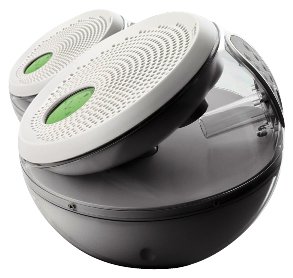
Image: The Oregon Scientific WRS368 Music Sphere wireless speaker (right) and its accompanying transmitter (left). The speaker features a perforated grille and a circular LCD display, while the transmitter is a smaller, translucent sphere.
Operating Instructions
- Power On/Off: Press the Power button on the speaker or transmitter to turn the units on or off.
- Selecting Audio Source: Use the Source button on the speaker or remote control to cycle through the connected audio inputs (AUX 1, AUX 2, AUX 3). The LCD display will change color to indicate the active source.
- Volume Control: Adjust the volume using the Volume Up (+) and Volume Down (-) buttons on the speaker or the provided remote control.
- Controlling Connected Devices: The system is designed to allow remote control signals from your source devices (e.g., iPod remote) to pass through the speaker system, enabling control of your connected device even when it's not directly accessible.
- LCD Display: The LCD display on the speaker provides visual feedback, including the active audio source and connection status. The display color changes based on the selected audio source.
Maintenance
- Cleaning: Wipe the surfaces of the speaker and transmitter with a soft, dry cloth. Do not use liquid cleaners or abrasive materials, as they may damage the finish.
- Battery Replacement (Speaker): If using batteries for the speaker, replace all 6 C-size batteries when the low battery indicator appears or when audio quality degrades. Ensure correct polarity when inserting new batteries.
- Storage: If storing the unit for an extended period, remove batteries from the speaker and disconnect both units from power outlets. Store in a cool, dry place.
- Environment: Avoid exposing the units to extreme temperatures, direct sunlight, high humidity, or dusty environments.
Troubleshooting
| Problem | Possible Cause | Solution |
|---|---|---|
| No sound from speaker. |
|
|
| Poor sound quality / Static. |
|
|
| Remote control of source device not working. |
|
|
Specifications
| Brand | Oregon Scientific |
| Model Name | WRS368 |
| Connectivity Technology | Wireless (2.4 GHz frequency-hopping spread spectrum) |
| Wireless Range | Up to 100 feet (30 meters) |
| Audio Output Mode | Stereo |
| Speaker Type | 3-speaker array (2 Tweeters, 1 Subwoofer) |
| Tweeter Driver Diameter | 1 Inch |
| Number of Audio Channels | 2.1 Channel |
| Compatible Devices | MP3 Player, Television, iPod, CD Player, Stereo Systems |
| Power Source (Speaker) | AC Adapter or 6 C-size Batteries (not included) |
| Power Source (Transmitter) | AC Adapter |
| Control Method | Remote Control, On-unit buttons |
| Mounting Type | Tabletop, Wall Mount (bracket included) |
| Color | Silver |
| UPC | 734811212092 |
Warranty and Support
Warranty: This product comes with a 1-year limited warranty from the date of purchase. Please retain your proof of purchase for warranty claims. The warranty covers manufacturing defects under normal use conditions.
Support: For technical assistance, troubleshooting, or warranty service, please contact Oregon Scientific customer support. Refer to the official Oregon Scientific website for the most current contact information and support resources.
Online Resources: www.oregonscientific.com
