
Introduction
Thank you for purchasing the CITIZEN DM6005Q Desktop Calculator. This manual provides detailed instructions on how to set up, operate, maintain, and troubleshoot your new calculator. Please read this manual thoroughly before use to ensure optimal performance and longevity of your device. Keep this manual for future reference.
Safety Information
To prevent damage to your calculator or injury to yourself and others, please observe the following safety precautions:
- Do not attempt to disassemble or modify the calculator. This may result in electric shock or damage.
- Keep the calculator away from water and other liquids. Exposure to moisture can cause malfunction.
- Avoid extreme temperatures, direct sunlight, and high humidity.
- Use only the specified battery type. Incorrect battery usage can lead to leakage or explosion.
- Keep batteries out of reach of children. If swallowed, seek medical attention immediately.
- Clean the calculator with a soft, dry cloth. Do not use abrasive cleaners or solvents.
Package Contents
Please check that all items are present in your package:
- CITIZEN DM6005Q Desktop Calculator
- User Manual (this document)
Product Overview
The CITIZEN DM6005Q is a reliable 12-digit desktop calculator designed for everyday use. It features a clear, inclined display for easy viewing and large, responsive keys for comfortable operation.
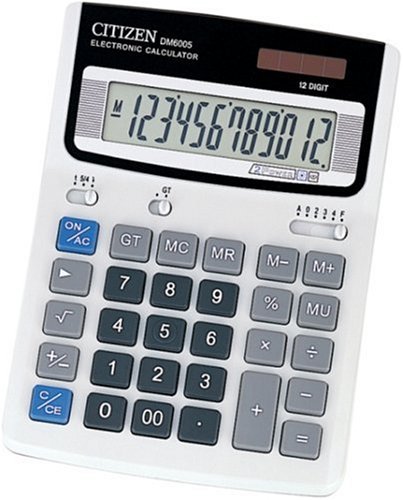
Image: Front view of the CITIZEN DM6005Q Desktop Calculator, showing the 12-digit display and key layout.
Key Features:
- 12-Digit Display: Provides ample space for complex calculations.
- Inclined Display: Ergonomically designed for improved readability from various angles.
- Large Keypad: Ensures comfortable and accurate data entry.
- Battery Powered: Offers portability and convenience.
Setup
Battery Installation
The CITIZEN DM6005Q calculator operates on battery power. Follow these steps to install or replace the batteries:
- Turn the calculator over to access the battery compartment on the back.
- Using a small screwdriver (not included), carefully open the battery compartment cover.
- Insert the required batteries (typically AA or AAA, refer to the compartment label for exact type) ensuring the correct polarity (+ and -) as indicated.
- Replace the battery compartment cover and secure it with the screw.
- Turn the calculator back over and press the ON/AC button to power it on.
Note: If the display does not appear after battery installation, recheck the battery orientation or try new batteries.
Operating Instructions
Basic Calculations
The calculator supports standard arithmetic operations:
- Addition (+): Enter the first number, press +, enter the second number, press =.
- Subtraction (-): Enter the first number, press -, enter the second number, press =.
- Multiplication (×): Enter the first number, press ×, enter the second number, press =.
- Division (÷): Enter the first number, press ÷, enter the second number, press =.
Other Functions
- ON/AC (All Clear): Turns the calculator on and clears all entries and memory.
- C (Clear Entry): Clears the last entered number without affecting previous operations or memory.
- +/- (Sign Change): Changes the sign of the displayed number from positive to negative or vice versa.
- % (Percentage): Used for percentage calculations.
- M+ (Memory Plus): Adds the displayed value to the memory.
- M- (Memory Minus): Subtracts the displayed value from the memory.
- MR (Memory Recall): Recalls the value stored in memory.
- MC (Memory Clear): Clears the memory.
Maintenance
Cleaning
To keep your calculator in good condition:
- Wipe the exterior of the calculator with a soft, dry cloth.
- For stubborn dirt, slightly dampen the cloth with water, then wipe dry immediately.
- Do not use chemical cleaners, solvents, or abrasive materials, as these can damage the casing or display.
Battery Replacement
When the display becomes dim or the calculator stops functioning, it's time to replace the batteries. Refer to the "Battery Installation" section under Setup for detailed instructions.
Always dispose of used batteries according to local regulations.
Troubleshooting
If you encounter issues with your calculator, try the following solutions:
| Problem | Solution |
|---|---|
| Display is blank or dim. | Check battery installation. Replace with fresh batteries if necessary. |
| Calculator does not turn on. | Ensure batteries are correctly installed and have sufficient charge. Press the ON/AC button firmly. |
| Incorrect calculation results. | Press ON/AC to clear all previous entries and memory, then re-enter the calculation. Ensure correct key presses. |
| Keys are unresponsive. | Clean the keypad area. If the issue persists, replace batteries. |
Specifications
- Brand: CITIZEN
- Model: DM6005Q
- Display Type: LCD (Liquid Crystal Display)
- Number of Digits: 12
- Power Source: Battery
- Calculator Type: Standard Desktop Calculator
- Color: Black, White (product may vary)
Warranty and Support
CITIZEN products are manufactured to high-quality standards. For warranty information or technical support, please refer to the warranty card included with your purchase or visit the official CITIZEN website. Keep your proof of purchase for warranty claims.
For further assistance, you may also contact your local retailer or authorized service center.
