
Monster MP HTS5100 MKII
Monster MP HTS5100 MKII Home Theatre Reference PowerCenter
User Manual
Introduction
The Monster MP HTS5100 MKII Home Theatre Reference PowerCenter is designed to provide advanced power conditioning and surge protection for high-end home theater systems. It features Monster Clean Power Stage 4 noise isolation and filtering, ensuring optimal performance for your audio and video components by rejecting noise and interference. Additionally, its advanced Monster T2 and Tri-Mode protection technology offers robust defense against power surges and spikes, safeguarding your valuable digital TV investments and other sensitive electronics.
This manual provides essential information for the proper setup, operation, and maintenance of your PowerCenter, helping you achieve the best possible picture and sound from your home theater system while ensuring its longevity.

Figure 1: Front view of the Monster MP HTS5100 MKII Home Theatre Reference PowerCenter, showcasing its sleek design and central digital display.
Important Safety Instructions
To reduce the risk of electric shock, fire, or injury, always follow these basic safety precautions:
- Read all instructions before operating the unit.
- Do not expose the unit to rain or moisture.
- Do not block any ventilation openings. Install in accordance with the manufacturer's instructions.
- Do not install near any heat sources such as radiators, heat registers, stoves, or other apparatus (including amplifiers) that produce heat.
- Only use attachments/accessories specified by the manufacturer.
- Unplug this apparatus during lightning storms or when unused for long periods of time.
- Refer all servicing to qualified service personnel. Servicing is required when the apparatus has been damaged in any way, such as power-supply cord or plug is damaged, liquid has been spilled or objects have fallen into the apparatus, the apparatus has been exposed to rain or moisture, does not operate normally, or has been dropped.
Setup and Installation
Proper setup of your Monster PowerCenter is crucial for optimal performance and protection. Follow these steps for installation:
1. Placement
Place the PowerCenter in a stable location, preferably near your home theater components. Ensure adequate ventilation around the unit to prevent overheating. The unit's dimensions are 3.88" H x 17.13" W x 14.63" D, and it weighs 20.35 lbs.
2. Electrical Connections
Connect the PowerCenter's extra-long 8 ft. PowerLine 300 Cable directly to a grounded wall outlet. Do not use extension cords or adapters. The PowerCenter features multiple outlets designed for different component types (e.g., audio, video, digital) to provide optimal noise isolation.
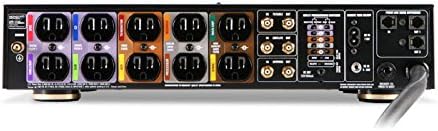
Figure 2: Rear panel connections of the Monster MP HTS5100 MKII, illustrating the various power outlets and signal line protection ports.
3. Component Connections
Plug your home theater components into the appropriate outlets on the PowerCenter. For enhanced protection, connect all incoming signal lines (cable, satellite, antenna, Ethernet, telephone) through the corresponding protected inputs/outputs on the PowerCenter.
4. Initial Power-On
Once all connections are secure, power on the PowerCenter. The digital LED meters will display input voltage and current usage. The unit supports programmable outlets for sequenced power-on/off, which can be configured for enhanced component control and protection.
Video 1: An informational video from Monster discussing the importance of power filtration and protection for home theater systems, highlighting how power surges can damage delicate electronics and how a PowerCenter safeguards equipment and optimizes performance.
Operating Your PowerCenter
Digital LED Meters
The front panel of the HTS5100 MKII features two easy-to-read digital LED meters. These meters simultaneously monitor the input voltage and current usage of your connected equipment. The illumination of these meters is adjustable for user preference.

Figure 3: Detailed view of the digital LED display, showing real-time input voltage and current usage readings.
Programmable Outlets and Trigger Control
The PowerCenter includes programmable outlets and external trigger control. This allows for sequenced power-on/off of your components, which can prevent sudden power draws and protect sensitive equipment during startup and shutdown sequences. Refer to the full product manual for detailed programming instructions.
Power Filtering and Protection
The Monster Clean Power Stage 4 noise isolation and filtering circuitry works continuously to reduce electromagnetic interference (EMI) and radio frequency interference (RFI) from your power lines, which can degrade audio and video quality. The advanced Monster T2 and Tri-Mode protection technology provides constant surge protection, automatically disconnecting equipment in the event of a dangerous power surge and reconnecting when safe.
Maintenance
To ensure the longevity and optimal performance of your Monster PowerCenter, follow these simple maintenance guidelines:
- Cleaning: Disconnect the PowerCenter from the wall outlet before cleaning. Use a soft, dry cloth to wipe down the exterior. Avoid using liquid cleaners or aerosol sprays.
- Ventilation: Ensure that the ventilation openings on the unit are not blocked. Proper airflow is essential to prevent overheating, especially given that the unit may generate a small amount of heat during operation.
- Cable Management: Keep power and signal cables organized and untangled to prevent strain on connections and to maintain optimal performance.
- Inspection: Periodically inspect the power cord and all connected cables for any signs of damage or wear. If any damage is found, discontinue use and contact qualified service personnel.
Troubleshooting
If you experience issues with your Monster PowerCenter, consult the following common troubleshooting steps:
| Problem | Possible Cause | Solution |
|---|---|---|
| No power to connected devices. | PowerCenter is off, or a circuit breaker has tripped. | Ensure the PowerCenter is switched on. Check the circuit breaker on the unit (if applicable) and reset if tripped. Verify the wall outlet has power. |
| Sudden power loss to some or all outlets. | Monster T2 or Tri-Mode protection activated due to a power surge. | The unit automatically disconnects power during a surge. It should automatically reconnect when safe. If not, unplug the unit, wait a few minutes, and plug it back in. If the issue persists, contact support. |
| Humming or noise from speakers/unit. | Electrical interference or ground loop. | Ensure all components are plugged into the PowerCenter. Verify proper grounding. The Clean Power Stage 4 filtering should minimize this; if not, check for external interference sources. |
| Digital display is dim or not working. | Adjustable illumination setting or unit malfunction. | Adjust the dimmer setting for the LED display. If the display remains off, the unit may require servicing. |
For issues not covered here, or if problems persist, please contact Monster customer support.
Specifications
- Model: MP HTS5100 MKII
- Dimensions (H x W x D): 3.88" x 17.13" x 14.63"
- Weight: 20.35 lbs
- Joule Rating: 6814 Joules (provides high level of surge absorption)
- Power Filtering: Monster Clean Power Stage 4 v.2.1 circuitry
- Surge Protection: Monster T2 automatic disconnect/reconnect, Tri-Mode power protection circuitry with audible alarm and auto disconnect
- Outlets: 10 AC outlets (with varying filtration for audio, video, digital)
- Cable: Extra-long 8 ft. PowerLine 300 Cable with large-gauge conductors and 24k gold contacts
- Additional Protection: Surge-protected phone/network connections
- Display: Two easy-to-read digital LED meters for input voltage and current usage with adjustable illumination
- Features: Programmable outlets, external trigger control
Warranty and Support
The Monster MP HTS5100 MKII PowerCenter comes with a manufacturer's warranty. This warranty typically covers defects in materials and workmanship. Additionally, the warranty may include coverage for equipment properly connected to the PowerCenter that is damaged by a power surge while protected by the unit.
For detailed warranty terms, conditions, and to register your product, please refer to the warranty card included with your purchase or visit the official Monster website. For technical support or service inquiries, please contact Monster customer service through their official channels.
Related documentsMP HTS5100 MKII


Ask a question about this manual
Ask about setup, troubleshooting, compatibility, parts, safety, or missing instructions. Manuals+ will review the question and use this page’s manual context to help answer it.