
Logitech G G7
Logitech G7 Laser Cordless Mouse User Manual
Model: G7 (P/N: 931375-0403)
Introduction
This manual provides comprehensive instructions for the setup, operation, maintenance, and troubleshooting of your Logitech G7 Laser Cordless Mouse. Please read this manual thoroughly before using the product to ensure optimal performance and longevity.
The Logitech G7 is a high-performance laser cordless mouse designed for precision and speed, featuring a 2000 dpi laser engine, full-speed USB connectivity, and hot-swappable Li-ion battery packs.
Package Contents
Verify that all items are present in your package:
- Logitech G7 laser cordless mouse
- 2 Li-Ion battery packs
- Charging station
- USB dongle (receiver)
- CD with SetPoint software
- Installation guide (this document)
- Three-year warranty information

Image: Logitech G7 Laser Cordless Mouse, showing its ergonomic design and carbon fiber pattern.
System Requirements
- IBM or compatible PC
- Windows 98, 2000, Me, XP
- Available USB port
Setup
- Install Batteries:
Insert one of the provided Li-Ion battery packs into the battery compartment on the underside of the mouse. Ensure it clicks into place securely.

Image: Underside of the Logitech G7 mouse, showing the battery compartment and release button.
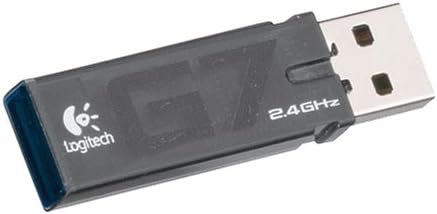
Image: Logitech G7 mouse with a Li-Ion battery pack removed, illustrating the hot-swappable design.
- Connect USB Dongle:
Plug the USB dongle (receiver) into an available USB port on your computer.

Image: Close-up of the Logitech G7 USB dongle, which provides the 2.4 GHz wireless connection.
- Connect Charging Station:
Connect the charging station to a USB port on your computer. You can also plug the USB dongle into the charging station's integrated USB port if desired.

Image: The Logitech G7 charging station with two Li-Ion battery packs, ready for charging.
- Install SetPoint Software:
Insert the provided CD into your computer's CD-ROM drive and follow the on-screen instructions to install the Logitech SetPoint software. This software allows for customization of mouse settings, including game detection and adjustable sensitivity.
Note: For Windows 9x and ME users, the SetPoint software will limit the report rate to 125 reports/second.
Operating Instructions
Mouse Features Overview

Image: Top view of the Logitech G7 mouse, highlighting the scroll wheel, DPI adjustment buttons, and battery indicator.
- Left/Right Click Buttons: Standard mouse functionality.
- Scroll Wheel: Scrolls documents and web pages. Can also tilt left/right for additional functions (programmable via SetPoint).
- DPI Adjustment Buttons (+/-): Located below the scroll wheel. Allows instant switching between three sensitivity levels: 400 dpi, 800 dpi, and 2000 dpi.
- Side Button: Functions as a "Back" button in most web browsers.
- Battery-Level Indicator: A five-level gauge on the mouse body indicates remaining battery life.
DPI Sensitivity Switching
The G7 allows for in-game sensitivity switching without driver installation. Use the '+' and '-' buttons below the scroll wheel to cycle through 400 dpi, 800 dpi, and 2000 dpi settings. This enables quick transitions from precise targeting to rapid movements.
Battery Management
The Logitech G7 includes two hot-swappable Li-ion battery packs. When one battery is low, indicated by the battery-level gauge, you can quickly swap it with a fully charged pack from the charging station without interrupting your activity.
Place the depleted battery into the charging station to recharge. The charging station offers a "Boost" mode for faster charging (approximately 2 hours) and a "Normal" mode (approximately 10 hours). Your computer must be powered on for the charging station to function.
Maintenance
- Cleaning: Use a soft, dry cloth to clean the mouse surface. For stubborn dirt, a slightly damp cloth can be used, but ensure no moisture enters the internal components. Avoid harsh chemicals or abrasive cleaners.
- Battery Care: To prolong battery life, avoid fully discharging the batteries regularly. Store unused battery packs in a cool, dry place.
- PTFE Gaming Feet: The mouse features Polytetrafluoroethylene (PTFE) gaming feet for smooth glide. If these become worn, replacement feet may be available from Logitech support.
Troubleshooting
| Problem | Solution |
|---|---|
| Mouse not responding |
|
| Lag or interference |
|
| Battery drains quickly |
|
| SetPoint software not installing/working |
|
Technical Specifications
- Tracking Resolution: 2000 dpi
- Image Processing: 6.4 megapixels/second
- Max. Acceleration: 20g
- Max. Speed: 45-65 inches/second (depending on surface)
- USB Data Format: 16 bits/axis
- USB Report Rate: 500 reports/second (125 reports/second for Windows 9x/ME)
- Sleep Mode: Disabled
- Connectivity: 2.4 GHz Wireless, USB
- Battery Type: Li-Ion (2 included)
- Product Dimensions: 9.02 x 9.02 x 2.76 inches
- Item Weight: 8.8 ounces
Warranty and Support
The Logitech G7 Laser Cordless Mouse comes with a Three-Year Limited Hardware Warranty from the date of purchase. This warranty covers defects in materials and workmanship under normal use.
For warranty claims, technical support, or further assistance, please visit the official Logitech G support website or contact their customer service. Keep your proof of purchase for warranty validation.
Logitech G Support: www.logitechg.com/support
Related documentsG7


Ask a question about this manual
Ask about setup, troubleshooting, compatibility, parts, safety, or missing instructions. Manuals+ will review the question and use this page’s manual context to help answer it.