
1. Introduction
This manual provides essential information for the setup, operation, and maintenance of your ELAC Cinema 05 ESP 5.1 Speaker System. This compact surround sound system is designed to deliver a balanced audio experience for home cinema environments.
The system comprises the SUB 05 ESP subwoofer, one Cinema 05 CENTER speaker, and four Cinema 05 SAT mini-satellite speakers. All components are engineered for optimal performance and durability.
2. Safety Instructions
- Power Supply: Ensure the subwoofer is connected to a power outlet with the correct voltage. Disconnect the power cord during electrical storms or when unused for long periods.
- Ventilation: Do not block any ventilation openings. Maintain adequate space around the subwoofer for proper airflow.
- Moisture and Heat: Do not expose the system to rain, moisture, dripping, or splashing. Keep away from heat sources such as radiators, heat registers, stoves, or other apparatus (including amplifiers) that produce heat.
- Placement: Place speakers on stable surfaces to prevent them from falling. Avoid placing heavy objects on the speakers.
- Servicing: Do not attempt to service this product yourself. Refer all servicing to qualified service personnel.
- Magnetic Shielding: All speakers are magnetically shielded. However, maintain a reasonable distance from sensitive electronic devices if interference is observed.
3. Package Contents
Please verify that all components are present in the packaging:
- 1x ELAC SUB 05 ESP Subwoofer
- 1x ELAC Cinema 05 CENTER Speaker
- 4x ELAC Cinema 05 SAT Mini-Satellite Speakers
- Power cable for subwoofer
- Speaker cables (may vary by region/retailer)
- Wall mounting brackets for center speaker (included)
- Mounting provisions for satellite speakers
4. Setup
4.1 Unpacking
Carefully remove all components from their packaging. Retain the packaging for future transport or storage.
4.2 Speaker Placement
Optimal speaker placement is crucial for achieving the best sound quality in a 5.1 surround sound configuration.

Figure 1: Overview of the ELAC Cinema 05 ESP 5.1 Speaker System components.
- Front Left/Right Satellites (Cinema 05 SAT): Place these speakers equidistant from your primary listening position, typically at ear level. They should form an equilateral triangle with the listening position.
- Center Speaker (Cinema 05 CENTER): Position the center speaker directly above or below your television/screen, centered horizontally. Its primary role is dialogue reproduction.
- Surround Left/Right Satellites (Cinema 05 SAT): Place these speakers to the sides or slightly behind the listening position, typically slightly above ear level.
- Subwoofer (SUB 05 ESP): The subwoofer's placement is less critical for imaging but can significantly impact bass response. Experiment with different locations in the room, often in a corner or along a wall, to find the best bass balance.
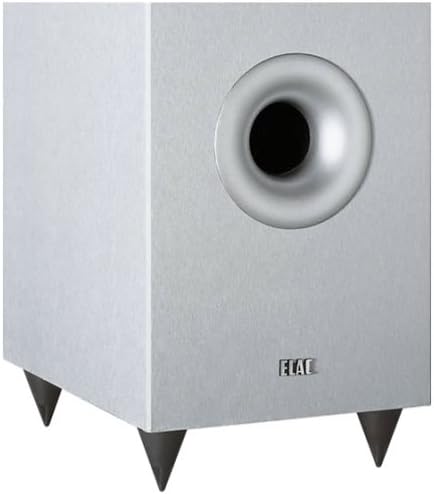
Figure 2: Front view of the ELAC SUB 05 ESP Subwoofer, featuring its down-firing woofer and front bass reflex port.
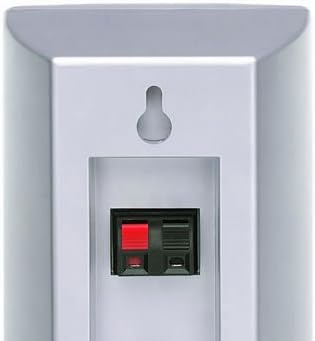
Figure 3: Front view of an ELAC Cinema 05 SAT Satellite Speaker, showcasing its compact design.

Figure 4: Front view of the ELAC Cinema 05 CENTER Speaker, designed for clear dialogue.
4.3 Wall Mounting
The Cinema 05 SAT satellites and Cinema 05 CENTER speaker are designed for flexible placement, including wall mounting.
- Cinema 05 SAT: These speakers feature a hanging provision for unobtrusive wall mounting. Optional horizontal swivel wall mounts are available (sold separately).
- Cinema 05 CENTER: A horizontal and vertical wall mount is included with the center speaker for versatile installation.

Figure 5: Rear view of an ELAC Cinema 05 SAT Satellite Speaker, showing the keyhole mount and speaker terminals.

Figure 6: Rear view of the ELAC Cinema 05 CENTER Speaker, illustrating the included wall mount attachment.
4.4 Connections
Ensure your AV receiver or amplifier is turned off before making any connections.
- Satellite and Center Speakers: Connect the Cinema 05 SAT and Cinema 05 CENTER speakers to the corresponding speaker terminals on your AV receiver using appropriate speaker wire. Ensure correct polarity (+ to + and - to -) for all connections.
- Subwoofer (SUB 05 ESP): Connect the subwoofer to your AV receiver's LFE (Low-Frequency Effects) or Subwoofer Pre-Out jack using a single RCA cable. If your receiver does not have an LFE output, use the Line Level inputs.
- Power Connection: Once all audio connections are made, connect the SUB 05 ESP subwoofer to a wall outlet using the provided power cable.
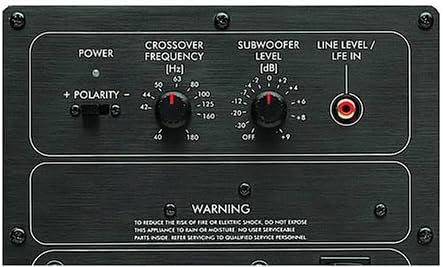
Figure 7: Rear control panel of the ELAC SUB 05 ESP Subwoofer, showing power input, LFE/Line In, and control knobs.
5. Operating
5.1 Powering On/Off
The SUB 05 ESP subwoofer has a power switch on its rear panel. Turn it on after connecting all cables. Many AV receivers can trigger the subwoofer to turn on automatically when a signal is detected.
5.2 Subwoofer Controls
The SUB 05 ESP features several controls on its rear panel to integrate it seamlessly with your main speakers and room acoustics.
- Crossover Frequency (Hz): This knob determines the highest frequency the subwoofer will reproduce. Adjust it to blend smoothly with your satellite speakers. A common starting point is around 80-100 Hz, but refer to your AV receiver's recommendations or experiment for the best sound.
- Subwoofer Level (dB): This control adjusts the subwoofer's output volume. Start at a moderate level and fine-tune it to match the volume of your satellite speakers. Avoid setting it too high, which can result in boomy or overpowering bass.
- Polarity (+ / -): This switch adjusts the phase of the subwoofer's output. Experiment with both positions while listening to music with strong bass. Choose the setting that provides the most impactful and coherent bass response.
- ESP (Electronic Stabilization Program): The SUB 05 ESP features ELAC's patented ESP technology, which prevents mechanical overload and distortion, ensuring a clean bass spectrum even at high volumes. This is an automatic feature and does not require user adjustment.
5.3 Initial Sound Adjustment
After connecting and powering on your system, use your AV receiver's automatic calibration feature (if available) or manually adjust speaker levels and distances to achieve a balanced sound field.
6. Maintenance
- Cleaning: Use a soft, dry cloth to clean the speaker cabinets. Do not use liquid cleaners, aerosols, or abrasive materials, as these may damage the finish.
- Grilles: The speaker grilles can be gently removed for cleaning if necessary. Use a soft brush or vacuum cleaner with a brush attachment to remove dust.
- Avoid Direct Sunlight: Prolonged exposure to direct sunlight can cause discoloration or damage to the speaker cabinets.
7. Troubleshooting
- No Sound from Speakers:
- Check all speaker wire connections at both the speaker and receiver ends for proper polarity and secure contact.
- Ensure the AV receiver is powered on and the correct input source is selected.
- Verify that the speaker levels in your receiver's settings are not set to minimum or muted.
- No Sound from Subwoofer:
- Check the subwoofer's power cable connection and ensure the power switch is in the 'ON' position.
- Verify the RCA cable connection between the subwoofer and the receiver's LFE/Subwoofer Pre-Out.
- Adjust the 'Subwoofer Level' knob on the subwoofer's rear panel.
- Check your AV receiver's settings to ensure the subwoofer output is enabled and the crossover frequency is set appropriately.
- Distorted or Unclear Sound:
- Ensure speaker wires are not frayed or shorting.
- Reduce the volume level on your receiver or amplifier.
- Check the source audio quality.
- Humming Noise:
- Ensure all connections are secure.
- Try connecting the subwoofer to a different electrical outlet.
- If using a long RCA cable, consider a higher quality, shielded cable.
8. Specifications
| Model Name | Cinema 5 |
| Model Number | 35322 |
| Speaker Type | Subwoofer, Center Speaker, Satellite Speakers |
| Surround Sound Configuration | 5.1 |
| Audio Output Mode | Surround |
| Maximum Speaker Output Power | 25 Watts (per channel, specific to satellites/center) |
| Connectivity Technology | Wired (Bluetooth mentioned for control method, but primary audio is wired) |
| Control Method | Remote Control (via connected AV receiver) |
| Power Source | Corded Electric (Subwoofer) |
| Color | Silver |
| Mounting Type | Wall Mount (for satellites and center) |
| Item Weight | 10 g (Note: This weight is likely for a single small component, not the entire system) |
9. Warranty and Support
9.1 Warranty Information
The ELAC Cinema 05 ESP 5.1 Speaker System comes with a Limited Warranty. Please refer to the warranty card included with your product or visit the official ELAC website for detailed terms and conditions regarding coverage, duration, and claims procedures.
9.2 Customer Support
For technical assistance, troubleshooting beyond this manual, or warranty inquiries, please contact ELAC customer support. Contact information can typically be found on the official ELAC website or in your product documentation.
When contacting support, please have your product model number (35322) and purchase information readily available.