
Introduction
This manual provides essential instructions for setting up, operating, maintaining, and troubleshooting your Olympus SP-350 8MP Digital Camera. Please read this manual thoroughly to ensure proper use and to maximize the camera's capabilities.
The Olympus SP-350 is an 8.0-megapixel digital camera equipped with a 3x optical zoom lens, designed for capturing high-quality images. It features a 2.5-inch LCD for viewing and playback, and offers both automatic and full manual control settings. The camera supports various shooting modes and can be expanded with conversion lenses and external flashes.

Figure 1: Olympus SP-350 Digital Camera. This image shows the front view of the black Olympus SP-350 digital camera with its lens extended, highlighting its compact design.
Setup
1. Battery Installation
The Olympus SP-350 can be powered by one CR-V3 battery or two AA-size batteries. Ensure batteries are inserted with correct polarity.
- Open the battery compartment cover, typically located on the bottom or side of the camera.
- Insert the CR-V3 battery or two AA-size batteries according to the polarity indicators (+/-).
- Close the battery compartment cover securely.
2. Memory Card Installation
The camera uses xD-Picture Cards for image storage, with a maximum supported size of 2 GB.
- Locate the memory card slot, usually near the battery compartment.
- Insert the xD-Picture Card into the slot until it clicks into place. Ensure the card is oriented correctly.
- Close the memory card slot cover.
3. Initial Power On
After installing batteries and a memory card, press the power button to turn on the camera. Follow any on-screen prompts for initial setup, such as setting the date and time.
Operating the Camera
1. Basic Shooting Modes
The camera offers Automatic, Program, and Scene shooting modes, along with 27 creative scene options.
- Automatic Mode: The camera automatically adjusts settings for optimal exposure.
- Program Mode: Allows some manual control over settings while the camera maintains proper exposure.
- Scene Modes: Select from various preset scenes (e.g., landscape, portrait, night scene) for specific shooting conditions.
2. Zoom Function
The SP-350 features a 3x optical zoom and a 5x digital zoom.
- Use the zoom lever/buttons to adjust the focal length. Optical zoom provides higher quality without pixelation.
- Digital zoom extends the magnification but may reduce image quality.
3. Focus Control
The camera uses Contrast Detection autofocus and supports both autofocus and manual focus modes.
- Autofocus (AF): The camera automatically focuses on the subject. Half-press the shutter button to engage AF.
- Manual Focus (MF): Allows you to manually adjust the focus for precise control. Refer to the on-screen display for focus indicators.
4. Flash Usage
The camera has an automatic flash mode and supports external flashes via a hot shoe.
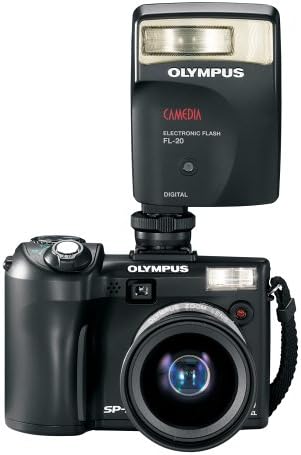
Figure 2: Olympus SP-350 Digital Camera with an attached external flash. This image illustrates how an external flash unit can be mounted on the camera's hot shoe for enhanced lighting.
- Built-in Flash: Operates in automatic mode, firing when lighting conditions require it.
- External Flash: For more advanced lighting control, attach a compatible external flash unit to the camera's hot shoe.
5. Movie Mode
Record videos with audio in QuickTime Movie Mode (MOV format) at 480p resolution.
- Select Movie Mode from the shooting mode dial.
- Press the shutter button to start and stop recording.
6. Image Playback
Use the 2.5-inch LCD screen to review captured photos and videos.
- Press the playback button to enter playback mode.
- Use the directional pad to navigate through images and videos.
7. Connectivity
Connect the camera to a computer or PictBridge-enabled printer using the multi-connector for USB and AV.
- USB Connection: Transfer images and videos to a computer using the provided USB cable.
- PictBridge: Print photos directly from the camera to a compatible printer without a computer.
Maintenance
1. Cleaning
- Use a soft, lint-free cloth to clean the camera body.
- For the lens and LCD screen, use a specialized lens cleaning cloth and solution. Avoid harsh chemicals.
- Keep the battery and memory card contacts clean and dry.
2. Storage
- Store the camera in a cool, dry place away from direct sunlight and extreme temperatures.
- Remove batteries if the camera will not be used for an extended period to prevent leakage.
- Use a camera bag or case to protect the camera from dust and physical damage.
Troubleshooting
- Camera does not power on: Ensure batteries are correctly inserted and charged. Try new batteries.
- Images are blurry or out of focus: Check focus mode settings. Ensure sufficient lighting. Clean the lens.
- Flash does not fire: Verify flash mode settings. Ensure external flash is properly attached and powered.
- Slow startup or shot-to-shot time: Ensure a high-speed xD-Picture Card is used.
- Memory card error: Reinsert the memory card. Try a different, compatible xD-Picture Card. Ensure the card is not full or locked.
- LCD screen is blank: Check if the camera is powered on. Adjust brightness settings if available.
Specifications
| Feature | Specification |
|---|---|
| Model Name | Olympus SP-350 |
| Effective Still Resolution | 8 MP |
| Optical Zoom | 3x |
| Digital Zoom | 5x |
| Screen Size | 2.5 Inches |
| Photo Sensor Technology | CMOS |
| Image Stabilization | Digital, Optical |
| Supported File Format | RAW, JPEG |
| Flash Memory Type | xD Picture Card, Internal |
| Flash Memory Supported Size Maximum | 2 GB |
| Connectivity Technology | USB |
| Hardware Interface | PictBridge, USB |
| Shooting Modes | Automatic, Program, Scene |
| Movie Mode | Yes (480p, MOV) |
| Auto Focus Technology | Contrast Detection |
| Focus Type | Autofocus & Manual |
| Battery Type | CR-V3 or 2x AA-size |
| Item Weight | 0.54 Pounds |
| Color | Black |
What's in the Box
The standard package for the Olympus SP-350 Digital Camera includes:
- Olympus SP-350 Digital Camera
- Strap
- Multi-connector for USB and AV
- CR-V3 Battery
- Basic Instruction Manual (this document)
- Quick Start Guide
- Warranty Card
- CD ROM: Olympus Master Software, and advanced manual
Warranty and Support
For warranty information and technical support, please refer to the warranty card included in your product package or visit the official Olympus support website. Keep your purchase receipt as proof of purchase for warranty claims.


