
Introduction
This manual provides comprehensive instructions for the Victor 1100-2 Minidesk Calculator, Model VCT11003A. It covers setup, basic operations, advanced functions, maintenance, and troubleshooting to ensure optimal performance and longevity of your device. This calculator features an AntiMicrobial surface and is made with 50% recycled plastic.
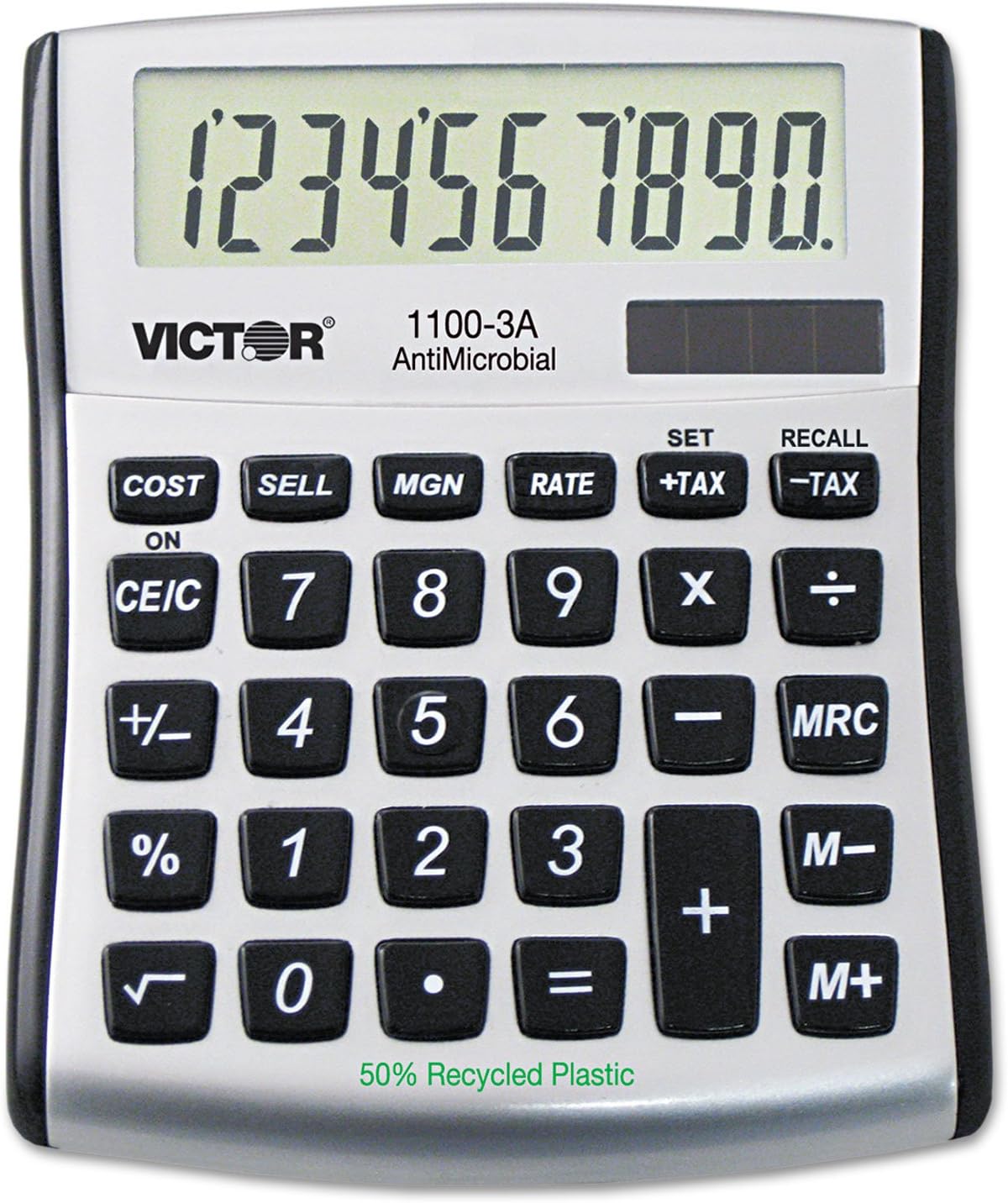
Image: Front view of the Victor 1100-2 Minidesk Calculator, displaying its 10-digit LCD screen, standard numeric keypad, and dedicated function keys for cost, sell, margin, tax, and memory operations. The calculator is silver and black, with 'VICTOR' and '1100-3A AntiMicrobial' printed on its face, along with '50% Recycled Plastic' at the bottom.
Setup
Battery Installation
The Victor 1100-2 calculator is battery-powered. To install or replace batteries:
- Locate the battery compartment cover on the back of the calculator.
- Use a small screwdriver or coin to open the cover.
- Insert the required batteries (typically 1.5V button cell or AAA, refer to the compartment label for exact type) ensuring correct polarity (+/-).
- Replace the battery compartment cover securely.
Initial Power On
Press the ON/CE/C button to turn on the calculator. The display should show '0' or '0.'. If the display is blank, check battery installation or replace batteries.
Operating Instructions
Basic Arithmetic Operations
- Addition (+): Enter the first number, press +, enter the second number, then press =.
- Subtraction (-): Enter the first number, press -, enter the second number, then press =.
- Multiplication (X): Enter the first number, press X, enter the second number, then press =.
- Division (÷): Enter the first number, press ÷, enter the second number, then press =.
Special Functions
- CE/C (Clear Entry/Clear All): Press once to clear the last entry. Press twice to clear all calculations and reset the calculator to zero.
- +/- (Change Sign): Changes the sign of the displayed number from positive to negative or vice versa.
- % (Percent): Used for percentage calculations. E.g., 50 X 10 % will calculate 10% of 50.
- √ (Square Root): Calculates the square root of the displayed number.
- M+ (Memory Plus): Adds the displayed number to the memory.
- M- (Memory Minus): Subtracts the displayed number from the memory.
- MRC (Memory Recall/Clear): Press once to recall the value stored in memory. Press twice to clear the memory.
- COST, SELL, MGN (Cost, Sell, Margin): These keys are used for profit margin calculations. Enter two of the three values (Cost, Sell, Margin Percentage) and press the third key to calculate the unknown value.
- +TAX, -TAX (Set/Recall Tax Rate):
- SET: To set the tax rate, enter the tax percentage (e.g., 5 for 5%), then press SET followed by +TAX.
- +TAX: After setting the rate, enter a value and press +TAX to add tax to the value.
- -TAX: Enter a value and press -TAX to subtract tax from the value.
- RECALL: To recall the set tax rate, press RECALL followed by -TAX.
Maintenance
Cleaning
To clean the calculator, use a soft, dry cloth. For stubborn dirt, slightly dampen the cloth with water or a mild, non-abrasive cleaner. Do not use harsh chemicals or immerse the calculator in liquid.
Battery Replacement
When the display becomes dim or erratic, it is time to replace the batteries. Follow the battery installation steps outlined in the 'Setup' section.
Storage
Store the calculator in a cool, dry place away from direct sunlight and extreme temperatures. If storing for an extended period, it is recommended to remove the batteries to prevent leakage.
Troubleshooting
- Display is blank or dim: Check battery installation. Replace batteries if necessary.
- Incorrect calculations: Ensure correct input sequence. Clear all memory and current calculations by pressing CE/C twice.
- Calculator does not respond: Remove batteries, wait a few seconds, then reinsert them. This can reset the device.
- Error message on display: This usually indicates an overflow or division by zero. Clear the calculation and re-enter.
Specifications
| Feature | Detail |
|---|---|
| Brand | Victor |
| Model Name | 1100-2 |
| Item Model Number | VCT11003A |
| Calculator Type | Standard Function |
| Power Source | Battery Powered |
| Display Type | LCD |
| Material | Plastic (50% Recycled Plastic) |
| Product Dimensions | 12.7 x 10.8 x 3.18 cm |
| Item Weight | 172 g |
| UPC | 014751110024 |
Warranty and Support
For warranty information and customer support, please refer to the documentation included with your purchase or visit the official Victor website. Keep your proof of purchase for any warranty claims.


