
Introduction
Welcome to the world of Mario Kart DS! This manual provides essential information for setting up, playing, and maintaining your game. Mario Kart DS offers a variety of racing and battle modes, allowing players to compete against computer-controlled opponents or friends via local wireless and online connections.
Setup and Installation
1. Compatible Systems
Mario Kart DS is compatible with the following Nintendo handheld systems:
- Nintendo DS
- Nintendo DS Lite
- Nintendo DSi
- Nintendo DSi XL
2. Inserting the Game Card
- Ensure your Nintendo DS system is powered off.
- Locate the Game Card slot on your Nintendo DS system.
- Insert the Mario Kart DS game card into the slot until it clicks into place. The label side of the game card should face away from the system's hinge.
- Power on your Nintendo DS system. The game icon should appear on the touch screen.

Image: The Mario Kart DS game cartridge, ready for insertion into a Nintendo DS system.
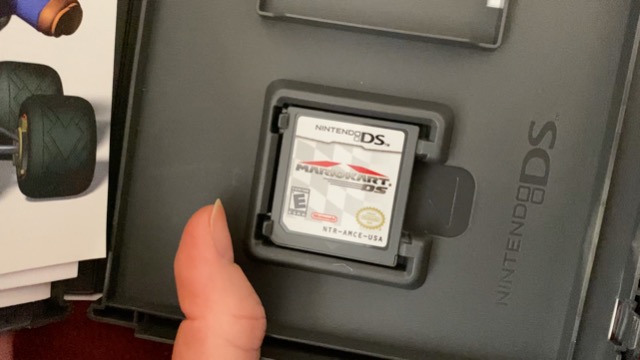
Image: The front cover of the Mario Kart DS game case, featuring Mario in a kart.
Operating Instructions
1. Main Menu
Upon launching the game, you will be presented with the main menu, offering several gameplay options:
- Single Player: Engage in various solo game modes.
- Multiplayer: Connect with other players wirelessly.
- Nintendo WFC: Access online multiplayer features (requires Wi-Fi connection, service availability may vary).
- Records: View your personal best times and achievements.
- Options: Adjust game settings such as sound, controls, and display.
2. Single Player Modes
The Single Player mode includes:
- Grand Prix: Compete in a series of races across different cups to earn trophies.
- Time Trials: Race against the clock to achieve the fastest lap times on any course.
- VS Race: Customize races with preferred rules, characters, and courses.
- Battle: Participate in competitive battle modes.
- Missions: Complete specific objectives and challenges.
3. Multiplayer Options
Mario Kart DS supports multiplayer gameplay:
- Local Wireless: Race and battle with up to 4 karts at once, or enjoy 8-player multiplayer action with a single game card using local wireless communication.
- Nintendo Wi-Fi Connection: Connect with friends or players worldwide for online races.
4. Gameplay Features
The game incorporates various elements to enhance the racing experience:
- Characters and Karts: Select from multiple characters, each with unique kart options affecting speed, acceleration, weight, handling, and drift.
- Items: Utilize a variety of power-up items collected during races to gain advantages or hinder opponents.
- Tracks and Arenas: Tour courses from classic Mario Kart games, as well as brand-new tracks and battle arenas.
- Battle Modes: Two distinct battle modes are available: "Balloon Battle" and "Shine Runners."
Maintenance
1. Game Card Care
- Keep the game card clean and free from dust and debris. Use a soft, dry cloth to gently wipe the gold connectors if necessary.
- Store the game card in its original case or a protective holder when not in use to prevent damage.
- Avoid exposing the game card to extreme temperatures, direct sunlight, or moisture.
2. System Care
Regularly clean your Nintendo DS system according to its own instruction manual to ensure optimal performance and compatibility with game cards.
Troubleshooting
- Game Does Not Load:
Ensure the game card is fully inserted into the slot. Power off and restart your Nintendo DS system. Clean the game card's gold connectors with a soft cloth. - Multiplayer Connection Issues:
For local wireless play, ensure all systems are within range and have sufficient battery life. For Nintendo Wi-Fi Connection, verify your internet connection and router settings. - Controls Unresponsive:
Check if your Nintendo DS system's buttons or touch screen are functioning correctly with other applications. If the issue is specific to Mario Kart DS, try restarting the game. - Game Freezes or Crashes:
Save your game progress frequently. If the game freezes, power off your system and restart. Ensure your game card is authentic and not damaged.
Specifications
| Feature | Detail |
|---|---|
| Product Title | Mario Kart DS |
| Platform | Nintendo DS |
| Release Date | November 14, 2005 |
| Item Model Number | 045496735906 |
| Product Dimensions | 5 x 5 x 0.75 inches (packaging) |
| Item Weight | 3.52 ounces |
| Language | English |
| ESRB Rating | Everyone |
| UPC/GTIN | 045496735913, 045496742614, 802645750186, 045496735906, 675663039096, 045496741143 |
Warranty Information
Specific warranty details for Mario Kart DS are typically provided within the product packaging or can be obtained directly from Nintendo's official website or customer support channels. Please refer to these resources for comprehensive warranty terms and conditions.
Support
For further assistance, technical support, or inquiries regarding Mario Kart DS, please visit the official Nintendo support website or contact their customer service. Contact information and support resources are subject to change and are best found on Nintendo's official platforms.