
Taylor 5582.00
Taylor 5582 Wireless Body Fat Analyzer and Scale
User Instruction Manual
1. Introduction
Thank you for purchasing the Taylor Model 5582 Wireless Body Fat Analyzer and Scale. This advanced personal scale is designed to provide accurate measurements of your weight, body fat percentage, body water percentage, and estimated daily calorie requirements. Its unique wireless remote display offers convenience and ease of use, allowing you to view your readings without bending or straining. Please read this manual thoroughly before using the scale to ensure proper operation and to maximize its features.
2. Safety Information
Please observe the following safety precautions when using your Taylor 5582 scale:
- Do not use this product if you have a pacemaker or other internal medical device.
- This scale is not intended for use by pregnant women.
- Always place the scale on a hard, flat surface. Carpets or uneven floors may affect accuracy.
- The scale surface can be slippery when wet. Ensure the surface is dry before stepping on.
- Do not immerse the scale or remote display in water. Clean with a damp cloth only.
- Keep batteries out of reach of children.
- Do not mix old and new batteries, or different types of batteries.
- Dispose of batteries according to local regulations.
3. Package Contents
Verify that all items are present in your package:
- Taylor 5582 Body Fat Analyzer and Scale Base
- Wireless Remote Display Unit
- Mounting Hardware (for optional wall mounting of remote)
- Instruction Manual (this document)
Note: 1 x 9V battery and 4 x AAA batteries are required for operation and are not included.
4. Product Overview
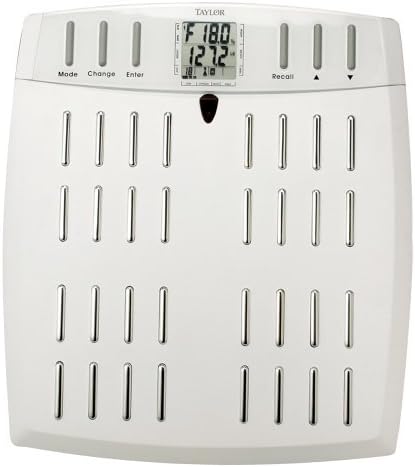
Figure 4.1: Front view of the Taylor 5582 scale with the wireless display unit attached to the base.

Figure 4.2: The wireless display unit detaching from the scale base, illustrating its removable feature.
Scale Base Components:
- Weighing Platform: The main surface where you stand.
- Electrodes: Metal strips on the platform for body fat/water analysis.
- Battery Compartment: Located on the underside of the scale base.
Wireless Remote Display Components:
- LCD Display: Shows weight, body fat, body water, and other readings.
- Mode Button: Used to select user profiles or measurement modes.
- Change Button: Used to adjust values during setup.
- Enter Button: Confirms selections and settings.
- Recall Button: Accesses stored user data.
- Up/Down Arrows: Navigate menus and adjust values.
- Battery Compartment: Located on the back of the remote display.
5. Setup
5.1 Battery Installation
The scale requires one 9V battery for the base unit and four AAA batteries for the remote display unit.
- Scale Base: Open the battery compartment cover on the underside of the scale. Insert one 9V battery, observing the correct polarity (+/-). Replace the cover.
- Remote Display: Open the battery compartment cover on the back of the remote display. Insert four AAA batteries, observing the correct polarity (+/-). Replace the cover.
5.2 Initial Setup and User Profile Programming
The scale can store data for up to 6 users. Each user profile requires programming of personal data for accurate body fat and body water analysis.
- Ensure the remote display is either attached to the scale or held in your hand.
- Press the MODE button to select a user number (P1-P6). The selected user number will flash.
- Press ENTER to confirm the user number.
- The display will now prompt for personal data:
- Gender: Use CHANGE or arrow buttons to select Male or Female. Press ENTER.
- Height: Use CHANGE or arrow buttons to adjust height (in feet/inches or cm). Press ENTER.
- Age: Use CHANGE or arrow buttons to adjust age. Press ENTER.
- Activity Level: Use CHANGE or arrow buttons to select activity level (e.g., Sedentary, Moderately Active, Active, Athlete). Press ENTER.
- Once all data is entered, the display will show "0.0" and is ready for measurement.
5.3 Mounting the Remote Display (Optional)
The remote display can be wall-mounted for convenience. Use the included mounting hardware to secure the bracket to a suitable wall surface at eye level. The remote display slides onto this bracket.
6. Operating Instructions
6.1 Taking a Measurement (Weight, Body Fat, Body Water)
For accurate body fat and body water readings, it is recommended to take measurements with bare feet. Ensure your feet are clean and slightly damp for better contact with the electrodes.

Figure 6.1: Proper foot placement on the scale's electrodes for accurate readings.
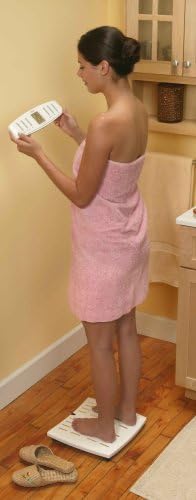
Figure 6.2: User standing on the scale while holding the detached wireless remote display for convenient viewing.
- Place the scale on a hard, flat surface.
- If the remote display is detached, ensure it is within range of the scale.
- Press the MODE button to select your user profile (P1-P6).
- Step onto the scale with bare feet, ensuring your feet are positioned on the metal electrodes. Stand still.
- The display will first show your weight. Then, it will calculate and display your body fat percentage, body water percentage, and estimated daily calorie requirements.
- The readings will cycle through and then hold the final measurement before automatically turning off.
6.2 Athlete Mode
The Taylor 5582 includes an "Athlete Mode" for individuals with intense workout schedules. This mode adjusts the calculation for body fat analysis to account for additional muscle mass, which can otherwise lead to an overestimation of body fat in highly athletic individuals.
- To activate Athlete Mode, select "Athlete" during the initial user profile setup for activity level.
- If you need to change an existing profile to Athlete Mode, select your user profile, then use the MODE and CHANGE buttons to navigate to the activity level setting and select "Athlete". Press ENTER to save.
6.3 Scale Only Mode
If you only wish to measure your weight without body fat or body water analysis, you can use the scale in "Scale Only" mode.
- Simply step onto the scale without selecting a user profile. The scale will display your weight and then turn off.
- Alternatively, you can wear socks or shoes when stepping on the scale; this will prevent the body fat/water analysis from occurring, and only your weight will be displayed.
6.4 Recalling Memory
To view your previously stored measurements:
- Press the RECALL button on the remote display.
- Use the UP/DOWN arrows to cycle through the stored user profiles (P1-P6).
- Once a user profile is selected, the display will show the last recorded weight, body fat, body water, and calorie data for that user.
- Press RECALL again or wait for the unit to automatically turn off to exit memory recall.
7. Maintenance
7.1 Cleaning
Clean the scale and remote display with a soft, damp cloth. Do not use abrasive cleaners or immerse the unit in water. The electrodes should be kept clean for accurate readings.
7.2 Storage
Store the scale in a cool, dry place. Avoid extreme temperatures and direct sunlight. Do not place heavy objects on the scale when not in use.
7.3 Battery Replacement
Replace batteries when the low battery indicator appears on the display or when the scale becomes unresponsive. Follow the battery installation instructions in Section 5.1.
8. Troubleshooting
| Problem | Possible Cause | Solution |
|---|---|---|
| Scale does not turn on. | Dead or incorrectly installed batteries. | Check battery polarity and replace batteries in both the scale base and remote display. |
| Inaccurate weight readings. | Scale on uneven surface; scale not calibrated to zero; user movement during measurement. | Place scale on a hard, flat surface. Ensure display shows "0.0" before stepping on. Stand still during measurement. |
| Body fat/water readings not displayed. | Feet not bare or not making good contact with electrodes; user profile not selected or programmed. | Step on with bare, slightly damp feet. Ensure feet are centered on electrodes. Select your user profile (P1-P6) before weighing. Ensure personal data is programmed. |
| Remote display not communicating with scale. | Remote out of range; low batteries in remote. | Move remote closer to the scale. Replace AAA batteries in the remote. |
9. Specifications
| Model: | Taylor 5582 |
| Capacity: | 330 lbs (150 kg) |
| Measurement Units: | Pounds (lb) or Kilograms (kg) |
| Body Fat/Water Increment: | 0.1% |
| User Memories: | 6 |
| Power: | 1 x 9V battery (scale base), 4 x AAA batteries (remote display) - not included |
| Dimensions: | Approximately 42.67 x 38.61 x 6.1 cm (Package dimensions) |
| Material: | Glass, Plastic |
10. Warranty and Support
The Taylor 5582 Wireless Body Fat Analyzer and Scale comes with a 5-year warranty from the date of purchase. This warranty covers defects in materials and workmanship under normal use.
For warranty claims, technical support, or general inquiries, please contact Taylor customer service. Refer to the contact information provided on the product packaging or the official Taylor website.
Please retain your purchase receipt as proof of purchase for warranty purposes.
Ask a question about this manual
Ask about setup, troubleshooting, compatibility, parts, safety, or missing instructions. Manuals+ will review the question and use this page’s manual context to help answer it.