
1. Important Safety Instructions
Please read these instructions carefully before installing or using your Fagor 4CC-130EX cooker hood. Keep this manual for future reference.
- Electrical Safety: Ensure the electrical installation complies with local regulations. Disconnect power before any maintenance or cleaning.
- Installation: The cooker hood must be installed by a qualified technician. Ensure adequate ventilation in the room when the hood is used simultaneously with other gas or fuel-burning appliances.
- Fire Hazard: Do not flambé under the cooker hood. Never leave frying pans unattended during use, as overheated oil can ignite. Clean grease filters regularly to prevent grease accumulation, which can be a fire hazard.
- Cleaning: Use non-abrasive cleaning agents. Do not use steam cleaners.
- Children: This appliance is not intended for use by persons (including children) with reduced physical, sensory or mental capabilities, or lack of experience and knowledge, unless they have been given supervision or instruction concerning use of the appliance by a person responsible for their safety.
2. Package Contents
Verify that all components are present and undamaged before proceeding with installation.
- Fagor 4CC-130EX Cooker Hood unit
- Grease filters (pre-installed)
- Mounting hardware (screws, wall plugs)
- Instruction Manual
- Ducting adapter (if applicable)
- Charcoal filters (for recirculation mode, may be sold separately)
3. Installation (Setup)
The Fagor 4CC-130EX is an integrated cooker hood designed for installation within a kitchen cabinet. Installation should be performed by a qualified professional.
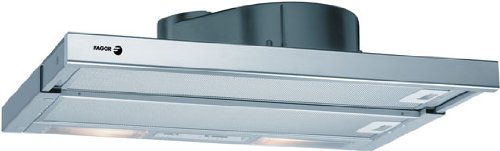
Image 1: Fagor 4CC-130EX integrated cooker hood. This image shows the stainless steel body of the hood with its two integrated lights and the metallic grease filters visible from below. The Fagor logo is visible on the front panel.
3.1. Mounting Requirements
- Ensure the cabinet opening dimensions are compatible with the hood's dimensions (approximately 59.8 cm width x 17.3 cm height x 29.5 cm depth).
- Maintain the minimum safety distance between the cooking surface and the lower part of the hood as specified in local regulations (typically 65 cm for electric hobs and 75 cm for gas hobs).
- A dedicated electrical outlet should be available within reach of the hood's power cable.
3.2. Ventilation Modes
The Fagor 4CC-130EX supports two ventilation modes:
- Ducted (Extraction) Mode: Air is extracted from the kitchen and expelled outside through a ducting system. This mode requires a connection to an external vent.
- Recirculation (Filter) Mode: Air is filtered through charcoal filters to remove odors and then recirculated back into the kitchen. This mode does not require external ducting but necessitates the installation of charcoal filters (often sold separately).
3.3. Installation Steps (General)
- Prepare the Cabinet: Ensure the cabinet opening is correctly sized and reinforced if necessary.
- Mount the Hood: Secure the hood to the cabinet using the provided mounting hardware.
- Connect Ducting (Ducted Mode): Attach the ducting pipe to the hood's outlet and route it to the external vent. Ensure airtight connections.
- Install Charcoal Filters (Recirculation Mode): If using recirculation, install the charcoal filters according to their specific instructions.
- Electrical Connection: Connect the hood to the power supply.
- Test Functionality: Turn on the hood and test all fan speeds and lighting.
4. Operation
The Fagor 4CC-130EX cooker hood features intuitive controls for fan speed and lighting.
4.1. Fan Speed Control
The hood typically features a slider or push-button controls to adjust the extraction power. Select the appropriate speed based on the intensity of cooking fumes and odors.
- Low Speed: Suitable for simmering or light cooking.
- Medium Speed: For general cooking and moderate fumes.
- High Speed: For intense frying, grilling, or when producing significant steam and odors.
4.2. Lighting Control
A separate switch or button controls the integrated lighting, providing illumination for your cooking surface. The hood is equipped with 2 bulbs.
5. Maintenance
Regular maintenance ensures optimal performance and extends the lifespan of your Fagor 4CC-130EX cooker hood. Always disconnect the power supply before performing any maintenance.
5.1. Cleaning Grease Filters
The metallic grease filters capture airborne grease particles. They should be cleaned regularly (approximately every 2-4 weeks, depending on usage) to maintain extraction efficiency and prevent fire hazards.
- Remove Filters: Locate the release latches or clips on the filters and carefully remove them.
- Clean Filters: Wash the filters by hand in hot soapy water or in a dishwasher on a low-temperature cycle. Avoid using abrasive brushes or detergents.
- Dry and Reinstall: Ensure filters are completely dry before reinstalling them.
5.2. Replacing Charcoal Filters (Recirculation Mode)
If your hood is operating in recirculation mode, the charcoal filters absorb cooking odors. These filters cannot be washed and must be replaced every 3-6 months, depending on usage.
- Remove Grease Filters: Access to charcoal filters is usually behind the grease filters.
- Remove Old Filters: Detach the old charcoal filters (they typically twist or clip into place).
- Install New Filters: Fit new charcoal filters, ensuring they are securely in place.
- Reinstall Grease Filters: Replace the metallic grease filters.
5.3. Cleaning the Exterior
Clean the stainless steel exterior with a soft cloth dampened with warm soapy water or a specialized stainless steel cleaner. Avoid abrasive cleaners, scouring pads, or corrosive detergents.
5.4. Replacing Light Bulbs
The hood uses 2 light bulbs. Always ensure the hood is disconnected from the power supply before replacing bulbs.
- Access Bulbs: Depending on the design, you may need to remove the grease filters or a light cover to access the bulbs.
- Replace Bulbs: Carefully unscrew or unclip the old bulb and replace it with a new bulb of the same type and wattage.
- Reassemble: Secure any covers or filters removed.
6. Troubleshooting
Before contacting customer service, review the following common issues and their potential solutions.
| Problem | Possible Cause | Solution |
|---|---|---|
| Hood does not operate. | No power supply. Controls are off. | Check if the hood is plugged in and the circuit breaker is on. Ensure fan speed and light controls are activated. |
| Poor extraction performance. | Grease filters are clogged. Charcoal filters are saturated (recirculation mode). Ducting is obstructed or improperly installed. Insufficient room ventilation. | Clean the grease filters. Replace charcoal filters. Check ducting for blockages or leaks. Ensure a window or door is slightly open for makeup air. |
| Lights do not work. | Light switch is off. Bulbs are faulty. Electrical connection issue. | Turn on the light switch. Replace faulty bulbs. Check electrical connections (by a qualified technician). |
| Excessive noise. | Loose components. Improper installation. Ducting issues. | Check for loose screws or parts. Ensure the hood is securely mounted. Inspect ducting for obstructions or incorrect sizing. |
7. Specifications
| Brand | Fagor |
| Model Number | 4CC-130EX |
| Dimensions (W x H x D) | 59.8 x 17.3 x 29.5 cm |
| Material | Stainless Steel |
| Noise Level | 58 Decibels |
| Extraction Capacity | 250 m³/h |
| Mounting Type | Integrated |
| Lights | 2 bulbs |
8. Warranty and Support
Your Fagor 4CC-130EX cooker hood is covered by a manufacturer's warranty. Please refer to the warranty card included with your product for specific terms and conditions.
For technical assistance, spare parts, or warranty claims, please contact Fagor customer support through their official website or the contact information provided in your warranty documentation.
Note: Always have your model number (4CC-130EX) and purchase date ready when contacting support.


