
Peerless-AV SF630
Peerless SF630-S Smartmount Flat Wall Mount User Manual
Model: SF630-S
Introduction
Thank you for choosing the Peerless SF630-S Smartmount Flat Wall Mount. This manual provides essential information for the safe and proper installation, operation, and maintenance of your wall mount. Please read this manual thoroughly before beginning installation and retain it for future reference.
This flat wall mount is designed to securely hold screens ranging from 10 to 29 inches, providing a low-profile solution for mounting televisions or monitors to a wall.
Safety Information
WARNING: Failure to read, understand, and follow all instructions can result in serious personal injury, property damage, or voiding of the warranty. Improper installation may cause the mount or display to fall, resulting in serious injury.
- Ensure the mounting surface can safely support the combined weight of the mount and the display.
- Always use a stud finder to locate wall studs for secure mounting. If mounting to concrete or brick, use appropriate anchors (not always included).
- Do not overtighten screws. Overtightening can cause damage to the mount or the display.
- This product is intended for indoor use only.
- Keep all small parts away from children.
- If you are unsure about any part of the installation process, consult a qualified installer.
Package Contents
Carefully unpack the box and ensure all parts are present and undamaged. If any parts are missing or damaged, do not attempt to install. Contact customer support for assistance.
- Wall Mount Assembly (1)
- Mounting Hardware Kit (various screws, washers, spacers)
- Installation Guide (this manual)
Note: Specific screw sizes and types may vary based on your display. The kit includes a variety of common sizes.
Setup
Tools Required (Not Included):
- Phillips Head Screwdriver
- Drill with appropriate drill bits (for wood studs or concrete/brick)
- Stud Finder
- Level
- Pencil
- Measuring Tape
Installation Steps:
- Determine Mounting Location: Choose a suitable location on the wall, ensuring it is at the desired viewing height and free from electrical wires or plumbing. Use a stud finder to locate at least two adjacent wood studs for secure mounting. Mark the center of the studs.
- Attach Wall Plate: Hold the wall plate of the mount against the wall at the marked stud locations. Use a level to ensure it is perfectly horizontal. Mark the drill holes with a pencil.
- Drill Pilot Holes: Drill pilot holes at the marked locations. For wood studs, use a drill bit slightly smaller than the lag bolts. For concrete/brick, use a masonry drill bit and insert appropriate anchors (if applicable).
- Secure Wall Plate: Align the wall plate with the drilled holes and secure it to the wall using the provided lag bolts and washers. Tighten firmly but do not overtighten.
- Attach Display Brackets: Identify the VESA mounting holes on the back of your display. Select the appropriate screws and spacers from the hardware kit that fit your display. Attach the display brackets to the back of your display. Ensure the brackets are securely fastened and evenly spaced.
- Mount Display to Wall Plate: Carefully lift the display with the attached brackets and align the brackets with the wall plate. Hook the display onto the wall plate. Ensure the display is seated securely.
- Secure Display: Depending on the mount design, there may be security screws or locking mechanisms to prevent accidental dislodging of the display. Engage these mechanisms as per the mount's specific design.
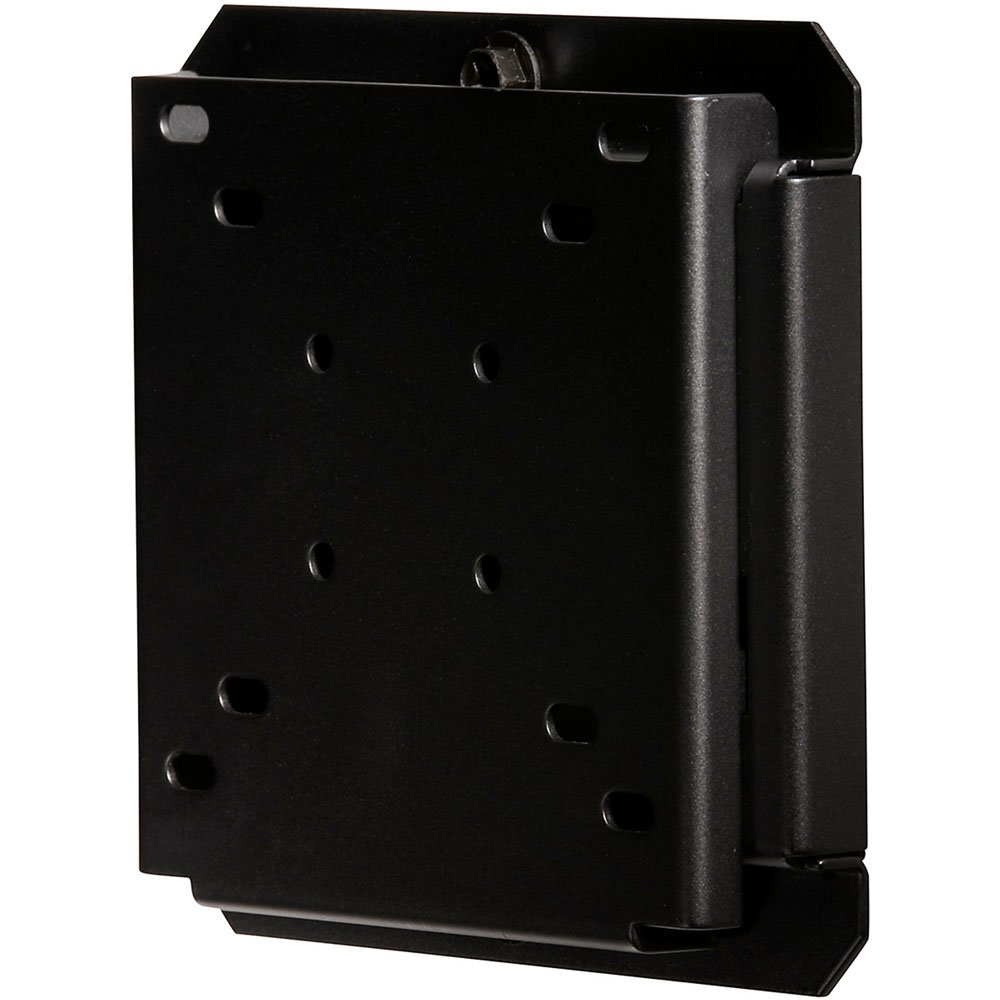
Image: The Peerless SF630-S Smartmount Flat Wall Mount, shown from a slightly angled side view. It is a black, sturdy metal bracket designed to hold a flat-panel display. The front plate features multiple oval and circular holes for VESA compatibility, and the side shows the low-profile design of the wall-mounting mechanism.
Operating
The Peerless SF630-S is a fixed flat wall mount, meaning once installed, it holds your display in a static position close to the wall. There are no moving parts or adjustments for tilt, swivel, or extension.
- Viewing Angle: Position your display at the optimal viewing height during installation, as it cannot be adjusted after mounting.
- Cable Management: Ensure all cables (power, HDMI, etc.) are routed neatly and safely behind the display and through any cable management features of the mount or wall. Avoid pinching cables.
Maintenance
Regular maintenance helps ensure the longevity and safety of your wall mount.
- Cleaning: Dust the mount periodically with a soft, dry cloth. Do not use abrasive cleaners or solvents, as they may damage the finish.
- Inspection: Periodically check all screws and bolts to ensure they remain tight. Over time, vibrations or minor shifts can cause fasteners to loosen. Retighten if necessary.
- Structural Integrity: If you notice any signs of damage, corrosion, or weakening of the wall or the mount itself, discontinue use immediately and consult a professional.
Troubleshooting
This section addresses common issues you might encounter.
| Problem | Possible Cause | Solution |
|---|---|---|
| Mount feels unstable after installation. | Not securely fastened to wall studs; incorrect anchors used; wall surface not strong enough. | Ensure mount is fastened into the center of at least two wood studs. If using concrete/brick, verify correct anchors are used and wall is structurally sound. Retighten all fasteners. |
| Display does not sit flush against the wall. | Cables or connectors are obstructing; display brackets not properly aligned. | Check cable routing and ensure no cables are pinched or preventing the display from sitting flush. Re-check display bracket alignment and re-install if necessary. Use spacers if needed for cable clearance. |
| Mounting screws for display do not fit. | Incorrect screw size or type selected for your display's VESA pattern. | Refer to your display's manual for correct VESA screw specifications. The mount kit includes common sizes; if yours is not included, you may need to purchase specific screws. |
Specifications
- Model: SF630-S
- Brand: Peerless-AV
- Mounting Type: Flat Wall Mount
- Compatible Screen Sizes: 10 to 29 Inches
- Material: Metal
- Product Dimensions: Approximately 1 x 1 x 1 inches (as per general product info, actual mount dimensions may vary slightly)
- Item Weight: Approximately 2.2 pounds
- Color: Black
- Country of Manufacture: Taiwan
Warranty and Support
Peerless-AV products are designed and manufactured to the highest standards. For specific warranty information, please refer to the warranty card included with your product or visit the official Peerless-AV website.
Customer Support: If you have any questions, require assistance with installation, or need to report missing/damaged parts, please contact Peerless-AV customer support. Contact information can typically be found on the manufacturer's website or on the product packaging.
Online Resources: For additional support, FAQs, or product registration, visit the Peerless-AV Store on Amazon or their official company website.
Official Product Videos
No official product videos from the seller are available for this model at this time.
Related documentsSF630


Ask a question about this manual
Ask about setup, troubleshooting, compatibility, parts, safety, or missing instructions. Manuals+ will review the question and use this page’s manual context to help answer it.