
Bose 282987-001
Bose Wave Radio II - Platinum White User Manual
Model: 282987-001
Introduction
The Bose Wave Radio II is designed to provide rich, room-filling sound from a compact system. Utilizing Bose's acoustic waveguide speaker technology, it delivers clear stereo sound and natural tonal balance across all volume levels. This manual provides essential information for setting up, operating, maintaining, and troubleshooting your Wave Radio II.
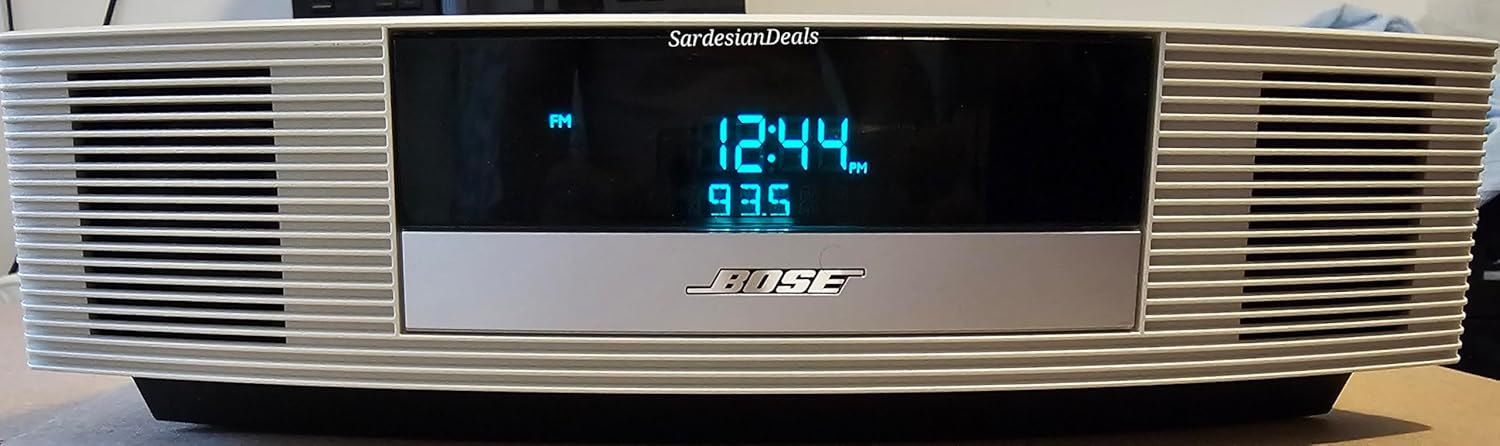
Figure 1: Front view of the Bose Wave Radio II, showcasing its display and speaker grilles.
Setup
Unpacking and Placement
Carefully remove all components from the packaging. Place the Wave Radio II on a stable, level surface, away from direct sunlight, heat sources, or excessive moisture. Ensure adequate ventilation around the unit.
Connecting Power
Connect the supplied power cord to the AC POWER input on the back of the unit, then plug the other end into a wall outlet. The unit is designed for 120V AC, 60Hz power.
Antenna Connection
For optimal FM reception, connect the supplied FM antenna to the FM 75Ω ANTENNA jack on the rear panel. Extend the antenna fully and position it for the best reception. For AM reception, the Wave Radio II has a built-in AM antenna.
Auxiliary Input (AUX IN)
To connect external audio devices such as an MP3 player or CD player, use a standard 3.5mm audio cable (not supplied) to connect the device's audio output to the AUX IN jack on the back of the Wave Radio II.
Headphone Connection
For private listening, plug standard headphones into the HEADPHONES jack on the rear panel. Connecting headphones will mute the main speakers.

Figure 2: Rear panel connections of the Wave Radio II.
Operating Instructions
Basic Controls (Using Remote Control)
The Bose Wave Radio II is primarily operated using the supplied remote control. Ensure the remote has working batteries and is pointed towards the front of the unit.
- Power: Press the POWER button to turn the unit on or off.
- Volume: Use the Volume Up (+) and Volume Down (-) buttons to adjust the listening level.
- Source Selection: Press FM, AM, or AUX to select the desired audio source.
- Mute: Press the MUTE button to temporarily silence the audio. Press again to restore.

Figure 3: Bose Wave Radio II with its remote control.
Tuning Radio Stations
- Seek: Press the SEEK buttons (<< or >>) to automatically scan for the next strong station.
- Manual Tune: Use the Tune Up (+) and Tune Down (-) buttons for fine-tuning or manual station selection.
Setting Presets
The Wave Radio II allows you to store up to six FM and six AM stations as presets for quick access.
- Tune to the desired station.
- Press and hold one of the Preset (1-6) buttons until you hear a beep, indicating the station is saved.
- To recall a preset, simply press the corresponding Preset (1-6) button.
Setting Time and Alarms
The unit features a clock display and dual alarms.
- Setting Time: Press the TIME button on the remote and use the Tune Up (+) and Tune Down (-) buttons to adjust the hour and minute. Press TIME again to confirm.
- Setting Alarms: Press Alarm 1 or Alarm 2. Use the Tune Up (+) and Tune Down (-) buttons to set the alarm time. Select the alarm source (radio or tone) and volume. Press the respective Alarm button again to activate.
- Snooze: When an alarm sounds, press the SNOOZE button on the remote to temporarily silence it. The alarm will sound again after a few minutes.
Bluetooth Connectivity (If applicable)
While the Bose Wave Radio II (Model 282987-001) primarily uses wired connections, some versions or accessories may offer Bluetooth connectivity. If your unit supports Bluetooth, refer to the specific instructions provided with your Bluetooth adapter or accessory for pairing and operation. Generally, this involves putting the adapter into pairing mode and selecting it from your device's Bluetooth settings.
Maintenance
Cleaning
To clean the unit, use a soft, dry cloth. Do not use liquid cleaners, sprays, or solvents, as they may damage the finish or internal components. Gently wipe the display and exterior surfaces.
General Care
- Avoid placing heavy objects on the unit.
- Do not block ventilation openings.
- If the unit is not used for an extended period, unplug it from the power outlet.
Troubleshooting
If you encounter issues with your Bose Wave Radio II, refer to the following common solutions:
| Problem | Possible Cause | Solution |
|---|---|---|
| No power | Power cord not securely connected; outlet not active. | Ensure power cord is firmly plugged into the unit and a working wall outlet. Test the outlet with another device. |
| No sound | Volume too low; Mute activated; incorrect source selected; headphones connected. | Increase volume. Press MUTE button. Select correct source (FM, AM, AUX). Disconnect headphones. |
| Poor radio reception | FM antenna not extended or positioned correctly; interference. | Fully extend and reposition the FM antenna. Move the unit away from other electronic devices that may cause interference. |
| Remote control not working | Batteries are dead or incorrectly inserted; remote not pointed at unit. | Replace batteries with new ones, ensuring correct polarity. Point the remote directly at the front of the Wave Radio II. Ensure no obstructions. |
If the problem persists after trying these solutions, please contact Bose customer support.
Specifications
- Product Dimensions: 4.2 x 8.6 x 14.6 inches (H x W x D)
- Item Weight: 3 pounds
- Model Number: 282987-001
- Manufacturer: BOSE
- Color: Platinum White
- Speaker Type: Stereo
- Connectivity Technology: Bluetooth (Note: Bluetooth functionality may require an external adapter for this model.)
- Power Requirement: 120V AC, 60Hz (standard for US models)
Warranty Information
Bose products are covered by a limited warranty. For detailed information regarding the warranty period, coverage, and terms and conditions for your Bose Wave Radio II, please refer to the warranty card included with your product or visit the official Bose website. Keep your proof of purchase for warranty claims.
Customer Support
For further assistance, technical support, or service inquiries, please contact Bose customer support through their official website or the contact information provided in your product documentation. You can visit the Bose Store on Amazon for general information, or the official Bose website for direct support.
Ask a question about this manual
Ask about setup, troubleshooting, compatibility, parts, safety, or missing instructions. Manuals+ will review the question and use this page’s manual context to help answer it.