
RCA RP2612
RCA RP2612 Personal CD Player with FM Tuner User Manual
Model: RP2612
Introduction
This manual provides detailed instructions for the setup, operation, and maintenance of your RCA RP2612 Personal CD Player with FM Tuner. Please read this manual thoroughly before using the device to ensure proper function and longevity.
Safety Information
To prevent fire or shock hazards, do not expose this appliance to rain or moisture. Do not open the cabinet. Refer servicing to qualified personnel only. The product dimensions are approximately 6.25 inches by 5.25 inches, with a depth of 1 inch.
Package Contents
Verify that all items listed below are included in your package:
- RCA RP2612 Personal CD Player
- Earphones (e.clipz clip-on headphones)
- Wired Remote Control
Note: Two AA alkaline batteries are required for operation and are not included.
Features
- Digital FM Tuner with 20 Presets
- 60-Second espXtreme Electronic Skip Protection
- Multifunction LCD Display
- e.clipz Headphones
- Up to 20 Hour Battery Life (with two AA alkaline batteries)
- Playback of CD, CD-R, CD-RW, MP3, and WMA files
- Digital Bass Boost
- Power Saver "Auto-Off" function
Setup
Battery Installation
Open the battery compartment cover located on the underside of the player. Insert two new AA alkaline batteries, ensuring correct polarity (+/-) as indicated inside the compartment. Close the cover securely.
Connecting Headphones
Plug the earphones or your preferred headphones into the headphone jack (usually marked with a headphone symbol) on the side of the player. For optimal sound, ensure the plug is fully inserted.
Connecting Wired Remote Control (Optional)
If using the wired remote control, plug its connector into the designated remote control jack on the player. Then, plug your headphones into the headphone jack on the remote control.
Operating Instructions
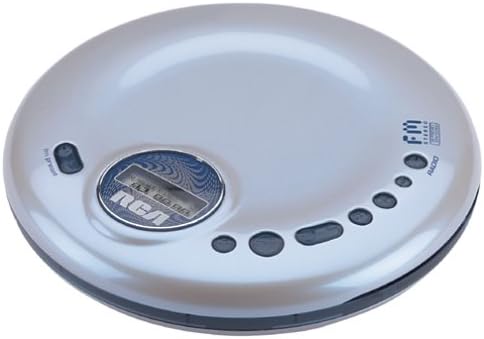
Image: Top view of the RCA RP2612 Personal CD Player. The image shows the silver-colored circular device with a central LCD display and the RCA logo. Various control buttons are arranged in an arc on the right side, and a hold switch is visible on the left. The FM Stereo logo is also present on the top right.
CD Playback
Open the CD Compartment: Press the OPEN button (if present) or slide the latch to open the top cover of the CD player.
Insert a CD: Place a CD (audio CD, CD-R, CD-RW, MP3, or WMA disc) onto the spindle with the label side facing up. Gently press down on the center of the disc until it clicks into place.
Close the CD Compartment: Close the top cover firmly until it latches.
Power On: Press the PLAY/PAUSE button to turn on the player. The LCD display will show "READING" or similar, then the total number of tracks and playing time.
Play/Pause: Press PLAY/PAUSE to start or pause playback.
Stop: Press the STOP button to stop playback.
Skip Tracks: Press the SKIP FORWARD or SKIP BACKWARD buttons to move to the next or previous track.
Fast Forward/Rewind: Press and hold the SKIP FORWARD or SKIP BACKWARD buttons to fast forward or rewind within a track.
Volume Control: Adjust the volume using the VOLUME +/- buttons or dial, typically located on the side or front of the player.
FM Tuner Operation
Switch to Radio Mode: Press the MODE or RADIO button to switch from CD mode to FM radio mode. The LCD display will show the radio frequency.
Tune Stations: Use the TUNE +/- or SEEK buttons to manually tune to a station or automatically scan for the next available station.
Preset Stations: To save a station, tune to the desired frequency, then press and hold the PRESET button until the preset number flashes. Use the SKIP FORWARD/BACKWARD buttons to select a preset number, then press PRESET again to confirm. To recall a preset, press the PRESET button repeatedly to cycle through saved stations.
Special Functions
espXtreme Electronic Skip Protection: This feature provides up to 60 seconds of anti-skip protection for CDs, ensuring uninterrupted playback during movement. It automatically activates during CD playback.
Digital Bass Boost: Press the DBBS or BASS button to enhance low-frequency sounds. Press again to deactivate.
Power Saver "Auto-Off": The player is designed to automatically power off after a period of inactivity to conserve battery life. To resume operation, press the PLAY/PAUSE button.
Hold Function: The HOLD switch, typically located on the side or back of the player, disables all buttons to prevent accidental operation. Slide the switch to the "HOLD" position to activate and slide it back to deactivate. Exercise care when operating the hold switch to avoid damage.
Maintenance
Cleaning the Unit: Use a soft, dry cloth to clean the exterior of the player. Do not use abrasive cleaners or solvents. For the lens, use a specialized CD lens cleaner if necessary, following its instructions.
Battery Care: Remove batteries if the unit will not be used for an extended period to prevent leakage. Dispose of used batteries responsibly according to local regulations.
Disc Care: Handle CDs by their edges. Keep discs clean and free of scratches. Store them in their cases when not in use.
Troubleshooting
| Problem | Possible Cause | Solution |
|---|---|---|
| No power | Batteries are dead or incorrectly inserted. | Replace batteries with new AA alkaline batteries, ensuring correct polarity. |
| Disc not playing / "NO DISC" error | Disc is dirty, scratched, or inserted incorrectly. Player is in HOLD mode. | Clean the disc, reinsert it correctly. Ensure the HOLD switch is off. Try another disc. |
| Skipping during playback | Disc is dirty or scratched. Player is subjected to excessive vibration. | Clean the disc. Ensure espXtreme is active. Minimize movement during playback. |
| No sound from headphones | Headphones not properly connected. Volume is too low. | Ensure headphones are fully plugged in. Increase volume. Test with different headphones. |
| Poor FM radio reception | Weak signal. Interference. | Adjust the player's position. Extend the headphone cable (which acts as an antenna). |
Specifications
- Model: RP2612
- Brand: RCA
- Supported Audio Formats: CD, CD-R, CD-RW, MP3, WMA
- Skip Protection: 60-second espXtreme Electronic Skip Protection
- Tuner: Digital FM Tuner with 20 Presets
- Power Source: 2 x AA Alkaline Batteries (not included)
- Battery Life: Up to 20 hours (approximate, with alkaline batteries)
- Dimensions: 3.5 x 12 x 8.8 inches (Product Dimensions)
- Weight: 12 ounces
- Connectivity: Auxiliary (for headphones)
- Special Features: Digital Bass Boost, Power Saver Auto-Off, Wired Remote Control capability
Warranty and Support
For warranty information or technical support, please refer to the documentation provided at the time of purchase or visit the official RCA website. Keep your purchase receipt as proof of purchase for warranty claims.
Ask a question about this manual
Ask about setup, troubleshooting, compatibility, parts, safety, or missing instructions. Manuals+ will review the question and use this page’s manual context to help answer it.