
Introduction
This manual provides comprehensive instructions for the setup, operation, maintenance, and troubleshooting of your RCA RS2650 Bookshelf Stereo System with 5-Disc CD Changer. Please read this manual thoroughly before using the system to ensure proper operation and to maximize your listening experience. Keep this manual for future reference.
Safety Information
Always follow basic safety precautions when using this product to reduce the risk of fire, electric shock, and injury to persons. This includes, but is not limited to:
- Do not expose this appliance to rain or moisture.
- Do not block any ventilation openings.
- Do not install near any heat sources.
- Protect the power cord from being walked on or pinched.
- Only use attachments/accessories specified by the manufacturer.
- Refer all servicing to qualified service personnel.
Package Contents
Verify that all items are present in the package:
- RCA RS2650 Bookshelf Stereo System Main Unit
- Two (2) Stereo Speakers
- Remote Control (with batteries)
- AM Loop Antenna
- FM Wire Antenna
- User Manual (this document)
Setup
1. Unpacking and Placement
Carefully remove all components from the packaging. Place the main unit on a stable, flat surface. Position the speakers on either side of the main unit, ensuring they are at an equal distance for optimal stereo sound. Allow adequate ventilation around the unit.
2. Connecting the Speakers
Connect the speaker wires from the main unit to the corresponding terminals on the back of each speaker. Ensure that the positive (+) and negative (-) terminals are matched correctly for each speaker to maintain proper audio phasing.
3. Connecting Antennas
- FM Antenna: Connect the supplied FM wire antenna to the FM antenna terminal on the rear of the main unit. Extend the wire for best reception.
- AM Antenna: Assemble the AM loop antenna and connect it to the AM antenna terminals on the rear of the main unit. Rotate the antenna for optimal AM reception.
4. Power Connection
Plug the AC power cord into a standard wall outlet. The system is now ready for operation.
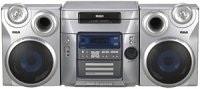
Figure 1: Front view of the RCA RS2650 Bookshelf Stereo System, showing the main unit with its 5-disc CD changer tray and control panel, flanked by two stereo speakers. This image illustrates the typical setup configuration.
Operating Instructions
1. Power On/Off
Press the POWER button on the front panel or remote control to turn the system on or off.
2. CD Player Operation
The system features a 5-disc CD changer compatible with CD, CD-R, CD-RW, MP3, and WMA formats.
- Press the OPEN/CLOSE button to open the CD tray.
- Place up to five discs onto the disc trays, label side up.
- Press OPEN/CLOSE again to close the tray.
- Press the CD button to select the CD function.
- Press PLAY/PAUSE to start playback.
- Use the SKIP buttons to navigate between tracks or discs.
- Programming: While in stop mode, press PROGRAM to create a custom playback sequence.
- Random Play: Press RANDOM to play tracks in a random order.
- Repeat Play: Press REPEAT to repeat the current track, current disc, or all discs.
3. AM/FM Tuner Operation
The digital AM/FM tuner allows you to listen to your favorite radio stations.
- Press the TUNER/BAND button to select either AM or FM band.
- Press the TUNE +/- buttons to manually tune to a station.
- Press and hold TUNE +/- for automatic station search.
- Preset Stations: The system supports 32 AM/FM presets. To store a station, tune to the desired frequency, then press PROGRAM followed by a preset number button. To recall a preset, press the corresponding preset number.
4. Equalizer and Bass Boost
Customize your audio experience with the built-in equalizer and bass boost system.
- Press the EQ button repeatedly to cycle through 5 preset equalization settings: Rock, Pop, Jazz, Classic, and Flat.
- Press the BASS BOOST button to enhance low-frequency sounds. Press again to deactivate.
5. Front A/V Inputs
The front A/V inputs allow you to connect external audio/video devices, such as game consoles or MP3 players, to the stereo system. Connect the audio output of your device to the corresponding input jacks on the front panel. Select the AUX input source to listen to the connected device.
Maintenance
Cleaning the Unit
Wipe the exterior of the unit with a soft, dry cloth. For stubborn stains, use a cloth lightly dampened with water. Do not use abrasive cleaners, waxes, or solvents as they may damage the finish. Ensure the unit is unplugged before cleaning.
CD Care
Handle CDs by their edges. Keep them clean and free of scratches. Store discs in their cases when not in use. If a disc is dirty, wipe it gently with a soft, lint-free cloth from the center outwards.
Troubleshooting
If you experience problems with your stereo system, refer to the following table for possible solutions.
| Problem | Possible Cause | Solution |
|---|---|---|
| No power | Power cord not securely plugged in. | Check power cord connection to the wall outlet and the unit. |
| No sound | Volume is too low or muted. Speakers not connected properly. | Increase volume. Check speaker wire connections. Ensure correct input source is selected. |
| CD not playing | Disc is dirty, scratched, or inserted incorrectly. Incorrect format. | Clean the disc. Insert disc label side up. Ensure disc format is compatible (CD, CD-R, CD-RW, MP3, WMA). |
| Poor radio reception | Antenna not properly positioned or connected. Interference. | Adjust the position of the AM/FM antennas. Move unit away from other electronic devices. |
Specifications
- Model Number: RS2650
- Brand: RCA
- Power Output: 100 Watts (Total)
- CD Changer: 5-Disc Carousel
- Supported Disc Formats: CD, CD-R, CD-RW, MP3, WMA
- Tuner: Digital AM/FM with 32 Presets
- Equalizer: 5 Preset Modes (Rock, Pop, Jazz, Classic, Flat) + Bass Boost
- Inputs: Front A/V (for MP3 players, game consoles)
- Speaker Type: Stereo
- Power Source: AC Cable Electric
- Product Dimensions (L x W x H): 63.5 x 45.72 x 38.1 cm
- Product Weight: 12.29 kg
Warranty Information
This RCA RS2650 Bookshelf Stereo System comes with a 1-year limited warranty from the date of purchase. This warranty covers manufacturing defects in materials and workmanship under normal use. It does not cover damage caused by misuse, accident, unauthorized modification, or external causes. Please retain your proof of purchase for warranty claims.
Customer Support
For further assistance, technical support, or warranty service, please contact RCA customer support. Refer to the contact information provided with your product packaging or visit the official RCA website for the most up-to-date support details.


