
Introduction
The Delta Faucet RP26752 Rotational Limit Stop is a crucial component designed to regulate the range of motion for your faucet handle, primarily to control water temperature or flow. This part ensures precise operation and can prevent scalding by limiting the hot water output, or simply restrict the handle's swing to avoid hitting adjacent surfaces. It is engineered to meet Delta's original specifications, ensuring compatibility and reliable performance with your Delta faucet.
Product Overview
The RP26752 Rotational Limit Stop is a small, durable component typically made from high-quality plastic, designed for longevity and consistent performance within your Delta faucet assembly. Its primary function is to provide a physical stop for the faucet handle's rotation, allowing users to set a maximum temperature or limit the handle's movement range.
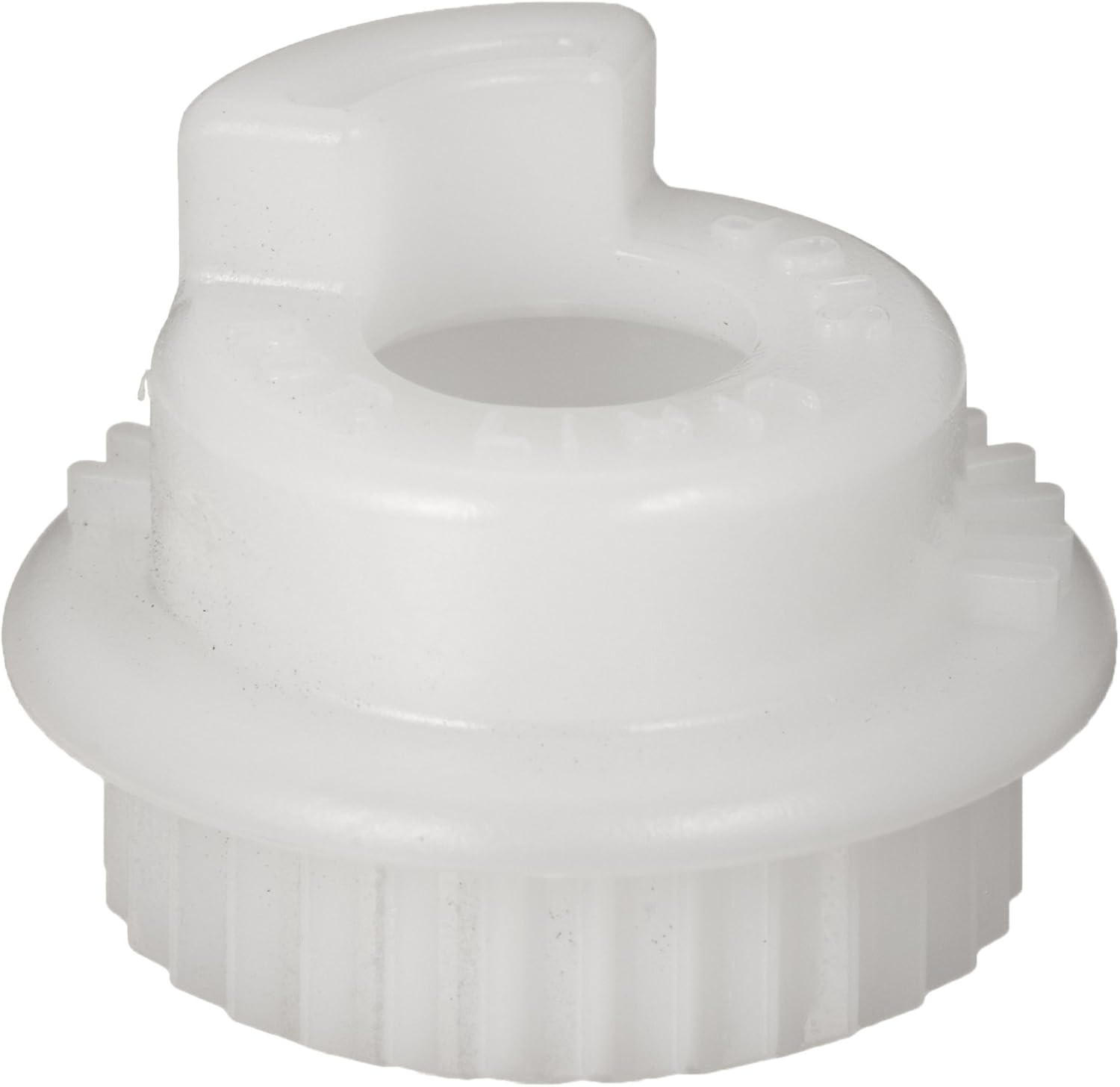
Figure 1: Front view of the Delta Faucet RP26752 Rotational Limit Stop. This image shows the white plastic component with its central opening and the notched base, designed to fit precisely within the faucet mechanism.

Figure 2: Angled view of the Delta Faucet RP26752 Rotational Limit Stop. This perspective highlights the specific shape and contours of the limit stop, including the small protrusion that acts as the physical stop point for the faucet handle.

Figure 3: Diagrammatic representation of the Delta Faucet RP26752 Rotational Limit Stop. This line drawing illustrates the component's form and key features, useful for identifying the part during installation or replacement.
Key Features:
- Designed exclusively for Delta faucets, ensuring perfect fit and function.
- Manufactured to original specifications for reliable performance.
- Rigorously tested to ensure quality and durability.
Specifications
| Attribute | Detail |
|---|---|
| Brand | DELTA |
| Model Number | RP26752 |
| Material | Durable Plastic (Component is plastic; 'Chrome' in specifications likely refers to compatible faucet finish) |
| Item Weight | 0.8 ounces |
| Product Dimensions | 4 x 3 x 1 inches |
| UPC | 034449394093 |
Installation Instructions
The Delta Faucet RP26752 Rotational Limit Stop is an internal component of certain Delta faucets. Installation typically involves disassembling part of the faucet handle or valve assembly. It is highly recommended to consult the specific installation manual for your Delta faucet model, as procedures may vary. The following are general steps and should not replace your faucet's official instructions.
- Turn Off Water Supply: Before beginning, locate and turn off the hot and cold water supply valves to the faucet. Open the faucet handle to drain any remaining water.
- Disassemble Faucet Handle: Carefully remove the faucet handle. This usually involves unscrewing a set screw (often hidden under a decorative cap) and lifting the handle off.
- Access Valve Assembly: Depending on your faucet model, you may need to remove a cap, dome, or retaining nut to expose the valve cartridge and the area where the limit stop is located.
- Locate and Remove Old Limit Stop (if applicable): Identify the existing rotational limit stop. It is typically a small plastic piece that interacts with the valve stem or cartridge. Note its orientation before removal. Gently pry or lift it out.
- Install New RP26752: Place the new RP26752 Rotational Limit Stop into its designated slot or onto the valve stem. Ensure it is seated correctly and oriented as per your faucet's manual. The notches or tabs on the limit stop should align with corresponding features on the faucet body or cartridge.
- Reassemble Faucet: Reinstall the valve assembly components, handle, and any decorative caps in reverse order of disassembly. Ensure all connections are secure but do not overtighten.
- Restore Water Supply: Slowly turn the hot and cold water supply valves back on. Check for any leaks.
- Test Operation: Test the faucet's operation, checking the range of motion and water temperature.
If you encounter any difficulties, refer to your specific faucet's installation guide or contact Delta Faucet support.
Operating and Adjustment
The RP26752 Rotational Limit Stop is designed to be set during installation or adjusted as needed to control the maximum hot water temperature or the overall handle swing. Once installed, its operation is passive, limiting the handle's movement based on its physical configuration.
Adjusting the Temperature Limit:
Many Delta faucets allow for adjustment of the rotational limit stop to fine-tune the maximum hot water temperature. This is particularly useful in households with children or elderly individuals to prevent accidental scalding.
- Access the Limit Stop: Follow the initial steps of the installation guide to turn off water and remove the faucet handle and any necessary covers to expose the valve cartridge and limit stop.
- Adjust the Stop: The limit stop typically has multiple settings or teeth that allow you to rotate it to a different position. Moving the stop will either increase or decrease the range of motion towards the hot water side. Consult your faucet's specific manual for precise adjustment instructions, as the method can vary (e.g., lifting and rotating, or simply rotating).
- Test and Reassemble: After making an adjustment, temporarily reassemble enough of the faucet to turn the water back on and test the maximum hot water temperature. If satisfied, turn off water, fully reassemble, and restore water supply. If not, repeat the adjustment process.
Always test the water temperature carefully after adjustment to ensure it is safe and meets your requirements.
Maintenance
The Delta Faucet RP26752 Rotational Limit Stop is a durable component designed for long-term use with minimal maintenance. As an internal part, it is not exposed to water or external elements that typically require regular cleaning.
- Periodic Inspection: If you are disassembling your faucet for other maintenance (e.g., replacing a cartridge), take the opportunity to inspect the limit stop for any signs of wear, cracks, or damage.
- Cleaning: If the limit stop appears dirty or has mineral deposits, gently wipe it clean with a soft cloth and mild soap and water. Avoid harsh chemicals or abrasive cleaners, as these can damage the plastic.
- Lubrication: No lubrication is typically required for the rotational limit stop itself. If lubricating other faucet components, ensure any lubricants used are safe for plastics and potable water systems.
Proper reassembly after any maintenance is crucial to ensure the faucet functions correctly and without leaks.
Troubleshooting
If you experience issues related to your faucet's handle rotation or temperature control after installing or adjusting the RP26752 Rotational Limit Stop, consider the following common troubleshooting steps:
- Handle Not Moving Freely or Too Restricted:
- Ensure the limit stop is correctly seated and not misaligned.
- Check if the limit stop is installed in the correct orientation as per your faucet's manual.
- Verify that no other internal components are obstructing the handle's movement.
- Not Enough Hot Water / Water Not Hot Enough:
- The limit stop may be set to restrict hot water too much. Adjust the limit stop to allow for a greater range of motion towards the hot side (refer to "Operating and Adjustment" section).
- Ensure the hot water supply valve is fully open.
- Check your water heater settings.
- Handle Feels Loose or Wobbly:
- Ensure all faucet components, including the handle set screw and any retaining nuts, are securely tightened.
- Verify the limit stop is properly seated and not allowing excessive play.
- Leaks After Installation:
- Leaks are typically not caused by the limit stop itself, but rather by improper reassembly of the faucet.
- Check that the valve cartridge is correctly seated and any O-rings or gaskets are in place and not damaged.
- Ensure all connections are tightened appropriately.
If troubleshooting does not resolve the issue, it may indicate a problem with another faucet component or require professional assistance.
Warranty and Support
For information regarding the warranty of your Delta Faucet RP26752 Rotational Limit Stop or your Delta faucet, please refer to the warranty documentation provided with your original faucet purchase. Delta Faucet stands behind its products with comprehensive warranties.
For technical support, replacement parts, or further assistance, please contact Delta Faucet customer service:
- Website: Visit the official Delta Faucet website for support resources, FAQs, and contact information.
- Phone: Refer to your faucet's manual or the Delta Faucet website for customer service phone numbers.
- Online Resources: Many installation guides and troubleshooting videos are available on the Delta Faucet website.
When contacting support, please have your faucet model number and the RP26752 part number ready for quicker assistance.