
1. Introduction and Overview
This manual provides essential information for the safe and efficient operation, maintenance, and troubleshooting of your JET JSG-6DC Benchtop Belt and Disc Sander. Please read and understand all instructions before operating the machine.

Figure 1: JET JSG-6DC Benchtop Belt and Disc Sander
The image displays the complete JET JSG-6DC Benchtop Belt and Disc Sander, showcasing its primary components including the belt sanding arm on the left, the disc sanding plate on the right, and the motor housing in the center with the power switch.
Key Features:
- Powerful Motor: Equipped with a 1-1/2 HP motor for demanding sanding tasks.
- Dual Sanding Surfaces: Features a 6" x 48" belt and a 12" disc for versatile applications.
- Adjustable Belt Arm: The belt can be used horizontally, vertically, or at any angle in between.
- Precision Tables: Cast iron tables with miter gauge slots and positive stops at 90 and 45 degrees.
- Efficient Dust Collection: Single 4" dust port for effective dust extraction from both sanding surfaces.
- Graphite Platen: Graphite-covered steel platen for cooler operation and extended belt life.
- Easy Adjustments: Dual thumbscrew belt tracking adjustment and quick-release belt tension lever.
2. Safety Instructions
Always follow basic safety precautions to reduce the risk of fire, electric shock, and personal injury when operating power tools. Keep this manual for future reference.
General Safety Rules:
- Work Area: Keep the work area clean and well-lit. Cluttered or dark areas invite accidents.
- Electrical Safety: Do not expose power tools to rain or wet conditions. Avoid body contact with grounded surfaces.
- Personal Safety: Always wear eye protection. Use hearing protection when operating the sander. Wear appropriate clothing; avoid loose clothing, jewelry, and long hair that can get caught in moving parts.
- Machine Operation: Do not force the tool. Use the correct tool for your application. Ensure the power switch is in the OFF position before connecting to power.
- Maintenance: Disconnect the plug from the power source before making any adjustments, changing accessories, or storing the tool.
- Dust Collection: Always connect the sander to a dust collection system to minimize airborne dust and maintain a clear workspace.
3. Components and Controls
Familiarize yourself with the various parts of the sander before operation.
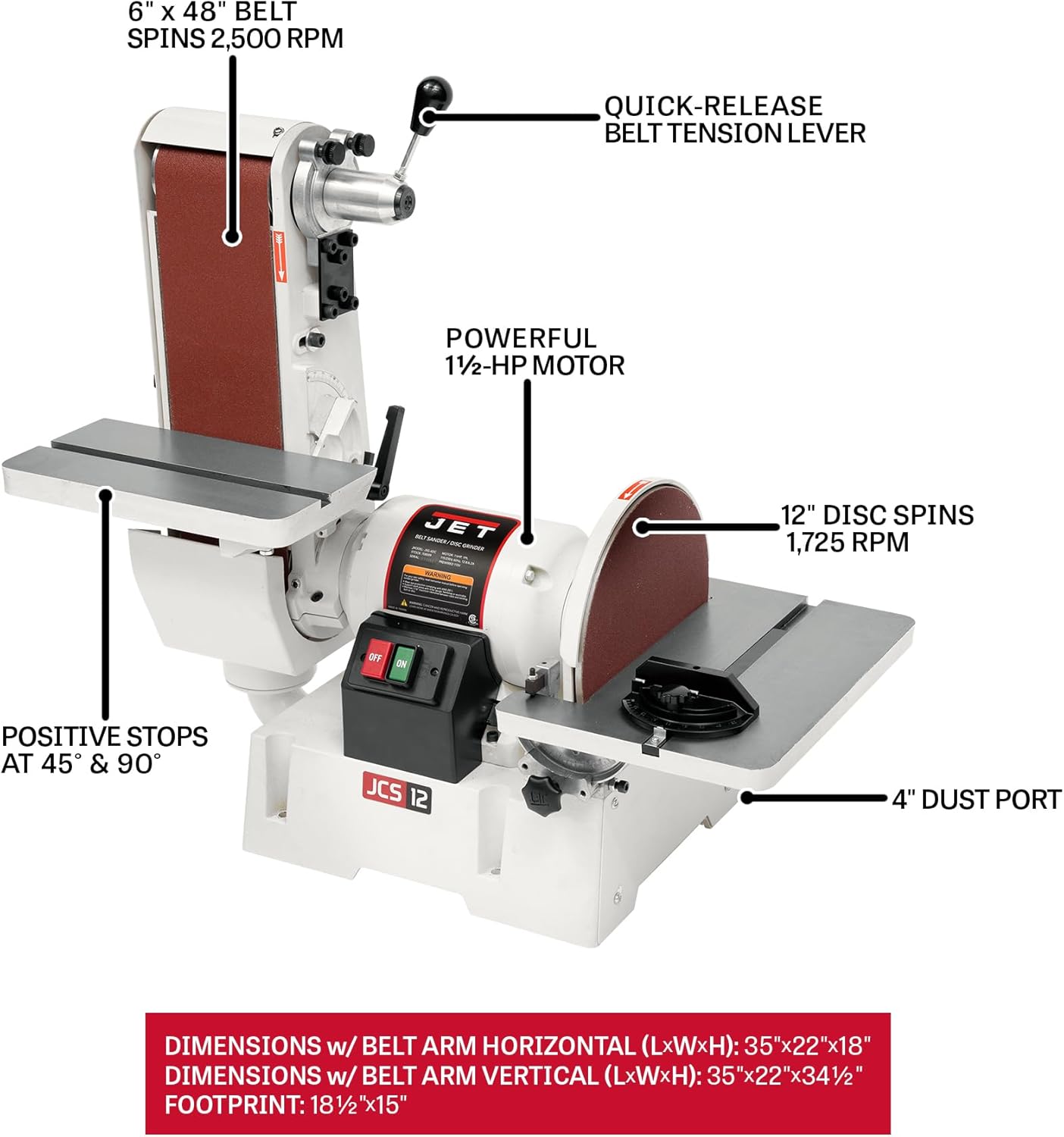
Figure 2: Key Components of the JSG-6DC Sander
This diagram illustrates the main components of the sander, including the 6" x 48" belt, 12" disc, 1-1/2 HP motor, quick-release belt tension lever, dual thumbscrew belt tracking adjustment, positive stops at 45° & 90°, and the 4" dust port.
- Belt Sanding Arm: Holds the 6" x 48" abrasive belt. Can be adjusted for horizontal, vertical, or angled sanding.
- Disc Sanding Plate: The 12" diameter disc for flat sanding operations.
- Work Tables: Two precision-ground cast iron tables, one for the belt and one for the disc, with miter gauge slots.
- Miter Gauge: Used with the work tables for accurate angle sanding.
- Power Switch: ON/OFF switch located on the motor housing.
- Dust Port: 4-inch diameter port for connecting to a dust collection system.
- Belt Tracking Adjustment: Dual thumbscrews for precise alignment of the sanding belt.
- Belt Tension Lever: Quick-release lever for easy belt changes.
4. Setup and Assembly
Unpacking and Inspection:
Carefully remove the sander and all components from the packaging. Inspect for any shipping damage. Report any damage immediately to your dealer.
Placement:
Place the sander on a sturdy, level workbench or an optional stand. Ensure adequate space around the machine for safe operation and material handling.
Electrical Connection:
- The JSG-6DC is prewired for 115V operation. It can be rewired for 230V by a qualified electrician if needed.
- Ensure the power supply matches the voltage requirements of the sander.
- Connect the sander to a grounded outlet.
Dust Collection System Connection:
Connect a 4-inch dust collection hose to the dust port located at the rear of the sander base. Proper dust collection is crucial for safety and machine longevity.

Figure 3: 4-Inch Dust Port
A close-up view of the 4-inch dust port, designed for connecting to an external dust collection system to manage sanding debris.
5. Operation
Starting and Stopping:
- To start the sander, press the green "ON" button.
- To stop the sander, press the red "OFF" button.
Using the Belt Sander:
- Belt Arm Adjustment: The belt arm can be positioned from horizontal to vertical. Loosen the locking knob, adjust the arm to the desired angle, and tighten the knob securely.
- Belt Tracking: Use the dual thumbscrew belt tracking adjustment to ensure the belt runs centrally on the rollers. Adjust while the sander is running (briefly) until the belt tracks correctly.
- Workpiece Support: Utilize the belt work table for supporting your workpiece. The table can be adjusted for angle sanding.
- Sanding Technique: Apply light, even pressure. Move the workpiece smoothly across the belt to prevent uneven sanding and overheating.
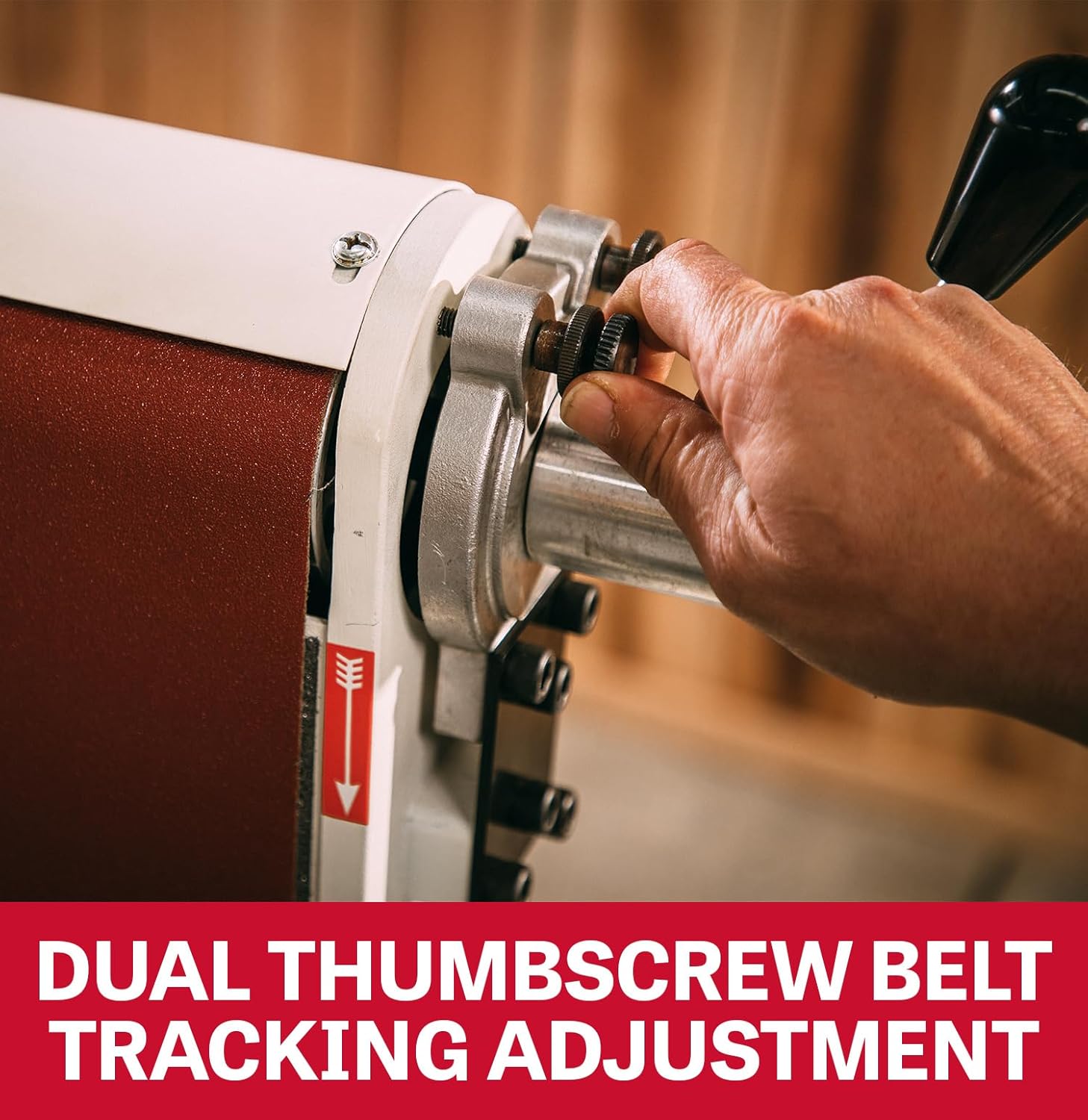
Figure 4: Dual Thumbscrew Belt Tracking Adjustment
A close-up of the dual thumbscrews used for precise adjustment of the sanding belt's tracking, ensuring it stays centered during operation.

Figure 5: Preset Stops for Work Tables
This image shows the mechanism for setting the work tables with positive stops at 90 and 45 degrees, facilitating accurate angle sanding.
Using the Disc Sander:
- Work Table Adjustment: The disc work table can be tilted and locked at various angles, with positive stops at 90 and 45 degrees.
- Miter Gauge: Insert the miter gauge into the table slot for precise angle sanding on the disc.
- Sanding Technique: Always sand on the downward-rotating side of the disc (left side when facing the disc) to prevent the workpiece from being thrown.

Figure 6: Precision-Ground Cast Iron Tables
A view of the robust cast iron work tables, highlighting their precision-ground surface for stable and accurate workpiece support during sanding.
6. Maintenance
Regular maintenance ensures optimal performance and extends the life of your sander. Always disconnect power before performing any maintenance.
Cleaning:
- After each use, clean dust and debris from the machine, especially around the motor vents, belt, and disc areas.
- Use compressed air or a brush. Do not use solvents that may damage plastic parts.
Belt Replacement:
- Disconnect power.
- Release the quick-release belt tension lever.
- Remove the old belt and install the new 6" x 48" belt, ensuring the directional arrow on the belt matches the arrow on the machine.
- Re-engage the tension lever and adjust belt tracking.
Disc Replacement:
- Disconnect power.
- Remove the quick-lock dust cover for access to the disc.
- Peel off the old adhesive-backed 12" sanding disc.
- Clean the disc plate thoroughly before applying a new disc.
- Align and firmly press the new disc onto the plate.

Figure 7: Graphite-Covered Steel Platen
A close-up view of the graphite-covered steel platen, which helps reduce friction and heat buildup, extending the life of the sanding belt.
7. Troubleshooting
This section addresses common issues you might encounter with your sander.
| Problem | Possible Cause | Solution |
|---|---|---|
| Sander does not start | No power, faulty switch, tripped circuit breaker. | Check power connection, wall outlet, circuit breaker. Inspect switch for damage. |
| Belt tracks unevenly | Incorrect belt tracking adjustment, worn belt. | Adjust belt tracking using thumbscrews. Replace worn belt. |
| Excessive vibration | Loose components, unbalanced disc, worn bearings. | Check all fasteners. Ensure disc is properly seated. Contact service if bearings are suspected. |
| Poor dust collection | Clogged dust port/hose, inadequate dust collector. | Clear obstructions from dust port and hose. Ensure dust collector is operating efficiently. |
| Sander bogs down under load | Overloading, dull abrasive, incorrect voltage. | Reduce pressure on workpiece. Replace abrasive belt/disc. Verify correct voltage supply. |
8. Specifications
| Specification | Detail |
|---|---|
| Model Number | JSG-6DC |
| Part Number | 708599 |
| Motor | 1-1/2 HP, 115/230V, 1Ph (prewired 115V) |
| Amperage (115V) | 12.8 Amps |
| Belt Size | 6" x 48" |
| Belt Speed | 2,500 SFPM (Surface Feet Per Minute) |
| Disc Diameter | 12 inches |
| Disc Speed | 1,725 RPM |
| Overall Dimensions (L x W x H) | 35" x 22" x 34.5" (with belt arm vertical) |
| Weight | 215 lbs |
| Material | Cast Iron, Steel |
| Included Abrasives | 60 Grit Belt, 60 Grit Disc |

Figure 8: Belt and Disc Speeds
This image highlights the operational speeds of the sander: the belt spins at 2,500 SFPM and the disc spins at 1,725 RPM.
9. Warranty and Support
Warranty Information:
The JET JSG-6DC Benchtop Belt and Disc Sander is covered by a 5-Year Warranty. This warranty covers defects in materials and workmanship under normal use and service.

Figure 9: JET 5-Year Warranty
The image displays the official JET 5-Year Warranty logo, indicating the product's coverage period.
For full warranty details, terms, and conditions, please refer to the official JET website or contact customer support.
Customer Support:
For technical assistance, parts, or service inquiries, please contact JET customer support. Have your model number (JSG-6DC) and serial number ready when contacting support.
Visit the official JET Store on Amazon for more information and product accessories.


