
KRUPS 8000032476
KRUPS FME214 Programmable Coffee Maker Machine
Model: FME214 (8000032476)
Introduction
This manual provides comprehensive instructions for the safe and efficient operation, maintenance, and troubleshooting of your KRUPS FME214 Programmable Coffee Maker. Please read this manual thoroughly before first use and keep it for future reference.
The KRUPS FME214 is designed to brew high-quality coffee with features such as a programmable timer, aroma function, and a duofilter water filtration system for optimal taste and machine longevity.
Important Safety Instructions
When using electrical appliances, basic safety precautions should always be followed to reduce the risk of fire, electric shock, and/or injury to persons, including the following:
- Read all instructions.
- Do not touch hot surfaces. Use handles or knobs.
- To protect against fire, electric shock, and injury to persons, do not immerse cord, plugs, or coffee maker in water or other liquid.
- Close supervision is necessary when any appliance is used by or near children.
- Unplug from outlet when not in use and before cleaning. Allow to cool before putting on or taking off parts, and before cleaning the appliance.
- Do not operate any appliance with a damaged cord or plug or after the appliance malfunctions, or has been damaged in any manner. Return appliance to the nearest authorized service facility for examination, repair, or adjustment.
- The use of accessory attachments not recommended by the appliance manufacturer may result in fire, electric shock, or injury to persons.
- Do not use outdoors.
- Do not let cord hang over edge of table or counter, or touch hot surfaces.
- Do not place on or near a hot gas or electric burner, or in a heated oven.
- Always attach plug to appliance first, then plug cord into the wall outlet. To disconnect, turn any control to "off", then remove plug from wall outlet.
- Do not use appliance for other than intended use.
- The carafe is designed for use with this appliance. It must never be used on a range top.
- Do not place a hot carafe on a wet or cold surface.
- Do not use a cracked carafe or a carafe having a loose or weakened handle.
- Do not clean carafe with cleansers, steel wool pads, or other abrasive material.
Product Overview
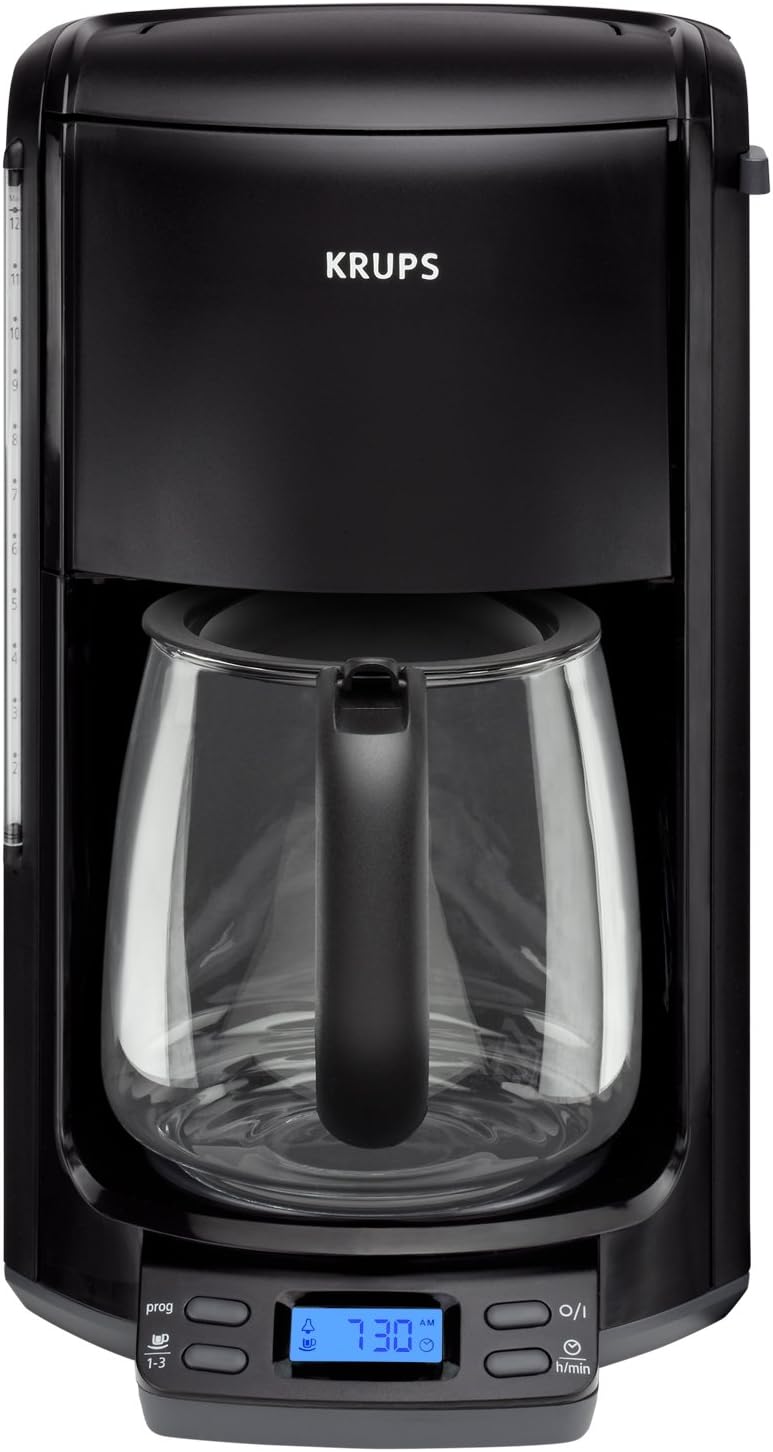
Image: Front view of the KRUPS FME214 Programmable Coffee Maker. It features a black exterior, a clear glass carafe, and a blue illuminated LED control panel at the base. The water level indicator is visible on the left side.
Components:
- Water Reservoir: Located at the back, with a clear water level indicator on the side.
- Lid: Covers the water reservoir and filter basket area.
- Filter Basket: Removable basket for holding coffee grounds and the filter.
- Cascading Brew Head: Delivers hot water evenly over coffee grounds.
- Glass Carafe: 12-cup capacity carafe with a handle and lid.
- Warming Plate: Keeps brewed coffee warm.
- LED Control Panel: Blue illuminated display with buttons for programming, time setting, and power.
- Duofilter Water Filtration System: Located within the water reservoir to improve water quality.
Setup
- Unpacking: Carefully remove all packaging materials and dispose of them responsibly.
- Initial Cleaning: Before first use, clean all removable parts (carafe, filter basket) with warm, soapy water. Wipe the exterior of the coffee maker with a damp cloth.
- First Brew Cycle (Cleaning): Fill the water reservoir to the 12-cup mark with fresh, cold water. Place an empty filter (paper or permanent) in the filter basket. Do not add coffee grounds. Place the carafe on the warming plate. Run a full brew cycle to flush the system. Discard the water. Repeat this process 2-3 times to ensure thorough cleaning and remove any manufacturing residues.
- Water Filter Installation: If using the Duofilter water filtration system, follow the instructions provided with the filter for proper installation into the water reservoir.
- Placement: Place the coffee maker on a flat, stable, heat-resistant surface, away from the edge of the counter and out of reach of children. Ensure adequate ventilation around the unit.
- Power Connection: Plug the power cord into a grounded electrical outlet.
Operating Instructions
Setting the Clock:
- When the coffee maker is plugged in, the LED display will flash.
- Press the "h/min" button (often labeled with a clock icon) to set the hour. Press and hold to advance quickly.
- Press the "h/min" button again to set the minutes. Press and hold to advance quickly.
- The clock is set when the display stops flashing.
Brewing Coffee:
- Fill Water Reservoir: Open the lid and fill the water reservoir with fresh, cold water to the desired number of cups, using the water level indicator on the side.
- Add Coffee Grounds: Place a paper filter (cone-shaped, size 4) or the permanent filter into the filter basket. Add the desired amount of ground coffee (approximately 1 tablespoon per cup, adjust to taste).
- Close Lid and Place Carafe: Close the lid securely. Ensure the glass carafe is empty and properly seated on the warming plate.
- Start Brewing: Press the "O/I" (On/Off) button. The indicator light will illuminate, and brewing will begin.
- Aroma Function: For a more intense extraction, especially when brewing smaller amounts (1-3 cups), press the "prog" button (often labeled "1-3" or with a coffee bean icon) before starting the brew cycle. This will slow down the brewing process for richer flavor.
- Pause and Serve: The coffee maker features a pause and serve function, allowing you to remove the carafe during the brewing cycle to pour a cup. Replace the carafe within 20 seconds to prevent overflow.
- Brewing Complete: An audible signal will sound when the brewing cycle is complete. The warming plate will keep the coffee warm for a set duration (up to 5 hours, depending on settings).
Programming Auto-Start:
- Prepare the coffee maker for brewing as described above (water, filter, coffee grounds, carafe in place).
- Press the "prog" button (often labeled "prog" or with a clock icon). The display will show "PROG" and the programmed start time will flash.
- Use the "h/min" button to set the desired auto-start time.
- Press the "prog" button again to confirm the auto-start time. The "PROG" indicator light will remain illuminated, indicating the auto-start function is active.
- The coffee maker will automatically begin brewing at the set time.
Maintenance and Cleaning
Regular cleaning and maintenance will ensure optimal performance and extend the life of your coffee maker.
Daily Cleaning:
- Always unplug the appliance before cleaning and allow it to cool completely.
- Wash the glass carafe, carafe lid, and filter basket in warm, soapy water after each use. These parts are generally top-rack dishwasher safe, but hand washing is recommended for longevity.
- Wipe the exterior of the coffee maker with a soft, damp cloth. Do not use abrasive cleaners or scouring pads.
- Do not immerse the coffee maker's main body, cord, or plug in water or any other liquid.
Descaling:
Mineral deposits (limescale) can build up in your coffee maker over time, affecting performance and taste. The descaling indicator will alert you when descaling is needed. Descale regularly, especially in areas with hard water.
- Prepare a descaling solution: Mix 1 part white vinegar with 2 parts water, or use a commercial descaling solution designed for coffee makers, following the product's instructions.
- Pour the solution into the water reservoir.
- Place an empty filter in the filter basket and the empty carafe on the warming plate.
- Run a full brew cycle.
- After the cycle, discard the solution from the carafe.
- Rinse the coffee maker by running 2-3 full cycles with fresh, cold water only.
Water Filter Replacement:
If using the Duofilter water filtration system, replace the filter cartridge every 2 months or after 60 brew cycles, whichever comes first, to maintain optimal water quality and prevent mineral buildup.
Troubleshooting
| Problem | Possible Cause | Solution |
|---|---|---|
| Coffee does not brew. | No water in reservoir; unit not plugged in; power outage; unit shut off due to empty reservoir detection. | Fill water reservoir; ensure unit is plugged in; check power supply; if unit shut off, refill water and restart. |
| Coffee tastes weak. | Not enough coffee grounds; coffee too coarsely ground; descaling needed. | Increase coffee amount; use finer grind; descale the coffee maker. |
| Coffee overflows from filter basket. | Too much coffee grounds; filter basket clogged; carafe not properly placed; carafe removed for too long. | Reduce coffee amount; clean filter basket; ensure carafe is correctly seated; replace carafe quickly if using pause and serve. |
| Unit leaks. | Water reservoir overfilled; loose connections; cracked carafe. | Do not exceed max fill line; check all removable parts are correctly assembled; inspect carafe for damage. |
| Audible signal sounds repeatedly. | Brewing cycle complete; error condition (e.g., empty water reservoir). | This is normal for brewing completion. If persistent and not brewing, check water level and restart. |
Specifications
- Model: FME214 (8000032476)
- Capacity: 12-cup
- Power: 1100 Watts
- Voltage: 120 Volts
- Color: Black
- Dimensions (L x W x H): 10.5 x 8.5 x 13.75 inches
- Item Weight: 5.4 pounds
- Filter Type: Reusable (or standard cone paper filters)
- Special Features: Programmable, Aroma Function, Pause & Serve, Duofilter Water Filtration System, LED Control Panel, Audible Signal, Descaling Indicator, Empty Water Reservoir Detection.
Warranty and Support
The KRUPS FME214 Programmable Coffee Maker comes with a 2-year worldwide warranty.
For warranty claims, technical support, or service inquiries, please contact KRUPS customer service. Keep your proof of purchase for warranty validation.
For more information, visit the official KRUPS website or refer to the contact details provided in your product packaging.
Ask a question about this manual
Ask about setup, troubleshooting, compatibility, parts, safety, or missing instructions. Manuals+ will review the question and use this page’s manual context to help answer it.