1. Introduction
This manual provides essential information for the proper use and care of your Tripp Lite High Speed HDMI Cable, Model P568-010. This cable is designed for high-quality digital audio and video transmission between compatible devices.
The Tripp Lite P568-010 is a 10-foot High Speed HDMI Gold Cable, enabling seamless interconnection between various digital display devices such as DTVs, Plasma displays, LCD TVs, and projectors, and digital source devices like Digital Set-Top boxes, Blu-Ray players, and AV receivers. It ensures optimal audio/video signal delivery by supporting uncompressed video and multi-channel audio data through a single cable. This cable supports high data rates up to 18 Gbps and is compatible with iPad2 Video Mirroring when used with an Apple Digital AV Adapter.
2. Key Features
- Premium Double-Shielded Design: Ensures superior signal integrity and reduces interference for clear audio and video.
- Gold-Plated Connectors: Provide optimal signal transfer and corrosion resistance, enhancing durability and performance.
- High Bandwidth Support: Capable of up to 18 Gbps, supporting Full 1080p resolution.
- Ultra High Definition (UHD) Compatibility: Supports 4Kx2K video resolutions up to 3840 x 2160, delivering crisp and vibrant visuals.
- iPad2 Video Mirroring: Compatible with iPad2 Video Mirroring when used with an Apple Digital AV Adapter, allowing display of iPad content on larger screens.
3. Package Contents
- 1 x Tripp Lite High Speed HDMI Cable (P568-010)
- 1 x Instruction Manual (this document)
4. Setup and Connection
Follow these steps to connect your Tripp Lite High Speed HDMI Cable:
- Identify HDMI Ports: Locate the HDMI output port on your source device (e.g., Blu-Ray player, game console, computer) and the HDMI input port on your display device (e.g., TV, monitor, projector). HDMI ports are typically rectangular with a small notch on one side.
- Connect Source: Gently insert one end of the Tripp Lite HDMI cable into the HDMI output port of your source device. Ensure the connector is fully seated and secure.
- Connect Display: Gently insert the other end of the Tripp Lite HDMI cable into the HDMI input port of your display device. Ensure the connector is fully seated and secure.
- Power On Devices: Turn on both your source device and your display device.
- Select Input: On your display device, use the remote control or on-screen menu to select the correct HDMI input source that corresponds to the port you used.

Image: The Tripp Lite High Speed HDMI Cable, showing both male connectors. These connectors are gold-plated for optimal signal transfer.
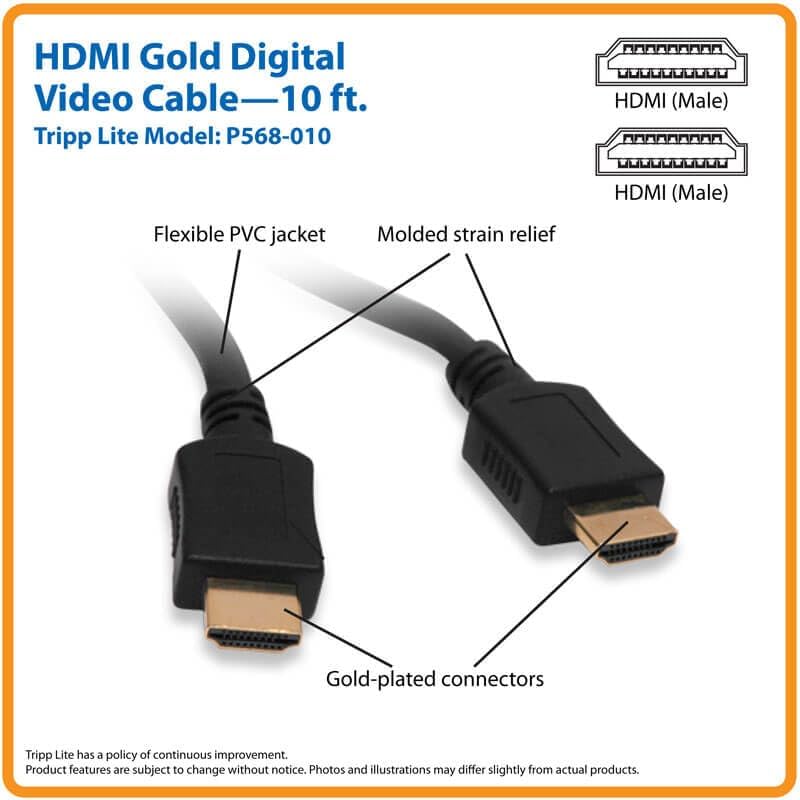
Image: A detailed diagram illustrating the key features of the Tripp Lite HDMI cable, including its flexible PVC jacket, molded strain relief for durability, and the gold-plated connectors that ensure reliable signal transmission.

Image: A close-up of the two HDMI connectors, highlighting the gold-plated pins which are crucial for high-quality, corrosion-resistant connections.
5. Operating Instructions
Once connected, the Tripp Lite High Speed HDMI Cable operates automatically to transmit digital audio and video signals. No additional configuration is typically required for the cable itself.
- Signal Transmission: The cable facilitates the transfer of uncompressed high-definition video and multi-channel digital audio from your source device to your display.
- Resolution Support: Ensure your source and display devices are configured to output and receive the desired resolutions. This cable supports resolutions up to 4Kx2K (3840 x 2160) and Full 1080p.
- Bandwidth: The cable's 18 Gbps bandwidth ensures smooth and high-fidelity transmission for demanding applications.
6. Maintenance and Care
To ensure the longevity and optimal performance of your HDMI cable, follow these maintenance guidelines:
- Handle with Care: Avoid excessive bending, twisting, or pulling on the cable, especially near the connectors. The molded strain relief helps, but extreme force can damage internal wires.
- Keep Connectors Clean: If connectors appear dusty, gently wipe them with a dry, lint-free cloth. Avoid using liquids or abrasive cleaners.
- Proper Storage: When not in use, coil the cable loosely. Avoid tight coiling or kinking, which can stress the internal conductors.
- Environmental Conditions: Store and use the cable in a dry environment, away from extreme temperatures and direct sunlight.
7. Troubleshooting
If you experience issues with your HDMI connection, try the following troubleshooting steps:
- No Picture/Sound:
- Ensure both ends of the HDMI cable are securely connected to the source and display devices.
- Verify that both the source and display devices are powered on.
- Check that the correct HDMI input is selected on your display device.
- Try connecting the cable to a different HDMI port on your display device, if available.
- Test the cable with another known-working HDMI device or try a different HDMI cable to isolate the issue.
- Intermittent Signal/Flickering:
- Ensure connections are tight and not loose.
- Check for any physical damage to the cable or connectors.
- Reduce the cable length if possible, or ensure it's not running near sources of strong electromagnetic interference.
- Poor Picture Quality (e.g., static, incorrect colors):
- Verify that your source device is outputting a compatible resolution for your display.
- Ensure the cable is not excessively bent or damaged.
If problems persist after trying these steps, consult the user manuals of your source and display devices or contact customer support.
8. Specifications
| Feature | Detail |
|---|---|
| Brand | Eaton |
| Series | RA15022 |
| Model Number | P568-010 |
| Item Weight | 4.2 ounces |
| Product Dimensions (LxWxH) | 6 x 5.25 x 1 inches |
| Color | Multicolor (typically black cable) |
| Manufacturer | TRIPP LITE |
| Cable Type | High Speed HDMI |
| Bandwidth | Up to 18 Gbps |
| Supported Resolutions | Full 1080p, Ultra High Definition (UHD) 4Kx2K up to 3840 x 2160 |
| Connector Type | HDMI Male (M/M) |
| Connector Plating | Gold-plated |
9. Warranty Information
For detailed warranty information regarding your Tripp Lite P568-010 HDMI cable, please refer to the warranty card included with your product or visit the official Tripp Lite (an Eaton brand) website. Warranty terms and conditions may vary by region and product type.
10. Customer Support
If you require further assistance or have questions not covered in this manual, please contact Tripp Lite customer support. You can find contact information and additional resources on the official Tripp Lite website:


