
1. Introduction and Overview
The Sigma 10-20mm f/4-5.6 EX DC HSM is an ultra-wide angle zoom lens specifically designed for Nikon Digital SLR cameras with APS-C size image sensors. This lens is a versatile tool for capturing expansive landscapes, architectural interiors, and large group shots, offering a broad field of view. It incorporates advanced optical technologies to deliver high image quality across its zoom range.
Key features include a Hyper Sonic Motor (HSM) for quiet and fast autofocus, aspherical lens elements for distortion correction, and Special Low Dispersion (SLD) glass elements to minimize chromatic aberration. The internal focusing system ensures the lens length remains constant during focusing, which is beneficial when using polarizing filters.
2. Key Features
- Focal Length: 10-20mm, providing an ultra-wide angle of view.
- Aperture: Maximum f/4-5.6, minimum f/22-32.
- Autofocus System: Ring-type Hyper Sonic Motor (HSM) for fast, quiet, and accurate autofocusing.
- Manual Focusing: Full-time manual focusing capability.
- Optical Design: Features three Special Low Dispersion (SLD) glass elements and three aspherical lenses for optimal image quality and correction of aberrations.
- Minimum Focusing Distance: 9.4 inches (0.24m) at all focal lengths.
- Filter Size: 77mm.
- Lens Mount: Designed for Nikon F (DX) mounts.
- Internal Focusing System: Ensures the front of the lens does not rotate, facilitating the use of polarizing filters.
3. Package Contents
Upon opening your Sigma 10-20mm f/4-5.6 EX DC HSM lens package, please ensure all the following items are present:
- Sigma 10-20mm f/4-5.6 EX DC HSM Lens
- Lens Hood
- Front Lens Cap
- Rear Lens Cap
- Instruction Manual (this document)
4. Setup
4.1 Attaching the Lens to Your Camera
To attach the lens, align the mounting index mark on the lens barrel with the corresponding mark on your Nikon Digital SLR camera body. Rotate the lens clockwise until it clicks securely into place. Ensure the lens is firmly attached before use.

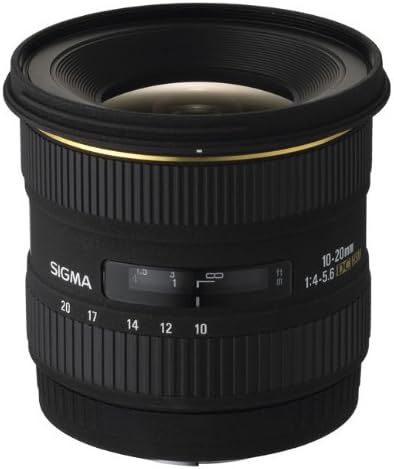
Front view of the Sigma 10-20mm f/4-5.6 EX DC HSM lens, showcasing its robust build and lens elements.
4.2 Attaching the Lens Hood
The included petal-type lens hood helps to prevent stray light from entering the lens, reducing flare and ghosting. Align the lens hood with the front of the lens and twist it gently until it locks into position. Ensure it is securely attached and correctly oriented.
Side profile of the Sigma 10-20mm f/4-5.6 EX DC HSM lens, highlighting the zoom and focus rings.
4.3 Using Filters
This lens accepts 77mm filters. Due to the internal focusing system, the front element does not rotate, making it convenient to use polarizing or graduated neutral density filters. Carefully screw the filter onto the front thread of the lens.
5. Operating the Lens
5.1 Autofocus (AF)
To use autofocus, set the AF/M switch on the lens barrel to 'AF'. The Hyper Sonic Motor (HSM) provides fast and quiet focusing. Half-press your camera's shutter button to activate autofocus. The lens will automatically adjust focus to your subject.
5.2 Manual Focus (M)
For manual focusing, set the AF/M switch on the lens barrel to 'M'. You can then rotate the focus ring to achieve precise focus. This lens also supports full-time manual override, allowing you to fine-tune focus manually even when in AF mode, without switching the lens's AF/M selector.
5.3 Zooming
To adjust the focal length, rotate the zoom ring on the lens barrel. The focal length can be set anywhere between 10mm (ultra-wide) and 20mm (wide). The current focal length is indicated on the lens barrel.
5.4 Aperture Control
Aperture control is managed through your camera body. The lens features a variable maximum aperture of f/4 at 10mm and f/5.6 at 20mm. The minimum aperture is f/22-32, depending on the focal length. Adjust the aperture setting on your camera to control depth of field and exposure.
Official manufacturer video demonstrating the features and benefits of the Sigma 10-20mm f/4-5.6 EX DC HSM lens, including its ultra-wide angle capabilities and Hyper Sonic Motor (HSM) for fast autofocus.
6. Maintenance
Proper care and maintenance will extend the life and performance of your lens.
- Cleaning: Use a soft, lint-free cloth or a lens brush to remove dust from the lens surfaces. For smudges or fingerprints, use a specialized lens cleaning solution and a microfiber cloth. Avoid touching the glass elements directly with your fingers.
- Storage: When not in use, store the lens with both front and rear caps attached in a dry, cool place, away from direct sunlight and extreme temperatures. Using a lens case can provide additional protection.
- Handling: Avoid dropping or subjecting the lens to strong impacts. Do not attempt to disassemble the lens, as this can void the warranty and cause damage.
7. Troubleshooting
If you encounter issues with your lens, consider the following general troubleshooting steps:
- Blurry Images: Check your camera's focus settings (AF/M) and ensure the lens is properly focused on your subject. Verify that the aperture and shutter speed settings are appropriate for the lighting conditions.
- Autofocus Not Working: Ensure the AF/M switch on the lens is set to 'AF'. Check your camera's autofocus mode and settings. Clean the lens and camera contacts.
- Lens Not Attaching Securely: Ensure the lens is correctly aligned with the camera's mounting index and rotated until it clicks into place. Do not force the lens.
- Error Messages: If your camera displays an error message related to the lens, consult your camera's instruction manual or contact Sigma customer support.
8. Specifications
| Brand | Sigma |
| Model Name | 201306 |
| Focal Length | 10-20 millimeters |
| Maximum Aperture | f/4-5.6 |
| Minimum Aperture | 32 |
| Lens Type | Wide Angle Zoom |
| Compatible Mountings | Nikon F (DX) |
| Focus Type | Ring-type ultrasonic (HSM) |
| Filter Size | 77mm |
| Number of Diaphragm Blades | 6 |
| Real Angle Of View | 102.4 degrees |
| Image Stabilization | Digital |
| Item Weight | 470 g |
| Color | Black |
9. Warranty and Support
This Sigma lens comes with a 1-year limited warranty. For detailed warranty terms, service, or technical support, please refer to the official Sigma website or contact Sigma customer service directly. Keep your proof of purchase for warranty claims.


